How to sell an online course by email: the 5-email funnel, with templates
Five emails, from the free guide to enrollment: what to send each day and the templates to do it

Five emails, from the free guide to enrollment: what to send each day and the templates to do it
Have you launched a course, announced it on social media and the sales just aren’t coming? It happens a lot. Someone who sees an ad or a post doesn’t know you yet, and a course is a considered purchase.
Email solves exactly that. It gives you a few days to show what you know before asking for anything.
In this guide you’ll find a five-email funnel to sell an online course, with the goal of each email, sample subject lines and the sales funnel templates ready to edit.
Nobody buys an online course on impulse.
People want to know whether you can teach, whether the course matches their level and whether others like them have achieved something. Those three doubts aren’t resolved in a social media post.
In the inbox you have their attention for several days in a row. You can provide value, show results and present the offer in the right order.
And you don’t depend on an algorithm to be seen.
It’s the logic of a sales funnel applied to email: first you attract, then you build trust and finally you sell. If you want to see the full concept, check out the guide to email marketing funnels.
The funnel starts when someone gives you their email address. For that you need three pieces:
| Piece | What it’s for | Example |
|---|---|---|
| A lead magnet | Getting someone to give you their email in exchange for something useful | PDF guide, mini-course, checklist |
| A landing page with a form | Explaining the gift and collecting the signup | Page with a headline, 3 benefits and a form |
| A subscriber group | So the automation knows who to write to | “Photography course leads” |
The lead magnet has to be related to the course.
If you want to sell an online course on smartphone photography, a guide with lighting tips attracts your ideal student. A phone giveaway attracts anyone.
Use double opt-in: it confirms that the email address exists and that the person wants to receive your emails. Your list will be smaller, but your emails will be delivered better.
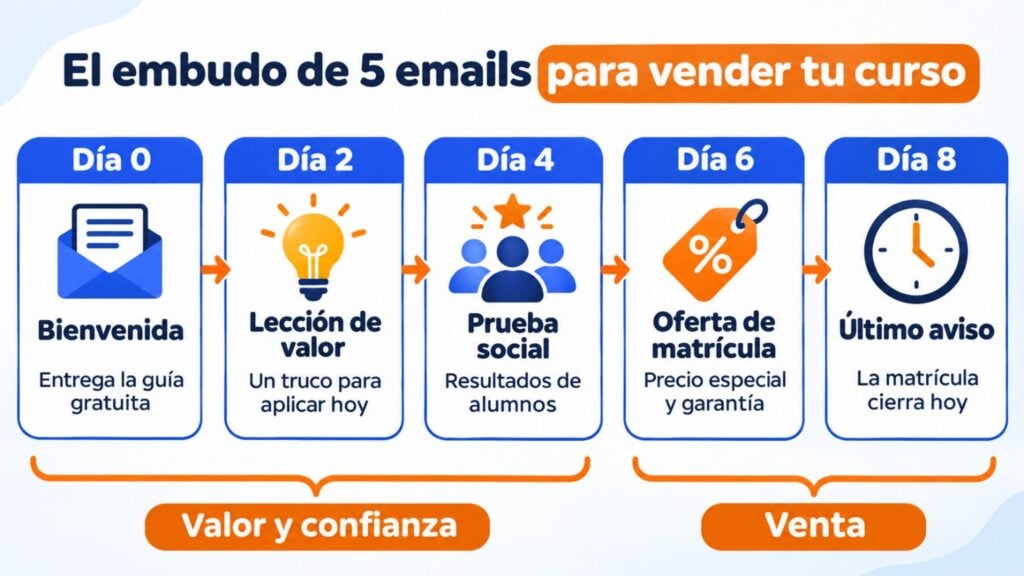
This is the complete journey. The first three emails provide value and build trust. The last two sell.
| When | Goal | Template | |
|---|---|---|---|
| 1. Welcome and free guide | On signup | Deliver the gift and introduce yourself | Welcome and free guide |
| 2. Value lesson | Day 2 | Show that you can teach | Value lesson |
| 3. Social proof | Day 4 | Show other students’ results | Social proof |
| 4. Enrollment offer | Day 6 | Open enrollment at a special price | Enrollment offer |
| 5. Final notice | Day 8 (closing) | Remind them that the offer ends today | Final notice |
The days are a guide. What matters is the order and leaving some breathing room between one email and the next.
Build your sales funnel without paying a thing
The five templates, automations and up to 80,000 emails a month, on the free account.
Its job is to deliver what you promised. The person has just signed up and is waiting for their gift. Give it to them right at the top, with a single download button.
Then introduce yourself in two or three sentences and tell them what they’ll receive over the next few days: a practical lesson, student stories and an invitation to the course.
That way the next email doesn’t take them by surprise.
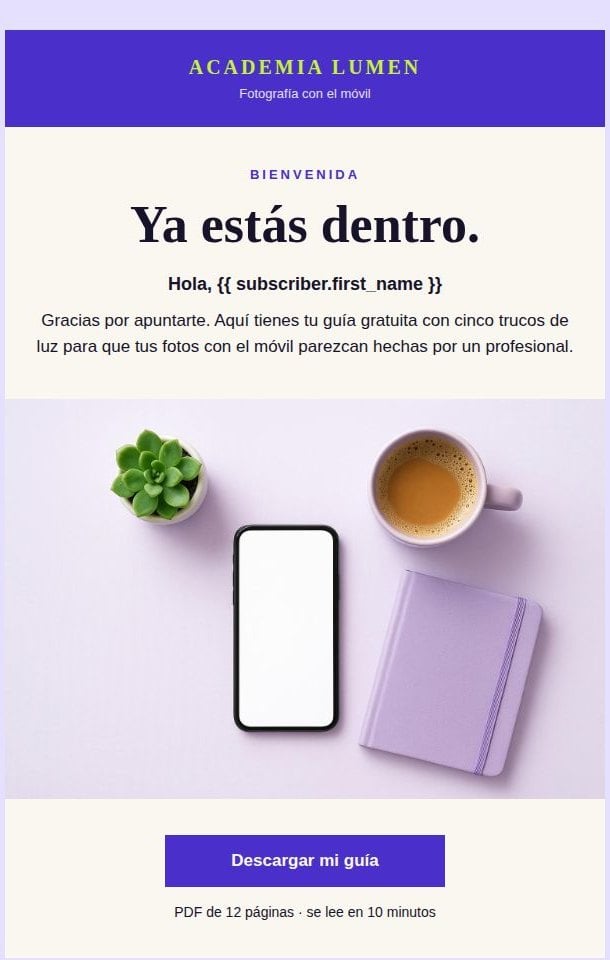
Sample subject line: “Here’s your guide (and what comes next)”. Preheader: “Download it now: it’s a 10-minute read”.
This welcome email is the most opened one in the whole sequence. Don’t fill it with links or slip the sale in yet.
This is where you show that you can teach. Give away a tip they can apply today.
In the template, the example is a smartphone photography academy: how to use window light, with a before-and-after photo and three simple steps.
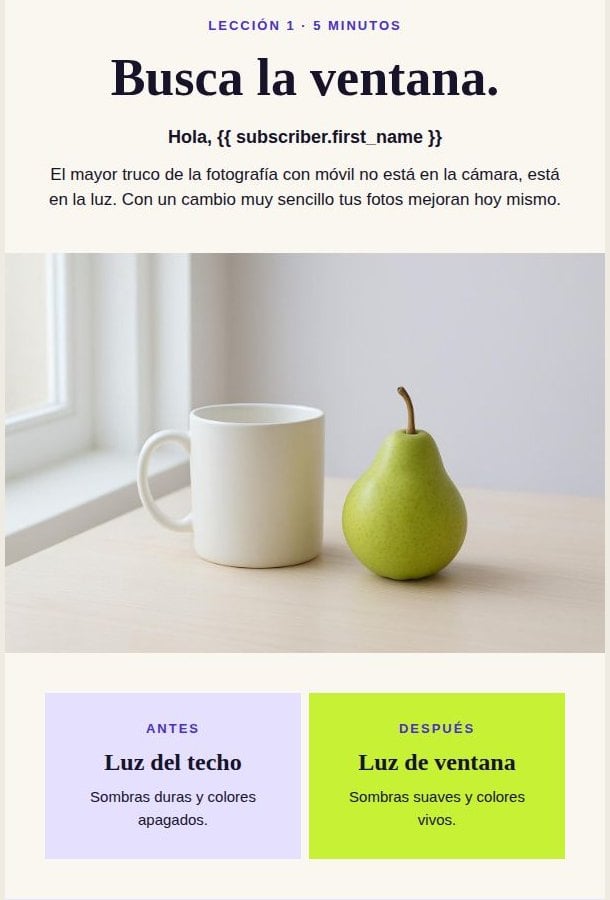
A single idea. If the reader tries it and it works, they’ve already had a small result with you. And that sells the course better than any list of modules.
End by inviting them to see the full lesson in the course, without pressure. Storytelling helps a lot here: a short anecdote at the start hooks readers more than a direct explanation.
Now you show others like them who have made it. The template tells the results of three students.
Each one goes in a block with a highlighted figure, a quote from them and their name.
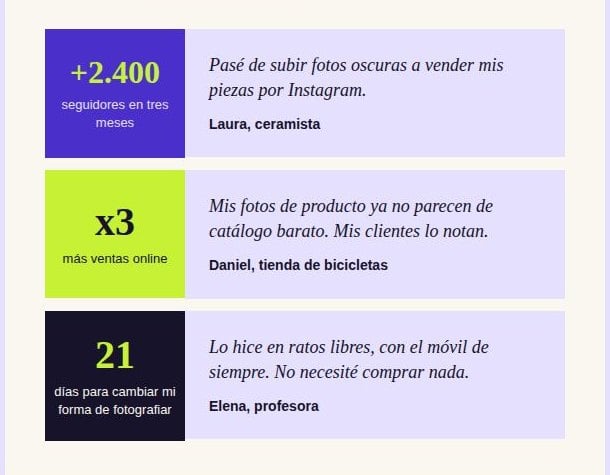
Use real results, with each student’s permission.
Better still if they started out in a situation similar to the reader’s: “I didn’t even know how to turn on manual mode” is more convincing than “I was already a professional photographer”.
If you don’t have students yet, tell your own story or that of a pilot test. What you can’t do is make up testimonials.
The email that sells. It comes after three emails that have provided value and built trust, so the reader already knows who you are. Now it’s time to be clear.
The template shows the special price next to the old one crossed out, a single button to sign up and a grid with what the course includes: lessons, exercises, community and guarantee days.
It closes with the money-back guarantee, which removes the fear of making a mistake.
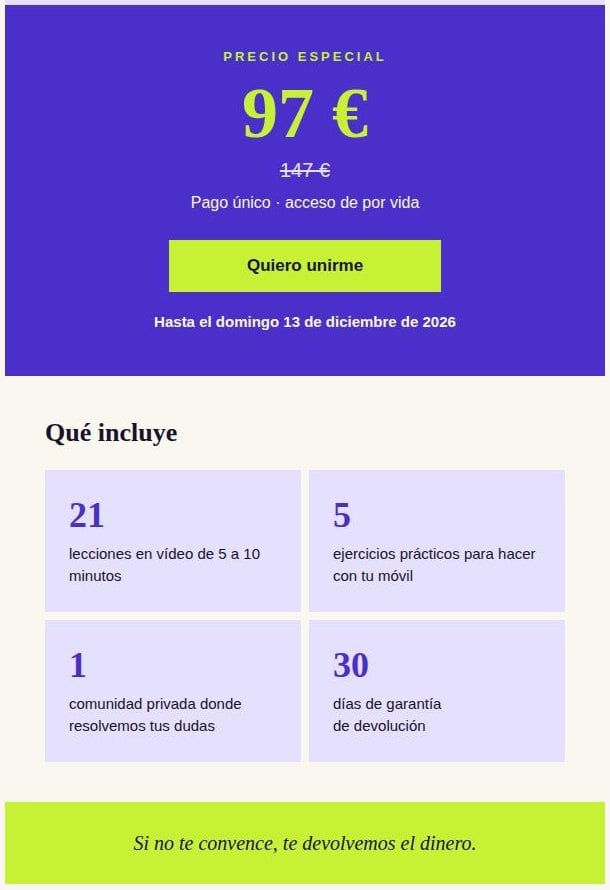
Sample subject line: “Enrollment is open (special price until Thursday)”. Preheader: “What the course includes and how much it costs”.
Set a deadline and stick to it.
If you announce a special price, make it real: if the “old price” never existed, the trust you’ve earned over three emails is lost in one.
A reminder for those who haven’t decided yet.
The template compares today’s price and tomorrow’s in two cards, states the closing time and answers the last three doubts before the button.
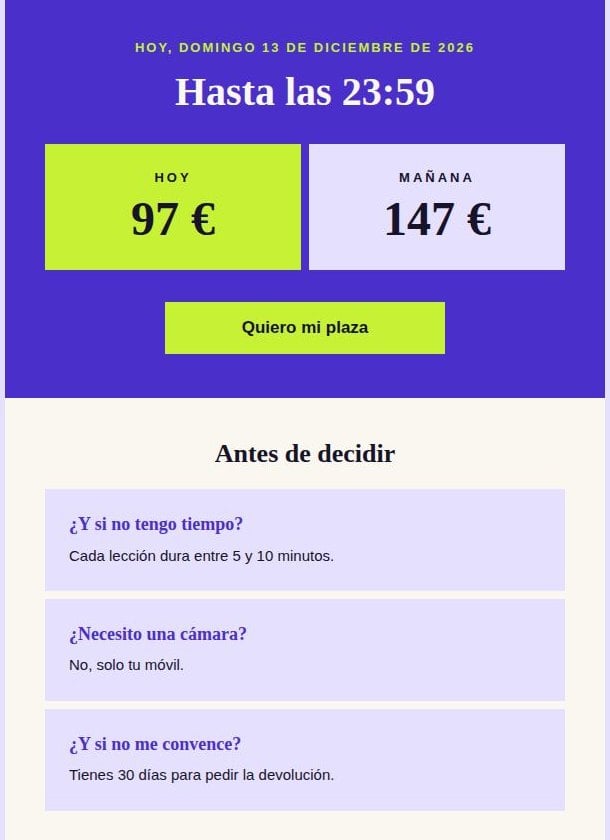
Many enrollments come in on the last day. It isn’t artificial pressure: people simply leave decisions until the end. A clear, short notice with a specific time helps them decide.
Sample subject line: “Enrollment closes today at 11:59 p.m.”. Preheader: “After that it goes back to the regular price”.
Send it only to those who haven’t enrolled. Anyone who has already bought shouldn’t receive it.
Two to three days between emails usually works well. It gives people time to read and try the lesson, and the course isn’t forgotten.
The closing is the exception. Emails 4 and 5 can be closer together, because the offer has a deadline.
If enrollment lasts three days, the final notice goes out on the morning of the closing day.
What if your course is expensive or your audience is businesses? Extend the value phase.
You can add a second lesson or another case study before the offer. The order stays the same: value, trust, offer and closing.
You build the funnel once and it runs on its own for everyone who signs up. In Mailrelay you do it with an automation:
Before activating it, send yourself a test of each email and check it on your phone. That’s where most people will read it.
An important detail: buyers don’t leave the sequence on their own. If someone enrolls on day 6, you need to remove them so they don’t get the final notice.
It’s simple. In the automation, each delay block shows the contacts that are waiting. Click that list, remove anyone who has already enrolled and they’ll leave the automation.
If you sell on a course platform, you can connect it to Mailrelay through Make so your students and leads reach your list without adding them by hand.
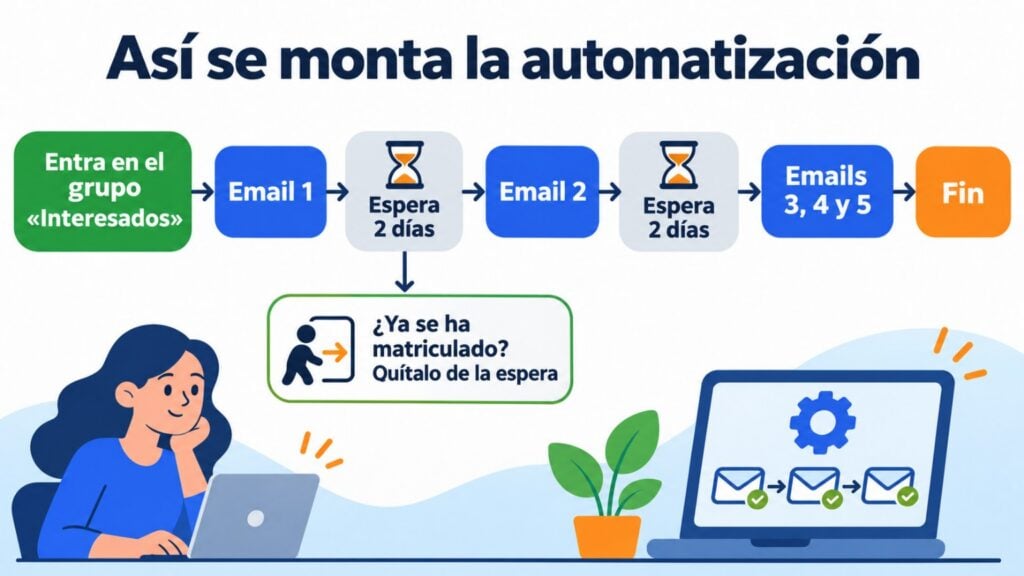
Each email has a different job, so don’t measure them all the same way:
| Main metric | If it fails, check | |
|---|---|---|
| 1. Welcome | Open rate and downloads | The subject line and that the gift is the one promised |
| 2. Value lesson | CTR | That the lesson is practical and short |
| 3. Social proof | Clicks and replies | That the cases resemble the reader |
| 4. Offer | Enrollments (conversion rate) | Price, guarantee and button clarity |
| 5. Final notice | Enrollments on closing day | The send time and the deadline |
Keep an eye on the unsubscribe rate too. Someone unsubscribing at email 4 is normal: they’re not interested in buying.
If they leave at email 2, the problem is the content or the lead magnet.
To improve your subject lines, run an A/B test on email 1. It’s the one most people receive and where you’ll see the difference soonest.
The most common is selling from the first email. The person came for a free guide; if you reply with an offer, they feel deceived.
The second is giving away too much in the value lesson. A useful, well-explained idea makes people want more.
A whole syllabus given away makes them think the course has nothing new to offer.
Another mistake is not setting a deadline. Without one, “I’ll sign up later” turns into never.
And one that costs you: continuing to sell to those who have already bought. They get “last chance” emails for something they already have. It looks like an oversight, and it is.
Finally, forgetting about those who don’t buy. Not enrolling now doesn’t mean they won’t in the next edition.
Move them to your newsletter and keep providing value. That’s the job of lead nurturing.
Mailrelay has everything this funnel needs, on the free account too, with 80,000 emails a month and up to 20,000 contacts. The five funnel templates are responsive and are edited with Mailrelay’s New editor, and with forms and landing pages you capture leads with double opt-in and reCAPTCHA.
Automations start when someone joins a group and respect the delays between emails. Then the open and click statistics for each email (on the free account and on Enterprise) tell you which one to improve. And if you get stuck, there’s human support on every plan.
If your academy already has students, you can also use Mailrelay for your newsletter, class reminders and the launch of the next edition.
In the guide to email marketing for training centers and academies you’ll find ideas for every stage.
Your course deserves a week of good emails
Create your free account, edit the templates and let the funnel run on its own.
To sell an online course you don’t need a big launch. You need the right person to get to know you over a few days before you ask them to enroll.
Start with the basics: a useful gift, a landing page and the five emails. Edit the templates, build the automation and leave it running. Then measure each email and improve the one that falls short.
The most common questions when you build your first sales funnel for a course.
With five emails you have a complete funnel: welcome, value lesson, social proof, offer and final notice. If the course is expensive, add one or two more lessons before the offer.
Yes, if you have a list of interested people.
Email converts; what you also need is a way to attract subscribers: your website, social media, collaborations or ads that lead to the lead magnet’s landing page.
To host the lessons and take payments, yes. Mailrelay takes care of the emails: capturing, nurturing and selling. You can connect your course platform to Mailrelay through Make.
Move them to your regular newsletter and keep sending them useful content. When you open a new edition or launch another course, they’ll be your warmest audience.
Yes. The automation keeps running for every new subscriber. You only need to update the dates and price in emails 4 and 5 for each edition.
20 lead magnet ideas
What to give away depending on your business so people join your list.
How to sell your infoproducts
Webinars, PLF-style launches and how to prepare the promotion.
Email marketing funnel
The stages of the funnel and which email to send at each one.
Email sales
How to turn your newsletter into a channel that sells.

Jose Argudo
CMO at Mailrelay. Writes about email marketing, copywriting and conversion for small businesses and entrepreneurs.