Non-governmental organizations (NGOs) rely heavily on the support of donors, volunteers and supporters to carry out their mission.
That’s well known, and with that in mind, where does email marketing fit in?
Email marketing has in fact become an essential tool for NGOs.
It lets you send newsletters to mobilize potential donors and keep supporters informed easily and at a very low cost.
Few tools let you reach thousands of people as instantly, effectively and quickly as email.
The question is no longer whether to use email marketing, since it’s a necessity, but which email marketing tool to use?
And this is where many NGOs forget to ask themselves the critical question that could ensure the success of their email communication.
What is that all-important question?
In short: Does this email marketing tool really fit our NGO’s needs and resources?
It may seem obvious.
However, when comparing popular options like Mailchimp, Mailrelay, Brevo or Acumbamail, it’s easy to be impressed by long lists of features.
But do you really need all that?
What matters most?
A generous free plan and affordable pricing: key for NGOs
Ultimately, budget is key. It’s a crucial factor, especially for NGOs.
NGOs usually have more limited resources than companies, since they don’t carry out an activity that generates a direct financial profit that can be reinvested in marketing.
Having a free plan (or special discounts for NGOs) is essential when choosing email software.
And this is often overlooked, despite its serious financial impact.
· Free sending capacity:
How many emails can you send without paying?
Many popular platforms set very low limits on their free plans.
For example, Mailchimp currently allows only 250 contacts and 500 sends per month on its free plan.
In addition, in 2025 it removed automations from the free version.
Acumbamail offers just up to 250 subscribers and 2,000 emails per month in its free version.
That falls short for most mid-sized NGOs.
Mailrelay, on the other hand, stands out for having the most generous free account on the market:
- It lets you send up to 80,000 emails per month to up to 20,000 contacts at no cost
The difference is huge.
With Mailrelay, an NGO can send an email campaign to all its members without worrying about the budget.
· Scalability and fair pricing:
An interesting point to consider, especially if you plan for your NGO to grow (which is what you’d expect).
What will happen then?
It’s important to review the costs and prices of the different plans at the different sending volumes you think you might reach.
For example, Mailrelay’s free plan may well serve your NGO for years, but that’s not usually the case with other tools.
That way you can plan your NGO’s growth through donor acquisition campaigns without any problems.
Without unnecessary expenses, money that could surely be put to better use.
You need a tool that lets you scale your efforts.

Dedicated technical support, even on the free plan
If you have to send a critical email campaign, you wouldn’t want a technical problem to stop you, would you?
Not being able to send a campaign when you need it most is never a good thing.
That’s why you need email marketing software that includes support.
It’s simply a must.
All Mailrelay accounts, even free ones, include support.
· Customer support in your language:
Most email marketing platforms only offer support in English, and only for paid accounts.
For example, on Brevo, users of the free plan only get email support, and phone support is reserved for Enterprise plans.
Mailchimp, for its part, offers practically no direct support on its free tier.
By contrast, Mailrelay offers technical support in Spanish (and other languages), even with the free account.
You can get your questions answered by phone, chat or tickets, receiving personalized help whenever you need it.
That way your NGO can get support when it needs it, even on a free email plan.
· Help getting the most out of the tool:
It’s not all about solving problems.
If the email marketing tool has lots of features, how can you be sure you’re making the most of them all?
With a good support team, you just ask about what you need. At Mailrelay, for example, we can advise you on which features could help you.
Maybe you only need to send a bulk email, but what if an automation helped you manage the people who open it and those who don’t? By splitting them into groups or sending a different email to each?
With Mailrelay you could do that, and if you don’t know how, we can help you.
That’s why it’s worth having a human team behind the tool that can help you use it.

Automation and personalization to save you time and effort
As we mentioned earlier, having automations, or automation workflows, can save you a lot of time and let you carry out actions that would otherwise be impossible or very costly.
Speaking of Mailrelay:
Which actions can you automate with automation workflows?
To start a workflow, you can choose any of the following options (at the time of writing):
- When a subscriber signs up through a subscription form
- When it’s the subscriber’s birthday
- Abandoned cart (WooCommerce)
- When receiving an email campaign
- When opening an email
- When they click a link
- When a contact is added to a group
- Or when they leave it
All of these are actions that can make a contact enter an automation workflow.
For example, if you send an email campaign to your contacts, the “on receiving an email campaign” condition would trigger that automation workflow.
What could you do next?
Lots of things:
- Add a condition block
- A wait block
- Send an email
- Or a webhook
- Send an SMS
- Add the contact to a group
- Or remove them from a group
Of course, each block has multiple options so you can tailor the workflow to your needs.
A very basic example would be:
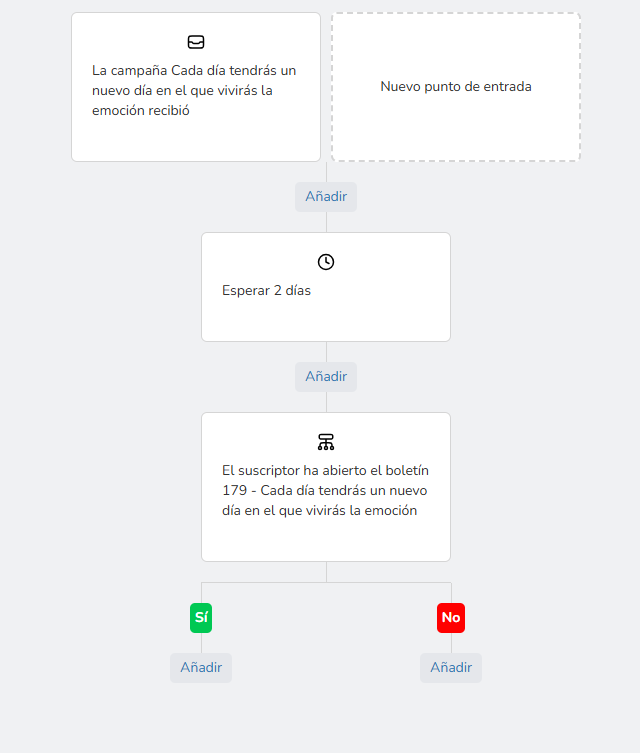
It’s incomplete, but you can see the visual flow of actions and conditions.
With this you could create welcome sequences for new contacts, send segmented emails that are triggered after a first send, automate greetings, and so on.
It’s worth noting that most email marketing tools don’t include automation workflows in their free plans. Mailrelay does.
· Segmentation and personalized messages:
If you found the automation options interesting, you’ll find the segmentation options amazing.
In fact, there are too many to list them all here without boring you.
But what is segmentation?
In a nutshell, segmentation means being able to take a group of contacts, “extract” the ones you’re interested in and send an email to them, separately from the rest.
To give you an idea, you could use conditions like these:
- Subscriber: subscriber characteristics, such as city, detected language, creation date…
- Newsletter: actions taken on previous emails received, such as opens, link clicks, campaigns they have or haven’t received…
- SMS campaigns
- Custom fields: which you can upload yourself with data you have about your contacts (such as their donor profile, for example) and use for segmentation
With all these options you can make sure your emails reach exactly the right contacts.
And personalize them as much as you need so they’re truly relevant.
· A/B testing for the best results:
We already covered this in this article.
If your NGO has to launch a critical campaign whose outcome many people depend on, it needs the best possible results.
There’s no other way.
One of the things you can do is use the A/B testing feature to make sure you get the best open rates.
This feature is also included in Mailrelay’s free accounts.

Ease of use that saves you time and brings you closer to your goals
Email campaigns are indispensable for any NGO, a key tool.
But on the other hand, they can’t become your main activity.
You probably have many other things to do.
What does this mean?
It means your time matters, and your email marketing tool shouldn’t take up your time, but save it.
With that in mind, we’ve built Mailrelay to be very easy to use, easy to learn, and powerful.
And as we mentioned earlier, you can always count on the support team.
· A simple, intuitive interface:
As soon as you create your free Mailrelay account (which you can do here), you’ll see buttons for the most basic actions:

- Import contacts
- Create a newsletter
- Create an automation
- Create a landing page (yes, also available on the free account)
You can’t get lost.
And of course, in the side menu you’ll find all the tool’s options organized by topic, so you can find them easily.
· Newsletter editor with built-in AI:
Mailrelay’s newsletter editor includes AI options, even in the free version.
You can see a short preview here.
As you can imagine, this saves time.
The editor itself is also very easy to use, yet powerful:
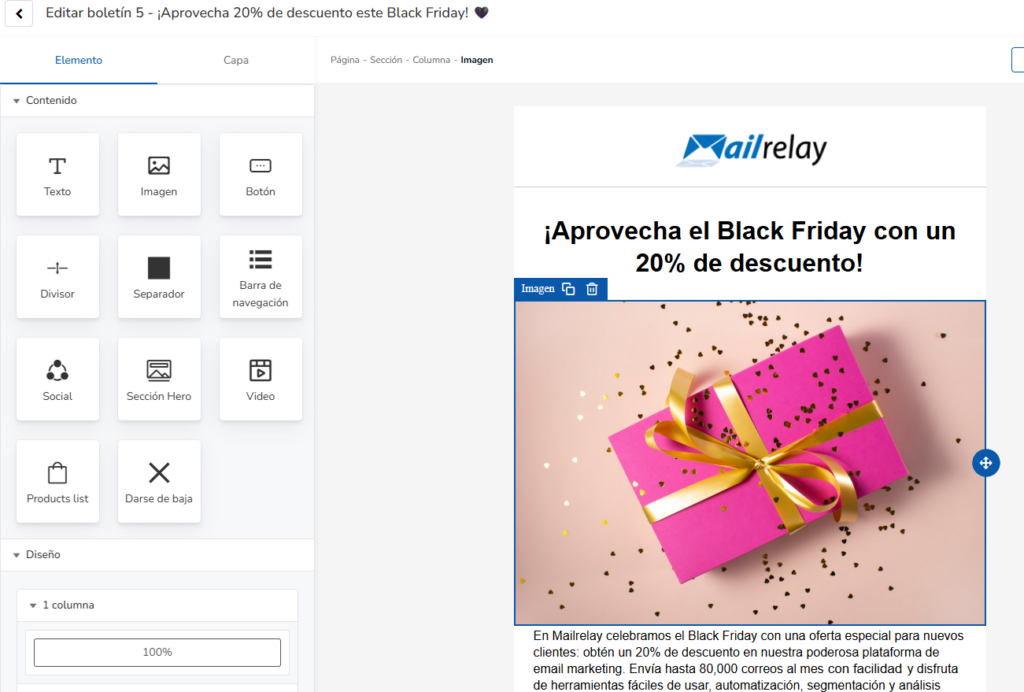
Just drag elements and sections wherever you want to build your email visually.
So if you’re in a hurry, you can use the AI features to create a base for your email, then add the elements you need (including stock images) and have your email ready in minutes.
All of this is included in your free Mailrelay account.
· Integration with other tools:
Mailrelay can integrate with hundreds of tools thanks to Make.
CRMs, ERPs, WordPress, whatever you need.
Need something more custom?
No problem, you can use the developer API.
Just want to send emails from your own system?
Use the SMTP server. Easy.

Real-time statistics and high deliverability
Every marketing action should be analyzed so you can make improvements.
Today, few online marketing tools offer statistics as comprehensive as email marketing.
For every email campaign you send, Mailrelay can tell you:
- How many emails you’ve sent
- How many have been delivered
- Soft bounces
- Hard bounces
- Total and unique views
- Total and unique clicks
- Unsubscribes
- Spam complaints
- A detailed list of the emails sent and their status
- A list of views with location and device (the same for clicks)
- Click map (heat map)
- Performance of the URLs in the email (to find out which link worked best)
- Unsubscribes and their reasons
An impressive amount of information about your campaigns that you can use to improve future ones.
You can even compare the results of several campaigns.
Who knows? It might help you discover which types of campaigns work best for your NGO.
That’s exactly why, when choosing email software, you shouldn’t forget to check what kind of reports it offers.
It’s also important to know how the platform helps make sure your emails reach their destination (deliverability).
· High email deliverability:
A great campaign is of little use if the emails end up in the spam folder.
First of all, I recommend reading these two articles:
- How to Choose an Email Marketing Service with High Deliverability
- What Outlook, Gmail and Yahoo! Require to Keep Your Emails Out of Spam
Because they can help you better understand which factors affect the deliverability of your email campaigns.
And from there, two recommendations.
On the one hand, contact our support team if you have any questions.
And try Mailrelay’s free account to see the difference compared to other tools.
There’s little more we can add
I think we’ve covered all the important points your NGO should consider when choosing an email marketing tool.
Cost may be the most important factor, since budgets for marketing activities can be limited.
However, as you’ve seen, with Mailrelay’s free account you don’t lose any functionality.
Try it out. You have nothing to lose and everything to gain.

Jose Argudo
CMO at Mailrelay. Writes about email marketing, copywriting, and conversion for small businesses and entrepreneurs.