Email newsletter: what it is, its parts and how to get more clicks
What is an email newsletter?
An email newsletter, also called an informational newsletter or e-newsletter, is simply an email sent on a regular basis to everyone who has voluntarily subscribed to a list to receive news, offers and other updates. (For a broader overview of the concept, see our entry on the newsletter.)
It’s a widely used digital marketing tool for driving traffic, building loyalty and keeping your brand top of mind with customers and prospects.
Email newsletters can be used by organizations, companies or individuals to share news, updates, tips and other relevant information with their followers or customers.
In general, newsletters are designed to be delivered on a regular schedule: daily, weekly, monthly or at other fixed intervals.
They keep your audience informed
Newsletters are an excellent way to keep followers or customers up to date with the latest news, updates and trends in their field of interest.
They build audience loyalty
By consistently delivering valuable and relevant information, newsletters help build loyalty and keep your audience engaged with your brand or topic.
They increase brand awareness
Sending your newsletter regularly keeps your brand name and image in people’s minds, which helps increase brand awareness and visibility.
They create sales opportunities
Newsletters can also include promotions and special offers, which helps generate sales opportunities and drive traffic to your website.
They give you a channel for feedback
Newsletters can include a section for readers’ comments and questions, which gives you a valuable channel for feedback and audience participation.
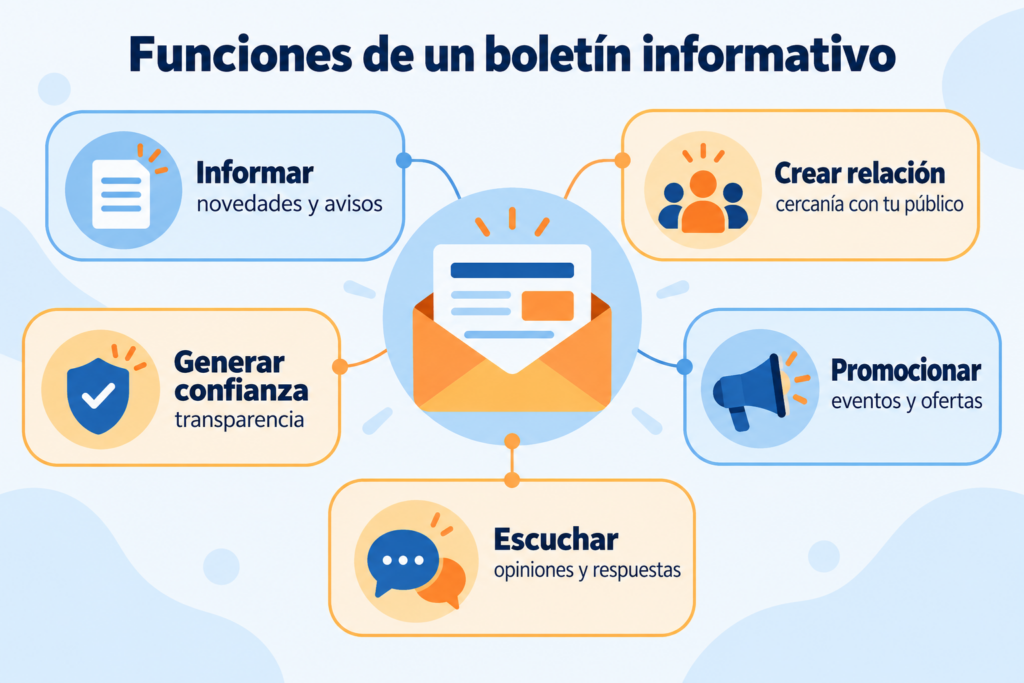
Email newsletters serve many purposes, which is why digital marketers value them so highly as a communication tool. Some of their most important functions are:
- They share news and updates. They work like a loudspeaker for announcing innovations, important news and new products.
- They build loyalty. Whether you’re talking to leads or customers, they let you communicate your strengths consistently and keep your brand in mind for future purchases.
- They boost your blog. Linking to useful blog posts brings recurring visits and turns your blog into a go-to resource for subscribers.
- They let you segment your messages. They’re an excellent way to reach specific customer segments with information that’s highly valuable to them.
- They position you as an expert. They help you show expertise in certain topics and gain relevance before your subscribers are ready to buy.
- They drive traffic to your website. Thanks to the links they include, they’re often used to send traffic to a website or specific pages.
- They build a community. They’re very useful for building a community of people with shared interests.
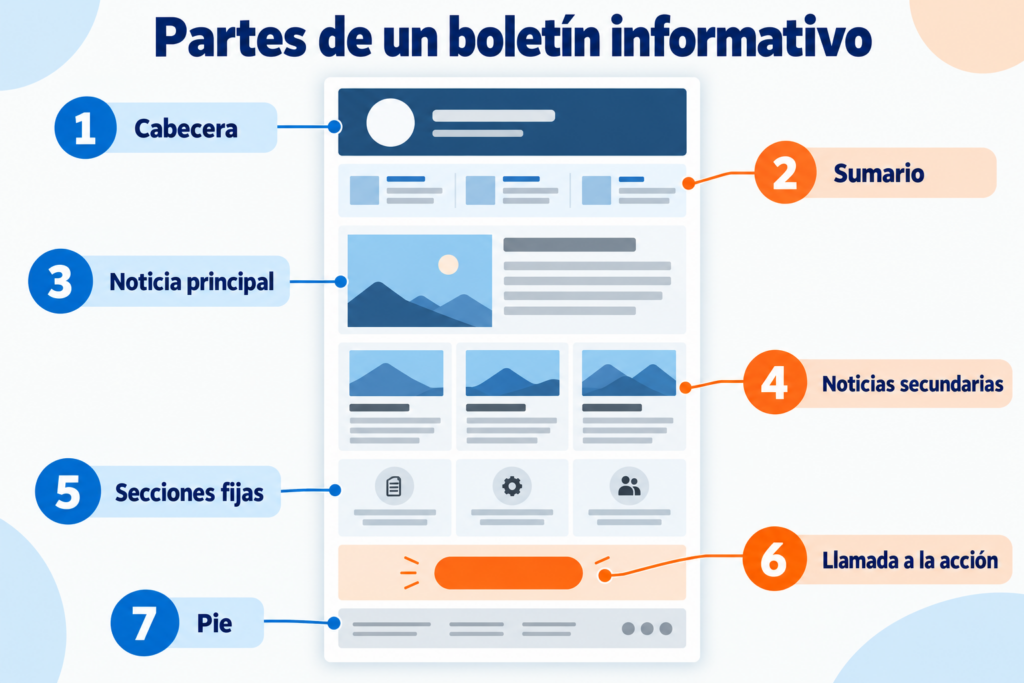
Although all newsletters share some common elements, not all of them include images or unsubscribe links. Still, at Mailrelay we recommend the ones that, in our experience, are essential:
Sender
Use a sender name your recipient recognizes and avoid no-reply addresses.
Subject line
The subject line is probably the most important part of a newsletter, since it’s what makes the recipient decide whether or not to open it, and so determines whether the send succeeds or fails.
Preheader
The preheader is the line of text that appears right after the subject line. It’s very valuable for getting more opens and improving your open rate.
Body
This is where the newsletter’s content goes, and it should match the subject line and preheader you’ve used. Aim to offer text that is valuable to subscribers, and use storytelling to give it a touch of quality.
Images
To give your newsletter visual impact, it’s essential to add visual resources such as photos, charts or infographics to complement the text.
Call to action
Newsletters are always sent with a purpose, so calls to action (CTAs) are vital to achieving the newsletter’s goal.
Unsubscribe link and web version
Subscribers may lose interest in your newsletters, so give them a way to unsubscribe with an unsubscribe link. You can place it in the footer or at the top of the email.
Also add a link so they can view the newsletter in their browser through a web version. In this case, always place the link at the top of the email.
Use the bottom of the newsletter for the legal terms of your sends, trademark references, usage rights and any other relevant information you need to include.
These are the characteristics of the most effective newsletters. Together, they turn them into an essential communication tool for any business.
- It reflects your brand. The newsletter design should follow your brand colors and visual identity. In other words, its fonts, colors and images should match what you use on your other channels.
- It has a clear schedule. It should reach subscribers’ inboxes at a very specific frequency (daily, weekly, every two weeks, etc.), so readers get used to receiving and reading it almost instinctively.
- It offers value to the reader. Your newsletter should make readers feel it’s worth their time. So use language that suits your audience and fill it with relevant content.
- It drives interaction. With calls to action and interesting content, it should be designed so that subscribers take action or want to share it with their contacts.
The main use of an informational newsletter is exactly what its name suggests: keeping current and future customers informed.
Sending them information about new features, offers, product changes, or news and articles of interest.
It’s a way to stay in touch with your contacts and make sure they receive important information, such as:
► New features and changes to your service
Imagine your company is going to change a product’s price, launch a new one or update some terms.
Instead of taking customers by surprise, a newsletter lets you warn them in advance and help them adapt smoothly.
► Opening hours and holidays
Another common use of newsletters is sharing information about your business hours, which is especially useful at times of the year when schedules usually change.
It’s true that there are many ways to share your opening hours today, such as your website or your Google Business Profile. But many customers won’t check this information until they need it, that is, when they want to get in touch.
It’s better to avoid awkward situations or unhappy customers by giving advance notice of any change in your hours.
► Offers and discounts
A purely sales-driven goal, but also an informative one: if you run an offer or discount, your customers will obviously want to know about it.
If you don’t tell your existing customers about offers and discounts, two things happen:
- You lose sales you could easily get.
- Your existing customers may think offers are only for new customers. In other words, that new customers get better treatment and access to deals they don’t.
For both reasons, it’s very important to let customers know about offers and promotions.
A well-timed email can stop your customers from feeling less valued than new ones.
► Company information
Is there any point in having a competitive advantage if nobody knows about it?
Not much.
That’s why you need to communicate it: both what makes your product different and what makes your company culture unique.
Keep in mind that when you compete with products very similar to yours, any differentiating factor helps your product stand out.
And that helps you sell a lot more.
► Product information
Besides general company news, it’s also worth sending newsletters with information about your products.
Not only to highlight what makes them different, but also to connect them with each other:
- For upselling
- And cross-selling
It’s another way to increase your sales with newsletters.
There are several psychological and marketing factors that help increase sales through newsletters. These include:
► Scarcity and urgency
Include limited-time offers or limited-stock products in your newsletter to tap into the fear of missing out and encourage quick decisions.
► Narrative and storytelling
Use exciting or inspiring stories about your brand, products or services to build an emotional connection with your subscribers and motivate them to buy.
► Reciprocity and added value
Offer useful, valuable content in your newsletter, such as tips, guides or free resources, so subscribers feel they’re getting something in return and are more willing to buy.
► Authority and credibility
Share testimonials from happy customers, product reviews or media mentions to show the quality of your products or services and build your subscribers’ trust in your brand.
► Personalization and empathy
Speak to your subscribers personally and make them feel understood and appreciated. This increases the likelihood that they will buy.
Include effective calls to action that lead to your offer or landing page
- The three-second rule: the message and call to action should be visible within 3 seconds of opening the email.
- Add several calls to action, at the top and the bottom, in different styles.
- Add links to both images and text so they still work if images aren’t displayed.
- Use styles that make your links easy to see.
- Look for compelling phrases that encourage clicks.
- Use eye-catching images and animated GIFs (without going over the top).
Mailrelay lets you insert a “forward to a friend” link in your newsletter, or you can use your own system.
Giving subscribers this option will increase clicks if you send great offers and content, because they’ll want to forward them to friends and family.
In the header, for example, you can add buttons for subscribers to confirm they want to keep receiving your emails.
A simple mailto: link can do it: replying to the newsletter confirms their interest and adds the sender to the subscriber’s address book.
You can do the same for unsubscribes, with a button like “this email doesn’t interest me” that goes to the unsubscribe link but with a different approach.
The more social networks you’re on, the more chances you have of getting clicks on those icons, as long as your information and offers are interesting.
Reward subscriber loyalty
You can do this with small giveaways, surveys or games (gamification) that subscribers can join by clicking links in the header.
For example:
- The classic giveaway for subscribers who share their opinion about your emails.
- Special offers for those who confirm their email by replying to the message, adding the sender to their address book at the same time.
Encourage scrolling
In other words, use vertical visual elements that encourage readers to scroll down.
This increases the time subscribers spend on the message and improves your reputation with systems like SmartScreen, as well as increasing the chances of link clicks and ROI.
Without overloading the newsletter, it doesn’t hurt to include links to similar products, full specifications, a PDF manual, more information and so on.
This also helps you reduce unsubscribes caused by email fatigue.
Add clickable third-party trust badges or customer testimonials
For example, secure shopping seals, or a “virus-free” note linking to the report from the antivirus you use.
Don’t put your phone number and address directly in the email: use contact options that require a click
The classic “click here and we’ll call you”, “click here to see the map”, or a “contact us” link that goes to the contact page on your website.
If you have a CRM or customer portal, show the links
With these CRM links, subscribers can log in to see their purchases, invoices and so on. Add the links in the footer so they can click if they want to check this information, increasing clicks.
Link to the extra services you offer subscribers, such as apps or delivery tracking
They’re a great incentive to click from a newsletter, as long as they offer a genuinely useful service.
It often happens that you receive an email that doesn’t interest you at first, but you see a section of the sender’s website you want to check and click through from the newsletter.
You can also add shortcuts to product searches related to the newsletter.
Always include a link to the web version
If for any reason the newsletter doesn’t display properly, subscribers can view it in their browser and click there, instead of you losing those clicks.
What’s more, advanced platforms like Mailrelay also count these clicks in your campaign statistics, even if they happen outside the email client.
The last tip is for advanced email marketers who have the time or resources to put it into practice
It involves segmenting subscribers based on how they interact with your newsletters, using design A/B tests to see how they respond to different calls to action.
In other words, sending different designs to different groups of subscribers based on data from previous newsletters and tests, so each group gets the design, calls to action and placements that worked best for them.