Email Service: What It Is and How It Differs from Other Email Tools
What is an email service?
An email service is the set of servers, protocols and applications that lets you send, receive, store and organize messages over the internet. Gmail, Outlook.com and Proton Mail are examples of email services; applications such as Outlook or Thunderbird can also work as clients for checking several accounts.
The key difference is simple: regular email is designed for one-to-one conversations or small groups, while an email marketing platform is built to manage subscribers, automate campaigns, send large volumes and measure results.
What is an email service?
An email service provides the infrastructure needed to exchange digital messages between a sender’s email address and one or more recipient addresses.
A message can include text, images, links and attachments. The provider receives it, carries it across the internet, stores it in the right mailbox and makes it available to the recipient.
In most cases, users don’t need to run their own servers. They can access their account through a website, a mobile app or a desktop program. There are free services for personal use, business plans tied to your own domain and enterprise solutions with extra administration, security and storage.
Short definition: an email service is a digital infrastructure that lets you send, receive and manage messages using an email address.
How does email work?
Although sending an email looks instant to the user, several components are involved behind the scenes:
- Writing: the sender writes the message in an email client or webmail and clicks “Send”.
- Sending: the sender’s service accepts the message and uses SMTP to send it.
- Finding the recipient: servers query the DNS to find out which system receives email for the destination domain.
- Transfer: one or more mail servers carry the message to the receiving server.
- Validation: the receiving system checks things such as authentication, sender reputation, malware and the likelihood of spam.
- Delivery: if the message is accepted, it is stored in the recipient’s inbox or another folder.
- Reading: the recipient opens it in webmail or syncs it with an app via IMAP; older setups may also download it via POP3.
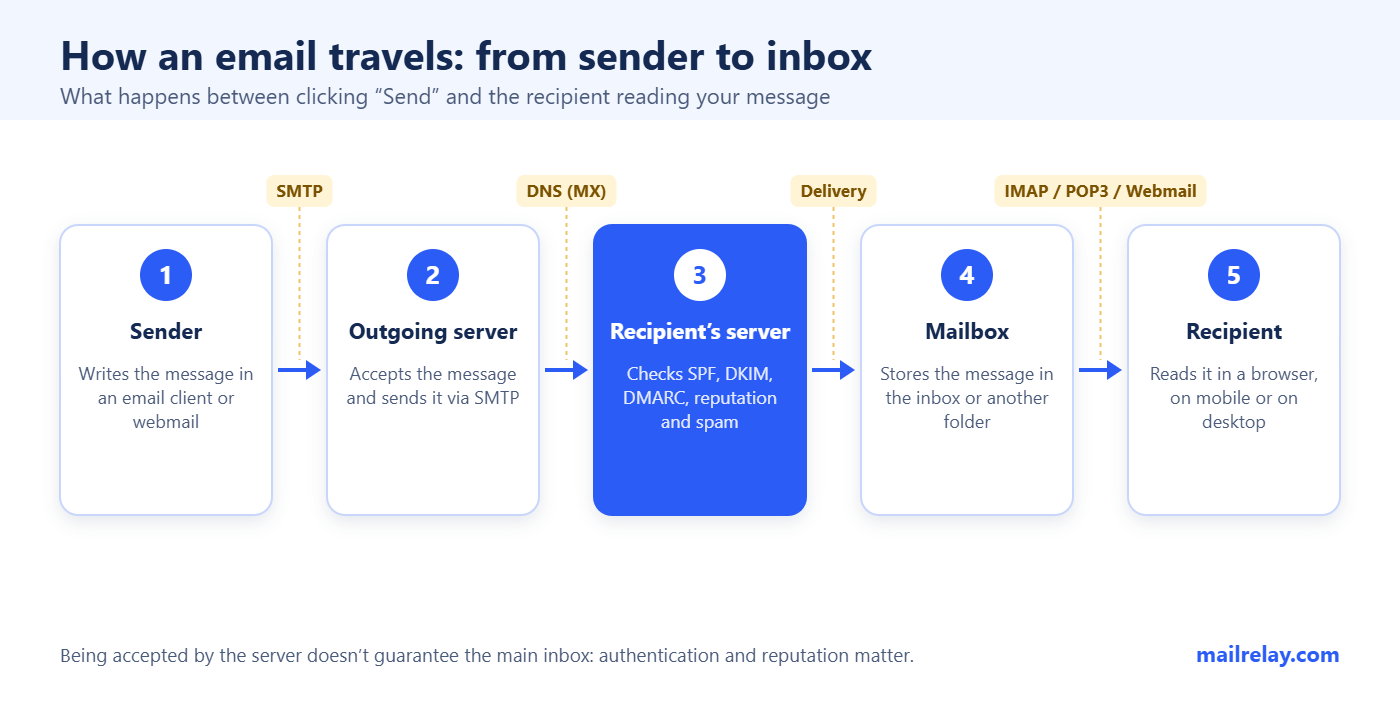
A server accepting a message doesn’t guarantee that it lands in the main inbox. Deliverability depends on factors such as domain authentication, sender reputation, list quality and how recipients react.
The components of an email service
Several related terms are often used as if they meant the same thing, but they don’t:
| Component | What it is | Example |
|---|---|---|
| Email address | Identifier of a mailbox | ‘name@company.com’ |
| Email provider | Company that hosts accounts and mailboxes | Gmail, Outlook.com, Proton Mail |
| Email server | System that sends, receives or stores messages | SMTP or IMAP server |
| Webmail | Interface accessed from a browser | The Gmail website |
| Email client | App for checking and managing accounts | Thunderbird, Apple Mail, Outlook |
| Protocol | Technical rules for transferring or retrieving messages | SMTP, IMAP, POP3 |
| Email marketing platform | Software for campaigns, lists, automation and metrics | Mailrelay |
The same brand can cover more than one role. Outlook, for example, can refer both to a web service and to an email app. So before comparing options, it’s worth checking whether you’re talking about hosting, an interface, a program or a sending platform.
SMTP, IMAP, POP3 and webmail: what’s the difference?
SMTP, IMAP and POP3 aren’t providers or account types: they are protocols with different jobs.
| Technology | Main function | Where messages are kept | Recommended use |
|---|---|---|---|
| SMTP | Sending and transferring email | Not used as a mailbox | Outgoing messages and server-to-server communication |
| IMAP | Checking and managing the mailbox in sync | Mainly on the server | Everyday use across several devices |
| POP3 | Downloading messages from the mailbox | Depends on the client settings; the server copy can be kept or deleted | Local access or setups with limited connectivity and storage |
| Webmail | Accessing email from a browser | On the provider’s servers | Easy access without installing an app |
SMTP: the sending protocol
SMTP stands for Simple Mail Transfer Protocol. It is used to send messages from a client to the outgoing server and to transfer email between servers. It isn’t designed to organize your inbox or sync folders.
It is the standard for email transport on the internet, defined in RFC 5321.
IMAP: syncing across devices
IMAP lets you view and manage messages that stay on the server. Anything you do on one device (read, move, archive or delete) is reflected on every other device connected to the same account.
It is usually the most practical option if you check your email on your phone, in a browser and on your computer. The modern version of the protocol is described in RFC 9051.
POP3: downloading the mailbox
POP3 was designed to retrieve messages stored on a server. Traditionally, messages were downloaded to the computer and the remote copy was deleted, but today’s clients can be set to keep it on the server.
It offers fewer syncing and remote management options than IMAP. It can still be useful if you want to keep a local archive or work with limited resources. Its basic specification is in RFC 1939.
Webmail: access from your browser
Webmail isn’t a protocol but a web interface. It lets you sign in and check your mailbox without installing any software. Gmail, Outlook.com and Yahoo Mail all offer webmail, although behind the scenes they use protocols and server systems to send, receive and store messages.
Types of email services
Email services can be classified by their purpose:
1. Free personal email
Designed for personal communication, it usually includes webmail, mobile apps, spam filters and some free storage. It normally uses the provider’s domain, such as ‘@gmail.com’ or ‘@outlook.com’.
2. Business email with your own domain
It lets you use addresses such as ‘sales@company.com’. It strengthens your brand identity and usually includes centralized administration, aliases, calendars, security controls and support.
3. Self-managed corporate email
The organization runs its own servers or dedicated infrastructure. It gives technical control, but requires expertise, maintenance, backups, monitoring and ongoing security and deliverability work.
4. Transactional email service
It sends automatic messages triggered by an action or event: order confirmations, password resets, shipping updates or account notifications. These messages are usually integrated with a website or app via SMTP or API. You can learn more in our guide to transactional emails.
5. Email marketing or bulk email platform
It is designed to send newsletters, promotions and communications to a list of subscribers. It includes contact management, segmentation, unsubscribes, templates, automation, testing and analytics. It doesn’t replace your everyday mailbox: it solves a different need.
Benefits of email services
Email is still a basic tool for people and businesses for several reasons:
- Speed: messages can be exchanged in seconds between different locations.
- Multi-device access: the mailbox can be checked from a browser, phone or computer.
- Asynchronous communication: people don’t need to be available at the same time.
- Traceability: it keeps conversations, dates, recipients and attached files.
- Organization: folders, labels, search, rules and filters make it easier to manage.
- Scalability: business services let you add accounts and storage as your organization grows.
- Integration: it can connect with calendars, CRM, ecommerce, support and other tools.
- Less infrastructure: a hosted service means the company doesn’t have to run the whole email system itself.
Features worth comparing
There’s no perfect service for everyone. Before choosing, check these points:
- Custom domain: check whether you can use your company’s identity.
- Storage: consider mailbox size, attachments and archiving policies.
- Compatibility: make sure it offers webmail, apps, IMAP, SMTP and the integrations you need.
- Security: look for encryption in transit, multi-factor authentication, anti-phishing filters and admin controls.
- Privacy and data location: review the terms, how data is handled and the compliance options that apply to your organization.
- Availability and backups: check the service level agreement and recovery options.
- Administration: with several users, centralized management, aliases, groups and audit logs are useful.
- Support and total cost: include licenses, migration, extra storage and admin time.
- Sending limits: a regular mailbox has limits and policies against bulk use. Don’t choose it as a replacement for a campaign platform.
Examples of email providers
Some of the best-known services are:
- Gmail: Google’s service with web and mobile access; its business version is part of Google Workspace.
- Outlook.com: Microsoft’s service; Microsoft Outlook is also an app that can manage accounts from different providers.
- Yahoo Mail: a personal email service with web and mobile access.
- Proton Mail: a Switzerland-based provider focused on privacy and encryption.
- Hosting services: many web hosting providers include mailboxes linked to the customer’s domain.
Popularity shouldn’t be the only criterion. For a personal account, ease of use and storage may matter most; for a business, your own domain, administration, support, recovery and security policies matter too.
Email service vs. email marketing platform
The difference isn’t just the number of messages. The purpose, infrastructure and available features change too.
| Criterion | Regular email | Email marketing platform |
|---|---|---|
| Goal | Conversations and daily work | Campaigns to an audience that has agreed to receive them |
| Recipients | One person or small groups | Segmented subscriber lists |
| Volume | Limited by the provider’s policies | Infrastructure built for higher volumes |
| Contact management | Basic address book | Sign-ups, unsubscribes, segments, fields and list cleaning |
| Design | Simple message editor | Templates, reusable blocks and dynamic content |
| Automation | Basic rules | Welcome emails, sequences, dates and behavior-based events |
| Analytics | Read receipts or limited data | Deliveries, bounces, clicks, unsubscribes and conversions |
| Compliance | Sender’s manual responsibility | Dedicated consent and unsubscribe features |
| Deliverability | Designed for person-to-person use | Tools and processes to manage reputation and volume |
Why shouldn’t you send a campaign from Gmail or Outlook?
Using a regular mailbox to send a promotion to hundreds or thousands of addresses can lead to:
- temporary limits or account suspension;
- accidentally exposing addresses if the recipient field is misused;
- more spam complaints and damage to your domain’s reputation;
- no reliable unsubscribe process;
- trouble handling bounces, invalid contacts and preferences;
- no segmentation, automation or useful metrics.
For a newsletter, a promotion or an automated sequence, use an email marketing platform. For a one-off sales inquiry or a conversation with a customer, use your usual email service.
Bulk, transactional and support email are not the same
| Type of message | What triggers it | Example | Right tool |
|---|---|---|---|
| Personal or support | A person starts the conversation | Reply to an inquiry | Mailbox or help desk |
| Transactional | A system action or event | Order confirmation | SMTP service or transactional API (available in Mailrelay) |
| Marketing | A campaign or marketing automation | Newsletter or promotion | Email marketing platform |
Keeping these flows separate makes them easier to manage and measure, and helps protect your reputation. It also means essential notifications don’t depend on how your promotional campaigns perform.
Security and deliverability: the basics
An email provider has to protect your account, but the domain owner has responsibilities too.
Access security
- Turn on multi-factor authentication.
- Use unique passwords or, where available, phishing-resistant methods.
- Review sessions, devices and suspicious forwarding rules.
- Keep your browser, operating system and email apps up to date.
- Be wary of urgent requests for credentials, payments or bank account changes.
Domain authentication
To send from your own domain, there are three main mechanisms:
- SPF lists the servers authorized to send on behalf of the domain.
- DKIM adds a cryptographic signature to verify the message’s origin and integrity.
- DMARC ties authentication to the visible sender domain, sets a policy for failures and lets you receive reports.
Gmail’s sender guidelines require SPF or DKIM from everyone sending to personal Gmail accounts. Senders of more than 5,000 messages a day must use SPF, DKIM and DMARC, along with other measures such as TLS and, for marketing or subscribed messages, one-click unsubscribe.
Authenticating your domain doesn’t guarantee the inbox on its own. Consent, complaints, bounces, reputation, frequency and content relevance all play a part.
How to choose the right service
Use these questions as a filter:
- Will you send conversations or campaigns? For conversations, choose a mailbox; for campaigns, an email marketing platform.
- Do you need an address with your own domain? For a business, it’s usually better than a free address.
- How many people will manage accounts? If several, look for centralized user management, groups and controls.
- How many devices will be used? For regular syncing, prioritize IMAP or apps connected to the service.
- Which integrations do you need? Check CRM, calendar, online store, help desk, SMTP or API.
- Which security and compliance requirements apply? Assess MFA, encryption, retention, auditing, data location and contracts.
- What support does the provider offer? A business-critical account needs recovery and support to match.
Frequently asked questions about email services
What is the difference between email and an email service?
Email can mean the message itself or the communication channel. An email service is the infrastructure and software that let you send, receive, store and manage those messages.
Is Gmail an email service or an email client?
Gmail is mainly an email service with its own webmail and apps. It can also connect to other accounts in some cases. It shouldn’t be confused with a standalone client that works without a mailbox provider.
Is Outlook a provider or an app?
It can be both, depending on the context. Outlook.com is Microsoft’s email service, while Microsoft Outlook is an app for managing email, calendars and accounts from different services.
Which is better, IMAP or POP3?
For most users today, IMAP is more convenient because it keeps the mailbox in sync across devices. POP3 can be useful if you want to download and archive email locally, but it offers more limited remote management.
Can SMTP be used to receive email?
SMTP is used to send and transfer messages. To check your mailbox you normally use IMAP, POP3 or the provider’s web interface.
Does POP3 always delete messages from the server?
No. Traditional POP3 use downloads messages and may delete them from the server, but many clients let you keep a copy there. It depends on your settings.
Technically you can send a message to several contacts, but a regular mailbox isn’t the right tool for a newsletter. It lacks proper management of consent, unsubscribes, bounces, segmentation and analytics, and it can trigger sending limits or spam filters.
What do I need to send email from my own domain?
You need the domain, a provider that hosts the mailboxes or handles sending, the right DNS records and correct authentication settings. To protect your identity and improve delivery, you should set up SPF, DKIM and DMARC.
What’s the difference between bulk email and spam?
Legitimate bulk email is sent to people who have requested or agreed to receive it, identifies the sender and makes it easy to unsubscribe. Spam is unsolicited or deceptive email. Volume alone doesn’t make the difference: consent and sending practices do.
In summary
An email service handles everyday communication: it provides accounts, mailboxes and systems to send, receive and organize messages. SMTP carries the email, IMAP keeps it in sync, POP3 lets you download it and webmail gives you access from your browser.
If a company wants to send newsletters, promotions or automations, it also needs a dedicated platform that manages subscribers, segmentation, unsubscribes, deliverability and metrics. Choosing the right tool for each job reduces problems and improves both the recipient’s experience and the sender’s results.
With Mailrelay you can create email marketing campaigns, segment contacts, automate sends and use an SMTP server for transactional or high-volume communications.