Sending limits
How many emails you can send before you hit the cap
You finish your newsletter, click “Send” and, halfway through the list, a warning pops up: you’ve reached your sending limit. The rest of the emails are stuck. It’s one of the most common surprises for anyone who starts sending campaigns from their own inbox. And there’s a simple reason for it: every email provider sets a cap.
What are email sending limits?
Sending limits are the maximum number of emails or recipients you can send in a given period: per hour, per day or per month. They’re set by your mailbox provider, the server that sends your messages or the email marketing platform you use.
Their purpose is to stop spam and protect the infrastructure. When an account suddenly fires off thousands of emails, it’s a red flag. Someone may have hacked it, or it may be sending unwanted advertising.
It’s worth separating them from two related ideas. Email throttling is the technique of pacing your sends so you don’t overload the receiving servers. And bulk sender requirements are the rules Gmail, Yahoo and Outlook apply to high-volume senders. Sending limits tell you how much; those rules tell you how.
Email your whole list without hitting a daily cap
Mailrelay’s free account gives you up to 80,000 emails a month and 20,000 contacts, with no daily limit and no credit card.
Create a free accountTypes of sending limits
There isn’t just one sending limit. Depending on where you send from, one or another will apply:
- Mailbox limits: Gmail, Outlook and Yahoo cap how many recipients you can reach per day from a personal or business account.
- SMTP server limits: many hosting providers and mail servers limit the number of messages each account can send per hour.
- Email marketing platform limits: your plan includes a monthly email volume and a maximum number of contacts.
- Receiving server limits: Gmail, Outlook and other providers accept mail at a pace that depends on your reputation. Go over it and they return temporary errors, and your emails wait in a queue.
Gmail and Outlook sending limits
These are the official sending limits of the most widely used providers. Keep them in mind if you still send campaigns from your own inbox.
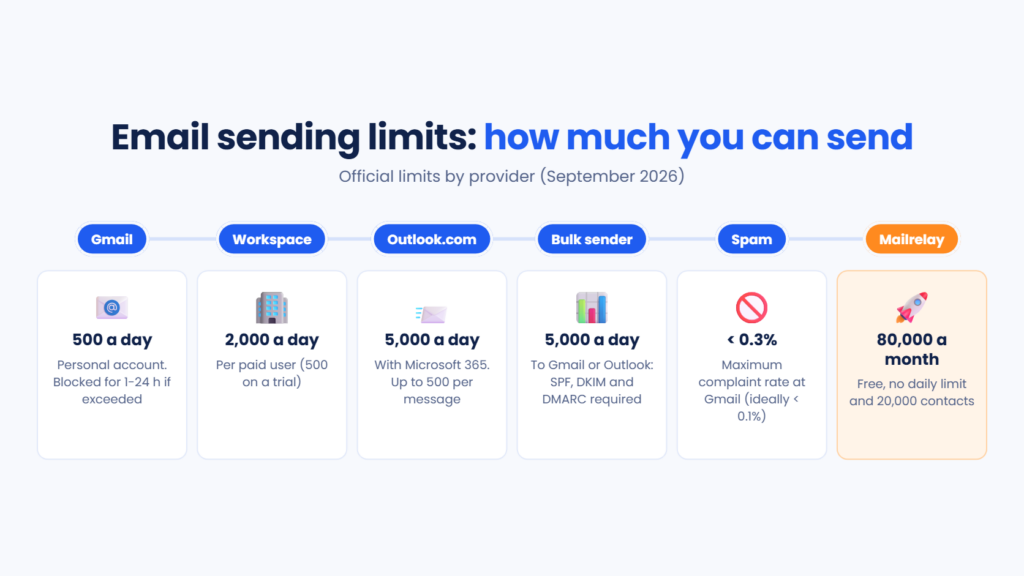
A personal Gmail account hits its limit if you send more than 500 emails in a day or add more than 500 recipients to a single message. You’ll see the warning “You have reached a limit for sending mail”. You won’t be able to send again for anywhere between 1 and 24 hours.
Google Workspace gives you more room: 2,000 messages a day per user, or 500 if the account is still on a trial. Each message can have up to 2,000 recipients, but no more than 500 external ones. Go over the cap and the user may be unable to send for up to 24 hours.
On Outlook.com, Microsoft 365 subscribers can reach 5,000 recipients a day, with a maximum of 500 per message. Only 1,000 of them can be people you’ve never emailed before. Free and newly created accounts have lower limits, which rise as the account builds trust.
What if your list has 3,000 contacts? With Gmail, it would take you six days to reach everyone. That’s why these inboxes work for everyday email, but not for email marketing. Our blog has a full comparison of bulk mailing with Gmail vs Mailrelay.
Bulk senders: the 5,000-email threshold
There’s another key number. Since 1 February 2024, Gmail treats anyone who sends 5,000 or more emails a day to personal Gmail accounts as a bulk sender. Yahoo applies similar rules, and Microsoft followed on 5 May 2025 for Outlook.com, Hotmail and Live.
Going over that volume isn’t forbidden. But it comes with extra requirements. You need to authenticate your domain with SPF, DKIM and DMARC, and offer one-click unsubscribe. Your spam rate must also stay below 0.3%, and Google recommends keeping it under 0.1%.
The consequences are already real. Since November 2025, Gmail has been rejecting non-compliant email. Outlook, for its part, bounces it back with error 550 5.7.515. You’ll find all the details in our guide on how to meet Outlook, Gmail and Yahoo requirements.
What happens when you exceed a sending limit
It depends on who sets the sending limit. If it’s your inbox, the account is blocked from sending for a few hours. If it’s your platform, the campaign pauses until you upgrade or a new billing period starts.
When the receiving server sets the limit, messages come back as temporary bounces, or soft bounces, and are retried later. That’s why a campaign sometimes takes hours to deliver in full. We explain it in detail in why some emails get stuck in the sending queue.
The underlying issue is your sender reputation. Hitting sending limits again and again, or suddenly sending far more than usual, is a warning sign for spam filters. And rebuilding that reputation takes weeks.
How to send more without problems
Before you run into a sending limit, work out how much you need. Multiply your contacts by the number of sends you’ll make each month. A list of 8,000 people with a weekly newsletter and one monthly promotion adds up to about 40,000 emails. That figure tells you whether your tool and plan are big enough to accomodate your list.
Next, increase your volume gradually. If you’re going from 2,000 to 50,000 emails, do it over several weeks. This is known as IP warming, and mailbox providers appreciate it.
Look after your list. Addresses that no longer exist cause bounces and damage your reputation. Good email list hygiene and double opt-in cut those errors down.
Authenticate your domain even if you don’t reach 5,000 emails a day. It’s the norm now, and it improves deliverability for any sender.
And don’t send every campaign to your entire database. Segmentation reduces volume, lifts open rates and lowers spam complaints.
Sending limits in Mailrelay
Mailrelay has no daily sending limit. The free account includes up to 80,000 emails a month and 20,000 contacts, and you can use them however you like: all in one campaign or spread across several sends during the month.
For the first five days, our system analyses new free accounts to optimise delivery speed. If you move to a paid plan, your sending speed goes up within minutes.
Keep two details in mind. Every email over 100 kB counts as one extra send for each additional 100 kB block. And if you use up your plan’s volume or contacts, your campaigns pause until renewal, unless you upgrade or buy a prepaid email package.
We also help with what lies behind the limits. You get domain authentication, real-time bounce and complaint reports, and expert technical support by phone, chat or ticket, even on the free account.
Stop worrying about your inbox’s caps
80,000 emails a month for free, high deliverability and a support team that helps you set up your domain from day one.
Try Mailrelay for freeSending limits FAQ
How many emails can I send a day with Gmail? With a personal account, 500 a day. With Google Workspace, 2,000 per user, or 500 during the trial period.
What about Outlook? Microsoft 365 subscribers can send to 5,000 recipients a day from Outlook.com, with a maximum of 500 per message. Free and new accounts have lower limits.
What is a bulk sender? Anyone who sends 5,000 or more emails a day to Gmail or Outlook accounts. They must authenticate their domain, offer one-click unsubscribe and keep a low spam rate.
Does Mailrelay have a daily sending limit? No. The free plan includes 80,000 emails a month and 20,000 contacts, with no daily cap.
What happens if I exceed my Mailrelay plan? Your campaigns pause until renewal. You can upgrade your plan or buy a prepaid email package to keep sending.
In short
Sending limits exist everywhere: in your inbox, on your server, on your platform and at the providers that receive your emails. Knowing them saves you from blocks halfway through a campaign. If your list is growing, keep your personal inbox for everyday email, authenticate your domain, increase volume gradually and use a tool built to email thousands of contacts.