Email marketing for events, trade shows and conferences
From the save the date to the thank-you email: how to fill your event and build attendee loyalty
Email marketing for events is the use of email to announce an event, get registrations, remind attendees of the date and stay in touch afterwards. It works for trade shows, conferences, seminars, concerts, product launches, and online or hybrid events.
It is the channel that accompanies each attendee from the moment they hear about the event until they receive the final materials. That is why it has a big impact on actual attendance, not just on registrations.
How is it different from other email campaigns?
A regular campaign has one goal and one send. Here, email marketing is a sequence with a fixed date: each message depends on what the contact did with the previous one.
It also combines two types of sends. Promotional emails aim to get registrations. Transactional emails, such as the confirmation or the ticket, must always arrive, and right away.
If your event is a short online session, also see our entry on webinars. For hands-on formats with few attendees, see the one on workshops.
What emails should you send in each phase of an event?
| Phase | Goal | |
|---|---|---|
| 2-3 months before | Save the date | Get them to save the date |
| 4-8 weeks before | Invitation with the program | Get registrations |
| After registering | Confirmation with the ticket or link | Provide the access details |
| Before registration closes | Last call or end of the early-bird rate | Win over the undecided |
| 1 week, 1 day and 1 hour before | Reminders with practical information | Reduce no-shows |
| On the day | SMS alerts about changes | Resolve issues on the spot |
| 1-2 days after | Thank-you, materials and survey | Measure satisfaction |
| Weeks after | Announcement of the next edition | Build attendee loyalty |
You’ll find an example of each send, with timings and copy, in our email schedule for a call for applications.
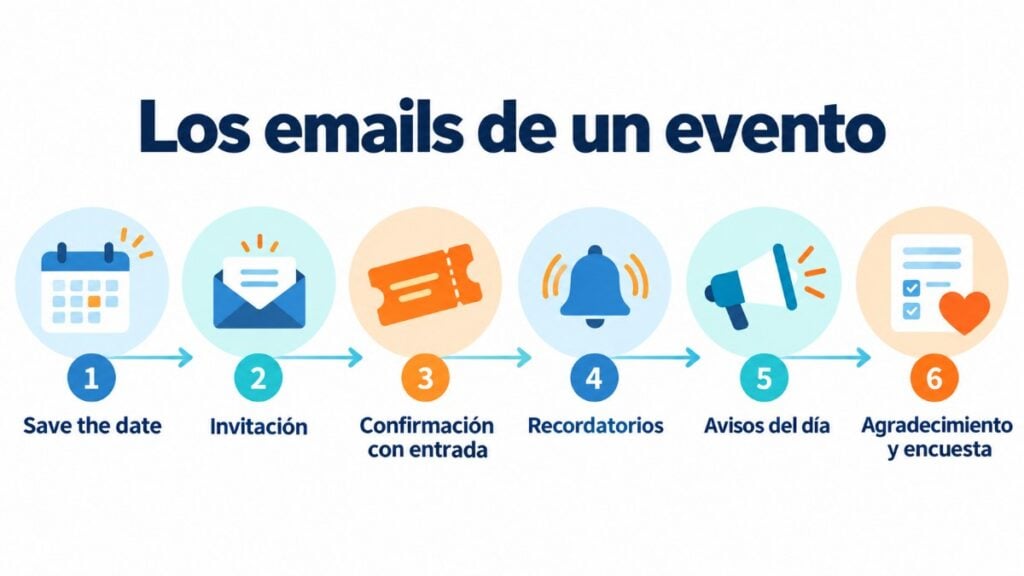
What each event email should include
Save the date. Name, date, venue or format, and one sentence on why it’s worth attending. You don’t need the full program yet.
Invitation. Program, speakers, price, available places and a single button to register. Here are some event invitation examples.
Confirmation. Registration summary, ticket or QR code, a button to add it to the calendar and the change policy. It is sent automatically with an autoresponder.
Reminders. Time, address, directions, check-in and the connection link if it’s online. The closer to the event, the shorter they should be.
Thank-you. Presentations, recordings, photos and a short survey for attendees. It’s the time to announce the next event.
Fill your next event
Invitations, confirmations and reminders by email and SMS from a single platform.
How should you segment attendees?
Not all attendees need the same information. The most useful segmentation separates these groups:
General public. Program, tickets and open activities.
Professionals and buyers. Meeting schedule, professional areas and accreditation.
Press. Press releases, press office hours and graphic materials.
Speakers. Schedules, technical requirements and deadlines for submitting presentations.
Exhibitors and sponsors. Setup, logistics and what they get in return. If you are looking for backing, see our entry on sponsorship.
It is also a good idea to separate those who registered from those who only opened the invitation. The former get the reminder; the latter, the last call.
The registration landing page
The email takes the contact to a registration page. If that page fails, the campaign loses everything it achieved.
A good registration landing page has a single goal, few fields and a clearly visible date. Also, connect the form to your list so the confirmation goes out on its own.
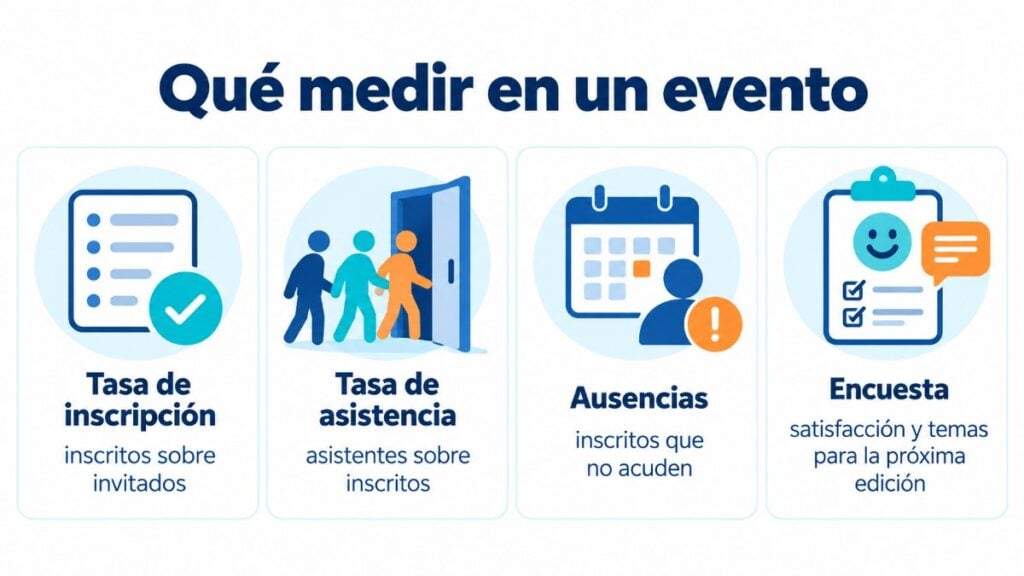
Metrics to measure an event’s email marketing
Registration rate. Registrants out of the contacts who received the invitation.
Attendance rate. Actual attendees out of registrants. It’s the figure that improves the most with good reminders.
No-shows. Registrants who didn’t attend. They tend to be higher at free events.
Clicks per link. Which part of the program generates the most interest.
Survey responses. Satisfaction and topics for the next edition.
Common mistakes
Inviting too late. Professional calendars fill up weeks in advance.
Sending the same thing to everyone. A speaker and a visitor don’t need the same information.
Forgetting about mobile. Many attendees open the reminder on the way: put the address and time at the top.
Not saying thank you. The follow-up email is the first one of the next edition.
How to schedule event reminders with Mailrelay
Event reminders can go out on their own, without you having to send them manually. Mailrelay gives you two ways to do it, and you can combine them.
With an automation triggered by registration
Create an automation with the “When a subscriber is added to a group” entry point and choose your registrants group. That way, everyone who signs up through the form or the landing page enters the sequence.
Then add the steps. For example: the confirmation email right away; a “Wait” block set to “Specific date of the year” until one week before the event, followed by the first reminder; another wait until the day before and a reminder with the time and address; and, on the morning of the event, a short SMS.
The “Wait” block lets you wait for an amount of time or until a specific time of day, day of the week, day of the month or date. That’s why it works both for events with a fixed date and for sequences that start on the day each person registers.
With scheduled campaigns
If you already have your list of registrants, you can also schedule each email or SMS with its send date and time, targeting the registrants group or segment. Exclude those who have already confirmed their attendance so you don’t repeat messages. You’ll find the full schedule, with timings and copy, in our guide to the email schedule for a call for applications.
For dates that come around every year for each contact, such as their birthday, Mailrelay has a dedicated entry point: “When it’s the subscriber’s birthday”. We explain it in our entry on the birthday email.
How Mailrelay helps you
With Mailrelay, you design invitations with the editor, collect registrations with forms and send the confirmation automatically. You can also send urgent day-of alerts by SMS from the same platform.
The free account includes up to 80,000 emails a month and 20,000 contacts, with human support by chat, ticket and phone. If you organize events for members, also see email marketing for associations.
If you run a hotel, a restaurant or a leisure business, also see our entry on email marketing for tourism and hotels.
Start your event for free
Up to 80,000 emails a month and 20,000 contacts, with human support on every plan.
Frequently asked questions
These are the most common questions about these sends.
What is email marketing for events?
The use of email to announce an event, get registrations, remind people of the date and stay in touch with attendees afterwards.
How far in advance should you send an event invitation?
Between four and eight weeks before. For trade shows and professional conferences, it’s best to send a save the date two or three months ahead first.
How many reminders should you send before an event?
Three usually work well: one week before, the day before and one hour before if it’s online.
How do you reduce no-shows at a free event?
Send reminders with practical information, ask people to confirm attendance a few days before and release the places that aren’t confirmed.
What should you include in the thank-you email?
The presentations or recordings, a short survey and the date or announcement of the next edition.