Email marketing for SMBs: how to get started and which software to choose
A practical guide to selling more by email with little time and a small budget
Email marketing for SMBs is the use of email to win customers, sell and build loyalty with a small budget and a small team. It works with your own contact list, simple campaigns and software that does the heavy lifting for you.
Choosing that software seems easy. You ask AI or look up a comparison and the same names always come up.
Are those answers any use to you? It depends. Many are designed for large teams, advanced use cases or budgets much bigger than yours.
And that’s where the problems start. You end up paying for features you don’t use or wasting hours setting up something you don’t need, with no one to help you.
In this guide you’ll see how to get started with email marketing in your SMB, what to send based on your type of business and what to look for before choosing a tool.
What is email marketing for SMBs?
It’s the same email marketing a large company does, but adapted to your resources. Fewer campaigns, more direct messages and plenty of automation.
An SMB doesn’t usually have a marketing department. Typically, the person who sends the newsletter also handles customer service or runs the social media accounts.
That’s why email marketing for SMBs needs a simple method. A list of contacts who have given permission, two or three types of email that repeat, and a few metrics to improve each send.
Why does email marketing work so well for an SMB?
Because the list is yours. You don’t depend on an algorithm that decides who sees your post, and you don’t pay for every click, as you do with advertising.
It’s also cheap. With a free account you can start sending campaigns at no cost and only pay when your list grows.
And it’s measurable. You know who opens, who clicks and who buys. With that data you decide what to repeat and what to change.
But there’s a catch. Email only works if the tool keeps up with your growth: you should be able to start without paying, learn quickly and increase your sending volume little by little.
How to get started with email marketing in your SMB in 6 steps
These are the steps to get email marketing for SMBs up and running without getting lost in technical details.
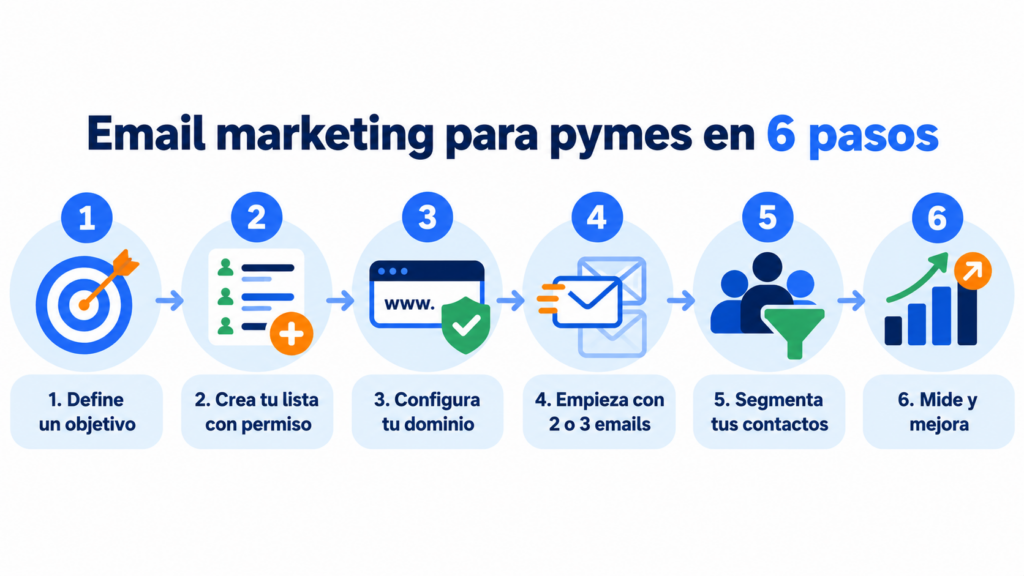
1. Set a specific goal
Choose a single goal for the first three months. For example, getting more bookings, selling more to existing customers or winning back those who haven’t bought in a while.
2. Build your list with permission
Add a subscription form to your website and online store, and use double opt-in to confirm each signup. Never buy databases.
In Spain, the LSSI (art. 21) requires prior consent to send commercial communications. The exception is your customers, when you offer them products similar to the ones they’ve already bought and they can unsubscribe.
3. Set up your sending domain
Send from an address on your own sending domain and authenticate it with SPF, DKIM and DMARC.
Gmail and Yahoo have required it since February 2024 for anyone sending more than 5,000 emails a day, and other providers take it into account too.
4. Start with two or three types of email
Don’t try to do everything at once. An automated welcome email and a monthly newsletter already cover the basics. Later you can add promotions or reminders.
5. Segment from the start
Separate customers from subscribers. Use subscriber groups and custom fields to talk to each person about what interests them.
With good segmentation, opens and clicks go up.
6. Measure and adjust every send
Check the open rate, CTR, unsubscribes and sales. If you can’t decide between two subject lines, run an A/B test on part of your list.
Get started with email marketing for your SMB for free
Send up to 80,000 emails a month to 20,000 contacts without paying, with support by chat, phone and ticket.
What emails to send based on the type of SMB
Every business has its key moments. This table gives you a starting point:
| Type of SMB | Most helpful email | When to send it |
|---|---|---|
| Online store | Abandoned cart and post-purchase recommendation | Automated, a few hours or days later |
| Restaurant or hospitality | Seasonal menu and bookings for special dates | Every month and before holidays |
| Clinic or beauty center | Appointment reminder and regular check-up | Automated, based on the appointment date |
| Academy or training center | Enrollment opening and course news | Before each intake |
| B2B services (consultancy, agency) | Newsletter with tips and customer case studies | Every month |
| Local store | Customer offers and in-store events | Every two weeks or every month |
If you don’t know where to start, begin with an email marketing template and adapt it to your brand.
What should email marketing software for SMBs include?
Email marketing software for SMBs is a platform for creating campaigns, managing lists, automating sends and measuring results without complex development or a technical team. Check that it includes these four things.
Automation that’s easy to set up
Automation doesn’t have to be complicated. What matters is being able to launch, in minutes, a welcome email, a sequence for new customers or a reminder.
You’ll find more ideas in the guide to email marketing automation for SMBs.
Hassle-free segmentation and personalization
It should let you organize contacts, create groups and personalize content in a few clicks. If you need a technician to segment, the tool isn’t right for your SMB.
Clear statistics and good deliverability
After each send you want to know how it went: opens, clicks, unsubscribes, complaints and bounces. A click map tells you which parts of the email work.
And deliverability decides whether your emails reach the inbox.
Human support when you need it
If you have a problem with a send, with your domain or when importing contacts, you need to talk to someone who knows how to fix it. Not in three days or after five emails.
Check whether support is included in the free plan or only in the paid ones.
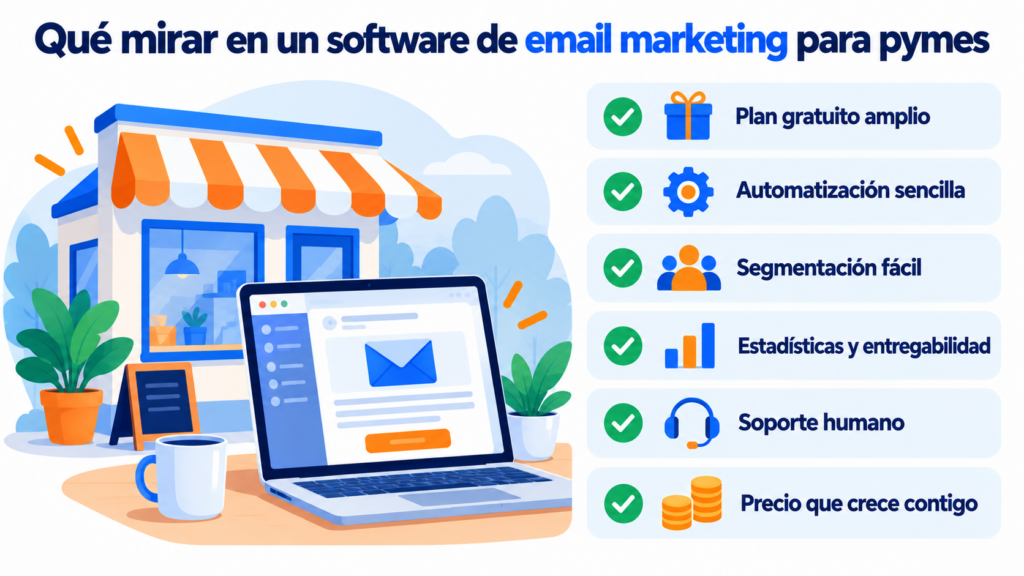
How to choose email marketing software for your small business
Start with your actual volume. Count how many contacts you have and how many emails you want to send a month. With those two figures you can rule out half of the options.
Then check whether the tool includes automation, segmentation and A/B testing without forcing you onto a paid plan from day one.
Also look at the language of the support and the interface, and where it stores your data.
If you’re comparing email marketing software for SMBs such as Mailchimp, MailerLite, Brevo, Acumbamail or Mailrelay, don’t just go for the best-known name. You’ll find the full comparison of free plans in email marketing software.
How Mailrelay helps you do email marketing in your SMB
The first advantage is the free plan. With a free Mailrelay account you can send up to 80,000 emails a month to 20,000 contacts.
The second is ease of use. You get hundreds of templates, an AI-powered drag-and-drop editor and automations you can activate in a few steps.
The third is the balance between simplicity and features: segmentation, custom fields, A/B testing, real-time reports with a click map, a WordPress plugin and an API.
And the fourth, perhaps the most valuable for an SMB, is human support. We provide support by chat, ticket and phone on all plans, including the free one.
The email marketing tool designed for SMBs
Templates, automations and segmentation without the hassle. Try it with your own list.
Frequently asked questions about email marketing for SMBs
These are the questions that come up most often when an SMB starts with email.
How much does email marketing cost for an SMB?
You can start for free. Many tools have a free plan, although with different limits.
With Mailrelay it goes up to 80,000 emails a month and 20,000 contacts, so most SMBs don’t pay anything at first.
What is the best email marketing software for SMBs?
The one that fits your volume, your budget and your team. For an SMB, a generous free plan and responsive support usually matter more than a long list of advanced features.
How often should a small business send emails?
One newsletter a month is a good starting point. Add to that automated emails (welcome, reminders, cart) and the occasional promotion on key dates.
Can I send emails to my customers without their permission?
Only if they’re already customers and you offer them products or services similar to the ones they bought, with the option to unsubscribe in every email. For all other contacts, you need their prior consent.
Do I need technical knowledge to get started?
No. A visual editor and a few templates are all you need to create your first emails. The only technical part is setting up your sending domain, and you can ask support for help with that.
Can it be integrated with WordPress or other tools?
Yes. Mailrelay has a WordPress plugin and a REST API, so you can connect your forms, your store or your CRM. You can also use Make.com to integrate it with other platforms.