Mailto: what it is and how to create an email link with subject and body
The link that opens an email with the address, subject and text already filled in
Mailto is a type of link that, when clicked, opens the user’s email program with a new message addressed to a specific address. It can also include the subject, the message text and CC recipients.
You see it every time a website has a “Contact us” link that opens Gmail, Outlook or Apple Mail. Its name comes from “mail to”, and it is defined in the IETF’s RFC 6068 standard.
How does a mailto link work?
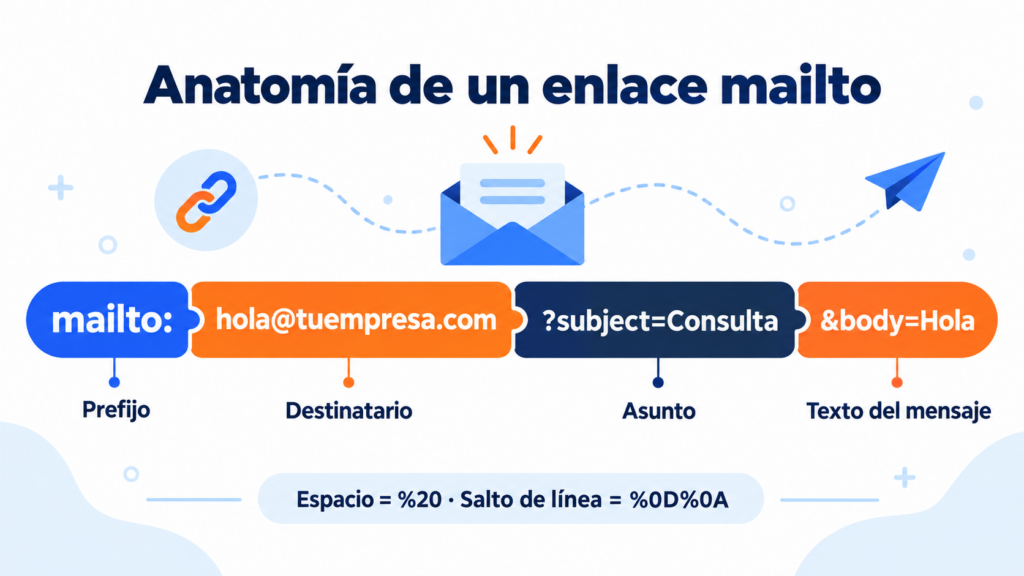
A mailto link starts with mailto: instead of https://. The browser doesn’t load a page: it passes the data to the email program the user has set up.
This is the basic structure:
mailto:[email protected]
If you want to add more data, write it after a question mark and separate each item with the “&” sign:
mailto:[email protected]?subject=Question&body=Hi
If the user doesn’t have an email program set up, the link does nothing or asks them to choose an app. This is one of its limitations.
What parameters does a mailto link accept?
| Parameter | What it’s for | Example |
|---|---|---|
| (address) | Main recipient | mailto:[email protected] |
| subject | Email subject | ?subject=Urgent%20order |
| body | Message text | &body=Hi,%20I%20would%20like%20information |
| cc | CC recipient | &[email protected] |
| bcc | BCC recipient | &[email protected] |
You can add several addresses separated by commas. And the order of the parameters doesn’t matter, as long as the first one goes after “?” and the rest after “&”.
Add contact links to your newsletters
Create campaigns with buttons, links and automatic unsubscribes in Mailrelay’s free account.
How do you write spaces and line breaks?
A link can’t contain spaces or special characters as they are. You need to write them encoded:
- Space: %20
- Line break: %0D%0A
- “&” sign within the text: %26
- “?” sign within the text: %3F
Accented letters and characters such as “ñ” usually work in modern email programs, but the safest option is to encode them too. For example, “información” is written informaci%C3%B3n.
How do you create a mailto link in HTML?
In HTML you use the usual link tag, with mailto in the href attribute:
<a href=”mailto:[email protected]?subject=Information”>Contact us</a>
In WordPress you don’t need to touch any code. Select the text, click the link button and type mailto: followed by the address. It works the same way in most email editors.
Mailto examples to copy
Replace the address and the text with your own:
- Simple contact: mailto:[email protected]
- With subject: mailto:[email protected]?subject=Quote%20request
- With subject and text: mailto:[email protected]?subject=Appointment&body=Hi,%20I%20would%20like%20to%20book%20an%20appointment%20for
- With CC: mailto:[email protected][email protected]&subject=Order
- To unsubscribe by reply: mailto:[email protected]?subject=UNSUBSCRIBE
What are its advantages and disadvantages?
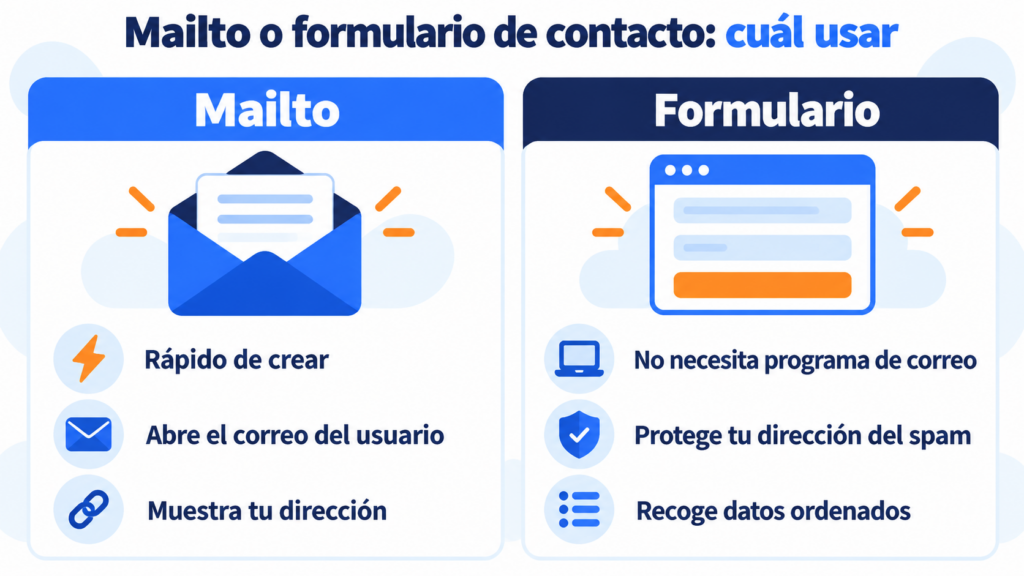
Advantages. It’s easy to create, needs no forms or coding, and the user writes from their own email account. Plus, filling in the subject helps you sort the messages you receive.
Disadvantages. If the user doesn’t have an email program set up, it doesn’t work. And the address is visible in the page’s code, so spam bots can harvest it.
That’s why many websites combine a mailto link with a contact form and hide or encode the address. If what you want is to collect contacts for your list, the right option is a subscription form.
Can you use mailto in an email?
Yes, and it’s very useful. In a newsletter you can add a “Take this survey” button that opens an email with the subject already filled in. Or a link to book an appointment, request a quote or contact a sales rep.
That said, a mailto link doesn’t replace the unsubscribe link in your campaigns. The law requires a simple, free way to unsubscribe, and an email marketing tool includes it automatically in every send.
How Mailrelay helps you
In Mailrelay’s editor you can add mailto links to text and buttons, just like any other link. That way your subscribers can write to you with one click from the newsletter.
Each campaign also includes its automatic unsubscribe link and a record of unsubscribes, so you don’t have to manage them by hand. And the statistics show you which links get the most clicks (on the free account and on Enterprise).
The free account lets you send up to 80,000 emails a month to 20,000 contacts, with human support on every plan.
Let your subscribers write to you with one click
Up to 80,000 emails a month for free, with human support on every plan.
Frequently asked questions about mailto
These are the most common questions when creating a mailto link.
What does mailto mean?
Mailto is short for “mail to”. It’s the prefix of a link that opens a new email addressed to a specific address.
How do I add a subject to a mailto link?
Add ?subject= after the address and write the subject with spaces as %20. For example: mailto:[email protected]?subject=Website%20question.
Why isn’t my mailto link working?
The most common reason is that the user doesn’t have an email program set up, or that the link has unencoded spaces. Also check that the “?” sign before the first parameter isn’t missing.
Can a mailto link open Gmail?
Yes, if Gmail is set as the default email handler in the browser. Chrome allows this from Gmail’s settings.
Is it safe to put my email address in a mailto link?
The address is visible to bots that harvest email addresses, so it may get more spam. Use a generic address, such as info or hello, and a good antispam filter.