WhatsApp Web: what it is, how to log in from your computer and how to link your phone
How to log in with the QR code or your phone number, how many devices you can link and how to protect your chats
WhatsApp Web is the version of WhatsApp you use from your computer’s browser, at web.whatsapp.com, linked to the account on your phone.
Here’s how to log in, how many devices you can link, how to protect your chats and what you can do with it if you use it for your business.
What is WhatsApp Web?
It’s a way to use your WhatsApp account on a big screen, without installing anything. You see the same chats, type with your keyboard and send files stored on your computer.
It isn’t a separate account. It works as a device linked to your phone, which remains the primary one. Messages are end-to-end encrypted, just like in the app.
It works in the usual browsers, such as Chrome, Edge, Firefox, Safari or Opera. If you prefer an application, WhatsApp also has a desktop app for Windows and Mac.
How do you log in to WhatsApp Web?
You only need your phone at hand the first time:
- Open web.whatsapp.com in your computer’s browser.
- On your phone, open WhatsApp and go to “Linked devices”.
- Tap “Link a device” and scan the QR code on the screen.
- Wait for your chats to load.
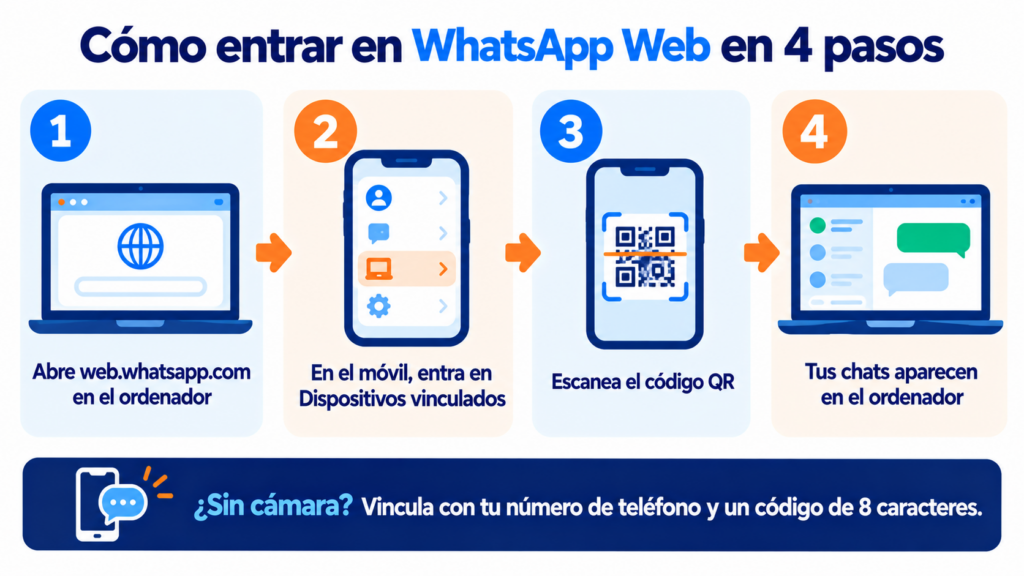
On Android, “Linked devices” is in the three-dot menu. On iPhone, it’s in Settings or under your profile picture.
Do you serve your customers from WhatsApp Web?
With Mailrelay’s WhatsApp campaigns, you send promotions and notices to your whole list, with Meta-approved templates and statistics for every send.
Can you log in without the QR code?
Yes. If your phone’s camera doesn’t work, choose to link with your phone number on the QR screen. Enter your number and the website will show you an eight-character code.
Then, on your phone, open the WhatsApp notification or go to “Linked devices” and enter that code.
How many devices can you link?
Up to four at a time, in addition to your primary phone. They can be computers, tablets or another phone.
| Situation | What happens |
|---|---|
| You link a fifth device | You have to log out on another one |
| A linked device goes 30 days without use | It gets disconnected |
| The primary phone goes more than 14 days without use | All linked devices are logged out |
| Your phone runs out of battery or loses connection | WhatsApp Web keeps working |
WhatsApp Web or the desktop app?
Both use the same account. Choose based on how you work.
| If… | Your best option |
|---|---|
| You use a computer that isn’t yours | WhatsApp Web, and log out when you’re done |
| You can’t install programs on the computer | WhatsApp Web |
| You spend the day with WhatsApp open | The desktop app, with its own notifications |
| You serve customers from several workstations | WhatsApp Business linked on each one |
| You want to send promotions to your list | A WhatsApp campaign tool |
How do you protect your WhatsApp Web?
Anyone who opens your browser can read your chats. Three habits prevent it:
- Log out on shared computers. When you log in, uncheck “Stay logged in on this browser”.
- Turn on screen lock. In the privacy settings of the web version, set a password that is requested after a few minutes of inactivity.
- Check your linked devices. If you see one you don’t recognize, log it out from your phone and turn on two-step verification.
And never share the one-time passcodes (OTP) you receive by SMS. It’s the most common trick for stealing WhatsApp accounts.
Watch out for websites that imitate WhatsApp Web to steal accounts. That’s phishing: always log in by typing the address into the browser yourself.
Can you use WhatsApp Web for your business?
For customer service, yes. It also works with the WhatsApp Business app, and typing on a keyboard speeds up your replies.
It’s the foundation of conversational marketing: talking to each customer on their channel.
For WhatsApp Marketing to many customers, it falls short. A broadcast list holds 256 contacts and only reaches people who have your number saved. You also get no delivery and read statistics, and messages nobody asked for end up marked as spam.
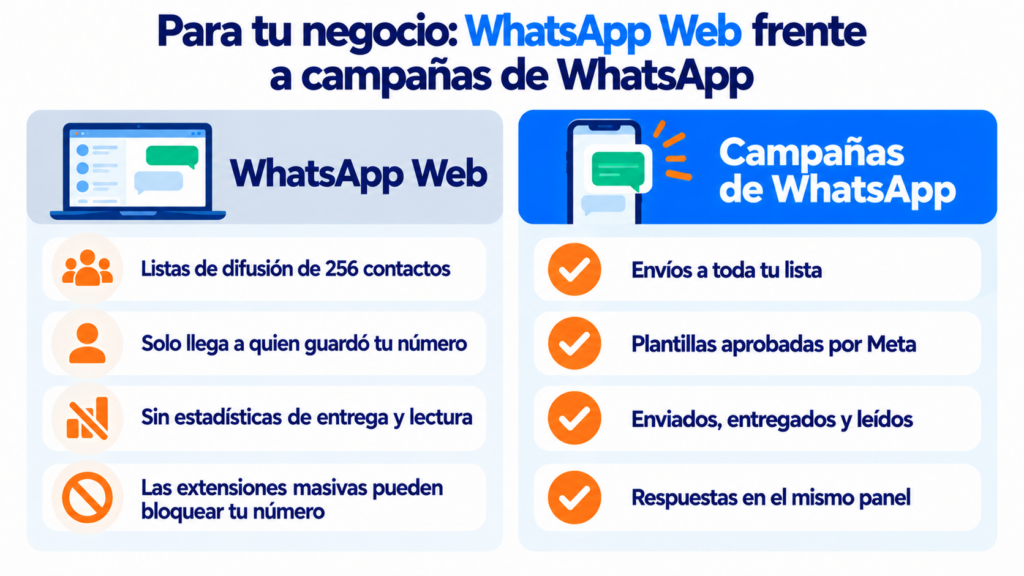
And don’t use extensions that promise bulk sending from the browser. WhatsApp doesn’t allow them and may block your number, and with it your customer service channel.
That’s what the WhatsApp Business API is for: the official way to send campaigns to your list. With it you can also connect a chatbot or an AI agent that answers the most frequent questions.
If you want to decide which channel to use in each case, see when to use email, SMS or WhatsApp. And if you sell through this channel, you’ll find ideas in how to sell on WhatsApp and payment reminder templates.
How Mailrelay helps you
With Mailrelay’s WhatsApp campaigns, you send promotions, reminders and notices to your list with Meta-approved templates. You see how many messages were sent, delivered and read, a more reliable metric than the email open rate.
And you answer replies from the dashboard.
Your WhatsApp Business app keeps working on your phone, so you can serve your customers just as before.
WhatsApp sending is included in the Standard and Enterprise plans (see pricing).
With the free account, you can try it for 10 days, and Meta’s fees are paid separately. You also manage email marketing and SMS marketing from the same account, for multichannel automation.
Try WhatsApp campaigns for free
Create your account, connect your number and try WhatsApp sending for 10 days. Your WhatsApp Business app keeps working.
WhatsApp Web FAQ
These are the most common questions.
Is WhatsApp Web free?
Yes. You only need an active WhatsApp account on your phone and a browser.
Does my phone need to be on to use WhatsApp Web?
No. Once linked, it works even if your phone is off or offline. But if your phone goes more than 14 days without use, the session is logged out.
Can I use WhatsApp Web on a tablet?
Yes. You can open the web version in your tablet’s browser or link it with the WhatsApp app, if there is one for your tablet.
How do I log out of WhatsApp Web remotely?
From your phone, in “Linked devices”. Tap the device and choose “Log out”.
Can I send bulk messages from WhatsApp Web?
Not safely. Broadcast lists have limits, and unofficial tools can get your number blocked by WhatsApp. For campaigns, use a tool that works with the official API.