Email marketing tools with the best deliverability: 2026 comparison
Which features to compare so your campaigns reach the inbox

Which features to compare so your campaigns reach the inbox
Almost every email marketing tool comparison looks at the same things: price, templates and automations. But there’s one criterion that decides whether any of that is worth anything. It’s deliverability, meaning that your emails reach the inbox and not the spam folder.
In this guide, we look at which deliverability features are worth comparing and what the most widely used ESPs offer. We also go over the tools that help you measure whether your campaigns are really getting through.
Deliverability is the ability of an email to reach the recipient’s inbox. It’s not the same as the delivery rate. A server can accept your message and still send it to the spam folder. That’s why there’s another metric, the inbox placement rate.
Your email marketing tool has a big influence on that result. It manages the IPs you send from, helps you authenticate your domain and cleans out the contacts that cause problems. If it does that job poorly, your good practices lose their effect.
If you’d like an overview first, see what an email marketing tool is and what it should include.
An ESP (email service provider) with good deliverability doesn’t rely on a single trick. It relies on a set of features that work together:
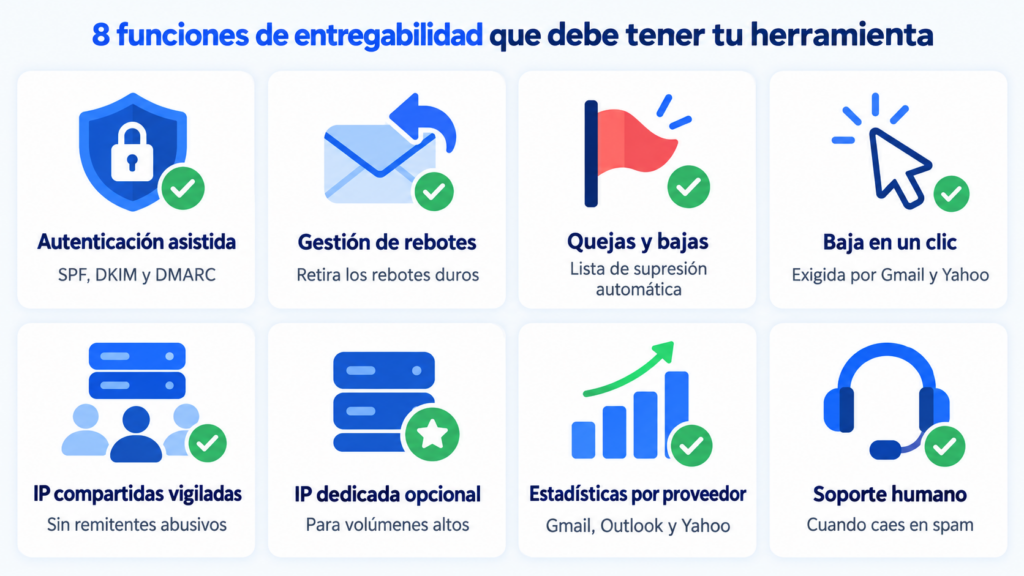
Every serious ESP lets you authenticate your domain and manages bounces. The differences come down to two points: whether you can have a dedicated IP and what support you get on the free plan. Here’s what each one offers as of October 2026:
| Tool | Dedicated IP | Support on the free plan |
|---|---|---|
| Mailrelay | Yes, from €600 per year (annual contract) | Ticket, with no time limit |
| Brevo | Add-on on Professional ($251 per year); one included in Enterprise | |
| Mailchimp | Campaigns are sent from shared IPs; dedicated IPs are offered in Mailchimp Transactional | First 30 days only |
| MailerLite | On request, from 50,000 emails per week | Initial period only |
| Mailjet | One IP on Premium, from 100,000 emails per month and on request | First month only |
| Acumbamail | Enterprise plan only | Not specified on its website |
| GetResponse | On the MAX plans | 24/7 email |
| SendGrid | Included in Email API Pro and Marketing Advanced | No free plan: 60-day trial |
These details change often, so it’s worth confirming them on each provider’s website before you decide. If you’re more interested in comparing free plans, limits and prices, you’ll find that in our comparison of email marketing software.
With a shared IP, your reputation is mixed with that of other senders using the same provider. If the ESP keeps a close eye on its customers, it’s the best option for most businesses. Plus, you don’t need to warm anything up.
A dedicated IP only makes sense with a high, steady volume. Its reputation depends entirely on your sends. That’s why you need to do IP warming when you start. MailerLite, for example, requires at least 50,000 emails per week to assign one.
Sending a low volume from a dedicated IP can work against you.
A tool built to reach the inbox
Authenticate your domain in minutes, clean your list automatically and get human support on every plan.
Your ESP is only part of the job. These tools tell you how the major providers see your emails and where the problem lies when something goes wrong:
| Tool | What it’s for | Cost |
|---|---|---|
| Google Postmaster Tools | Compliance status with Gmail’s requirements and spam rate | Free |
| Microsoft SNDS | Data on the IPs that send to Outlook and Hotmail | Free |
| Yahoo Sender Hub | Complaint feedback loop (CFL) and Insights dashboard with the complaint rate | Free |
| mail-tester | Spam score for a test email | 3 free tests every 24 hours |
| GlockApps | Inbox placement tests by provider | Paid |
| Litmus | Previews in different email clients | Paid |
| Email on Acid | Previews and accessibility checks | Paid |
| MXToolbox | DNS, SPF, DKIM and blacklist checks | Free with paid options |
| Spamhaus | Check whether your IP or domain is on its blacklist | Free |
| dmarcian | Easy-to-read DMARC reports | Free with paid options |
| ZeroBounce | List verification before you import | Paid, credit-based |
| NeverBounce | Address verification and cleaning | Paid, credit-based |
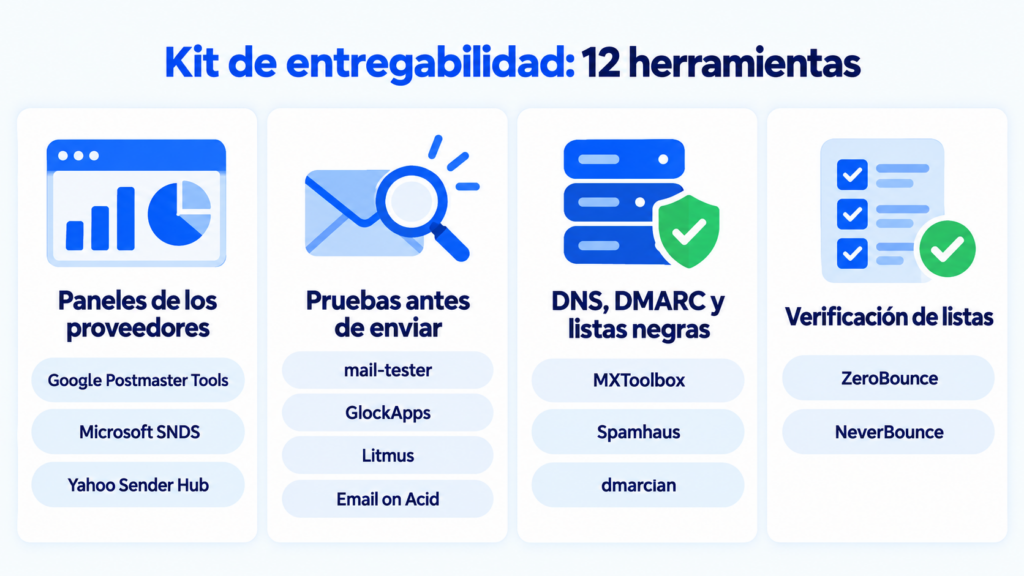
A note on Google Postmaster Tools: since September 30, 2025, it no longer shows IP and domain reputation. It now focuses on whether you meet Gmail’s requirements. And in 2025 Yahoo launched its Insights dashboard, which finally gives senders their own complaint figure.
Deliverability also depends on content. An email made of a single image, with hardly any text, raises suspicion with spam filters. If you design banners or headers with Canva or a similar tool, always combine them with real text and add alt text to every image.
You don’t have to trust any comparison, not even this one. You can test it yourself in an afternoon. Create a free account, authenticate your domain and send the same campaign to your own Gmail, Outlook and Yahoo addresses.
Then check which folder each one lands in. Run the email through mail-tester and open the headers to confirm that SPF, DKIM and DMARC show “pass”. Finally, contact support with a technical question and time how long they take to reply. That tells you a lot about what will happen the day you have a real problem.
You’ll find the full list of criteria in how to choose an email marketing service with high deliverability.
At Mailrelay, we work with our own IP ranges and algorithms that help prevent blocks. Automatic list cleaning is included on every plan, including the free one. And if your volume justifies it, you can get a dedicated IP with annual billing.
We explain how we do it, with shared IPs, dedicated IPs and automatic monitoring, in how Mailrelay protects deliverability.
Human ticket support is available on every account, with no time limit. Plus, the free account lets you send up to 80,000 emails per month to 20,000 contacts. That’s enough to run the test above with your real list.
See for yourself with your real list
Up to 80,000 emails per month and 20,000 contacts for free to measure Mailrelay’s deliverability with your own campaigns.
Which email marketing tool has the best deliverability? There’s no universal ranking. It depends on how the provider manages its IPs and, above all, on your practices: permission-based lists, an authenticated domain and relevant content. The most reliable approach is to test with your own domain.
Which email services include a high-reputation shared IP? All the ones in this comparison send from shared IPs monitored by the provider itself by default: Mailrelay, Brevo, Mailchimp, MailerLite, Mailjet, Acumbamail and GetResponse. The difference lies in how closely they control who sends from them (review of new accounts, anti-spam policy and automatic removal of contacts who complain) and whether you can move to a dedicated IP as your volume grows, as you can see in the table.
Do I need a dedicated IP? Only if you send a high, steady volume. For most small businesses, a well-managed shared IP works better.
How do I know if my emails are going to spam? Send tests to your own accounts with several providers and use tools like mail-tester or GlockApps. It’s also worth monitoring opens by provider: a sudden drop usually points to a problem.
Are there free tools to measure deliverability? Yes. Google Postmaster Tools, Microsoft SNDS, Yahoo Sender Hub and Spamhaus are free. mail-tester allows three free tests every 24 hours.

Jose Argudo
CMO at Mailrelay. Writes about email marketing, copywriting and conversion for SMEs and entrepreneurs.