Preference center
The alternative to unsubscribing that lets subscribers choose what they receive and how often
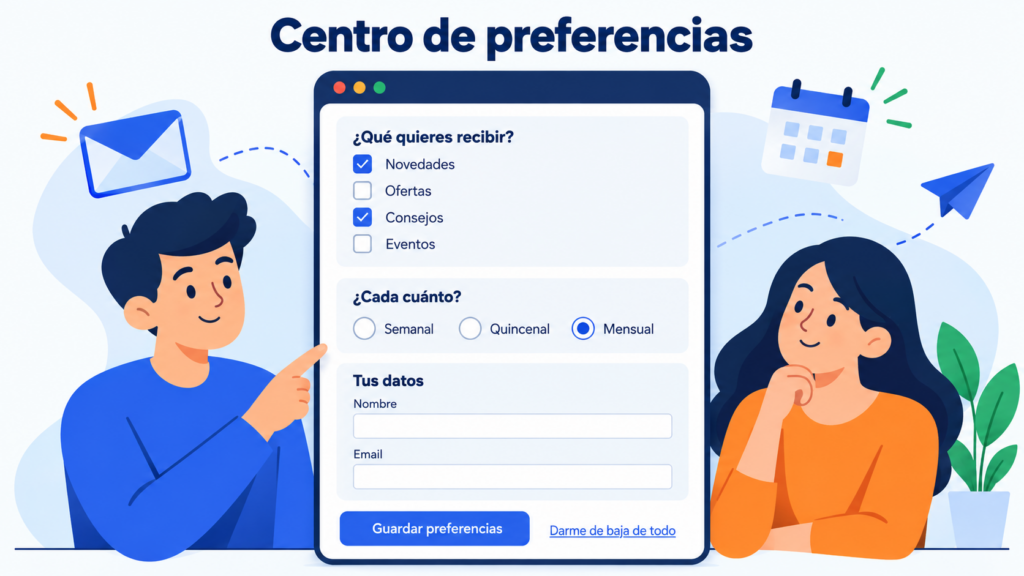
A preference center is the page where each subscriber decides which emails they want to receive from a brand, how often and with which data. It usually opens from the link in the email footer, next to the unsubscribe option.
Think of a subscriber who signed up for news and now also receives offers, webinars and surveys.
If all they find is the unsubscribe button, they’ll click it. If they can keep what interests them, they may stay with you.
What is a preference center for?
Its first job is to give the subscriber control. They can pick topics, slow down the pace or update their details without losing their whole subscription.
For you, the benefit is twofold. You keep contacts who would have left out of fatigue.
And you get information they give you voluntarily, known as zero-party data, which tends to be the most reliable.
It also helps your deliverability. People who only receive what they asked for mark fewer emails as spam, and those complaints weigh on your domain reputation.
What options does a preference center include?
You don’t need to offer everything. These are the most common options and what each one brings:
| Option | What the subscriber chooses | What it does for you |
|---|---|---|
| Topics or lists | News, offers, blog, events | Send each person only what interests them |
| Frequency | Weekly, biweekly, monthly | Reduce fatigue without losing the contact |
| Channel | Email, SMS or WhatsApp | Respect how they prefer you to contact them |
| Personal data | Name, email, city, language | Keep the record up to date and personalize better |
| Temporary pause | Stop receiving emails for a while | Avoid unsubscribes during busy periods, such as December |
| Full unsubscribe | Unsubscribe from everything | Comply with the law and don’t hold on to people who want to leave |
The last row is not optional. A preference center complements the unsubscribe option, but never replaces it.
Differences between a preference center and unsubscribing
Unsubscribing is a final decision: the contact stops receiving your campaigns. A preference center offers in-between options before it gets to that point.
The difference matters because of the regulations. The GDPR requires withdrawing consent to be as easy as giving it (Article 7(3)). Spain’s LSSI requires a simple, free way to opt out in every commercial communication.
That’s why the unsubscribe option has to be one click away and clearly visible, never hidden behind several screens.
Mailbox providers are moving in the same direction. Since 2024, Gmail has required one-click unsubscribe from anyone who sends more than 5,000 messages a day. It’s done with the List-Unsubscribe header and a visible link in the body of the email.
And when someone unsubscribes, that decision must be kept in your suppression list so that no import adds them back.
How do you create a preference center step by step?
You don’t need a complex platform. Here’s a practical order:
- Define your email types. Make a list of what you send: newsletter, offers, blog content, event notices. Each type will be a checkbox.
- Create a group or a field for each option. Topics work well as subscriber groups, and frequency or language as custom fields.
- Build the page. A form or a landing page with those checkboxes, the contact’s email and a button to save.
- Link to it from every campaign. Put the link in the footer, next to the unsubscribe link, with clear text such as “Choose which emails you want to receive”.
- Respect their choices. Segment each send according to what each person has checked, and make sure nobody slips through by mistake.
A tip: ask as little as possible. Three or four well-explained options work better than a page with twenty checkboxes.
Let your subscribers choose
In Mailrelay you use visible groups, custom fields and per-group unsubscribe so each contact receives only what they want, even on the free plan.
Practical example of a preference center
Imagine an online sports store that sends four types of email: news, offers, training tips and event notices.
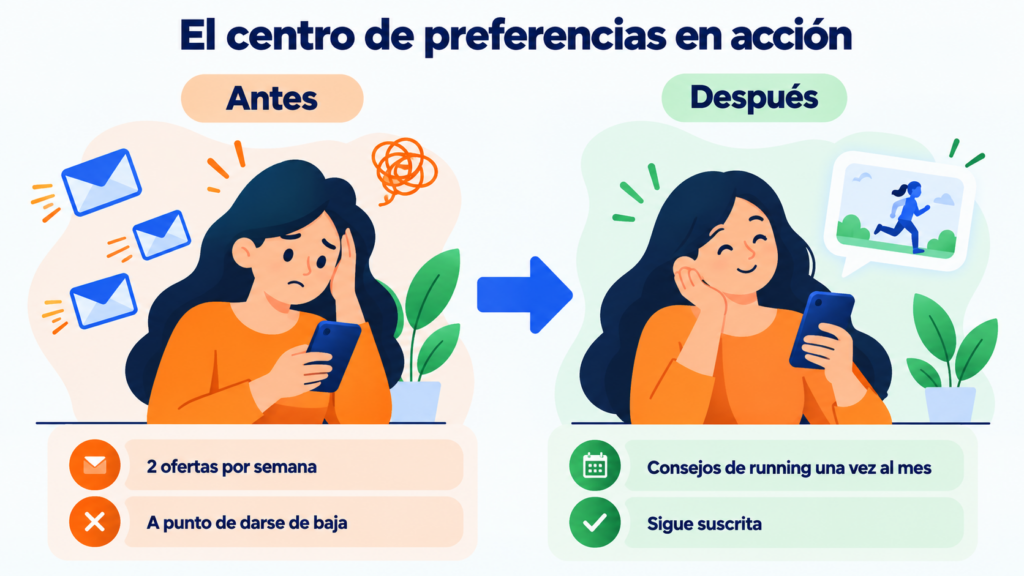
Laura signed up for the running tips, but she gets two offers a week and is about to leave.
She opens the preference center, unchecks “Offers”, keeps “Tips” and chooses to receive them once a month.
As you can see, the store doesn’t lose the contact. And it learns something valuable: Laura responds to useful content, not to discounts.
With that information, it fine-tunes its segmentation and personalization.
When should you offer a preference center?
It pays off when you send several types of communication or send fairly often. If you only send a monthly newsletter, a clear unsubscribe option is enough.
Some signs tell you that you need one: a rising unsubscribe rate, spam complaints or engagement that drops month after month.
They all point to the same thing: you’re sending too much or sending something people aren’t interested in.
Also review your calendar with our guide on the ideal sending frequency.
Common preference center mistakes
The most serious one is using it to delay the unsubscribe. Asking for a password or showing three screens before confirming causes frustration and spam complaints.
Another mistake is not honoring what the subscriber chooses. If they check “monthly” and keep getting emails every week, you’ve lost their trust — and probably the contact.
Don’t include transactional emails among the options either. Invoices, shipping notices or password changes don’t depend on marketing preferences.
Finally, review it from time to time as part of your list hygiene. A forgotten preference center ends up full of options you no longer send.
How Mailrelay helps you with your preference center
In Mailrelay you can set up a simple preference center with features you already have in your account, even on the free plan.
In subscription forms you choose which groups are visible, and each person checks the topics they’re interested in.
With custom fields you store the frequency or language. Then, segments and automations send each contact what they asked for.
For unsubscribing, you have several variables. The variable {{ unsubscribe_url_click }} unsubscribes the contact with a single click.
And the variable {{ unsubscribe_url_groups }} removes the subscriber only from the group that receives that newsletter, without removing them from the rest of your lists.
Real-time statistics show the unsubscribes and complaints for each campaign, so you can check whether your changes are working.
All with up to 80,000 emails a month and 20,000 contacts for free, plus support by chat, ticket and phone.
Fewer unsubscribes, better data
Groups, segments and automations with up to 80,000 emails a month and 20,000 contacts for free, plus support by chat, ticket and phone.
Frequently asked questions about preference centers
What is an email preference center? It’s a page where subscribers choose which emails they receive, how often and through which channel.
Is a preference center mandatory? No. What is mandatory is offering a simple, free unsubscribe option in every commercial email. A preference center is an optional improvement that reduces unsubscribes.
Can a preference center replace the unsubscribe link? No. The unsubscribe option must always be visible and work with one click. The preference center sits next to it, as an alternative.
What options should it include? The usual ones are topics, frequency and personal data, plus full unsubscribe. Start with three or four options and only add more if your subscribers use them.
How do I know if my preference center is working? Compare the unsubscribe rate and complaints before and after launching it. If someone leaves anyway, a winback campaign may be your last chance.