reCAPTCHA: what it is, how it works, and why it protects your forms from bots
How it tells a person from a bot and why your subscription form needs it
reCAPTCHA is Google’s service that checks whether whoever fills in a form or logs in to a website is a person or an automated program.
You’ve surely seen it: the “I’m not a robot” checkbox or the grid where you have to pick traffic lights, crosswalks or bicycles. For the user it’s a small toll; for the website, a filter against spam and fake sign-ups.
If you have a subscription form or a contact form, it’s worth understanding it well. An unprotected form is an open door for bots.
What is reCAPTCHA and what does CAPTCHA mean?
CAPTCHA stands for “Completely Automated Public Turing test to tell Computers and Humans Apart”.
It’s the generic name for any test of this kind: distorted letters, simple sums, images you have to identify.
The best-known version was born at Carnegie Mellon University, with Luis von Ahn among its creators, and Google bought it in 2009.
In its early years it had a curious double use: the words users typed helped digitize old books.
Today any website can install it to stop bots on forms, registrations, comments or logins. It also helps cut off phishing attempts that use other people’s forms to send links.
How does reCAPTCHA work?
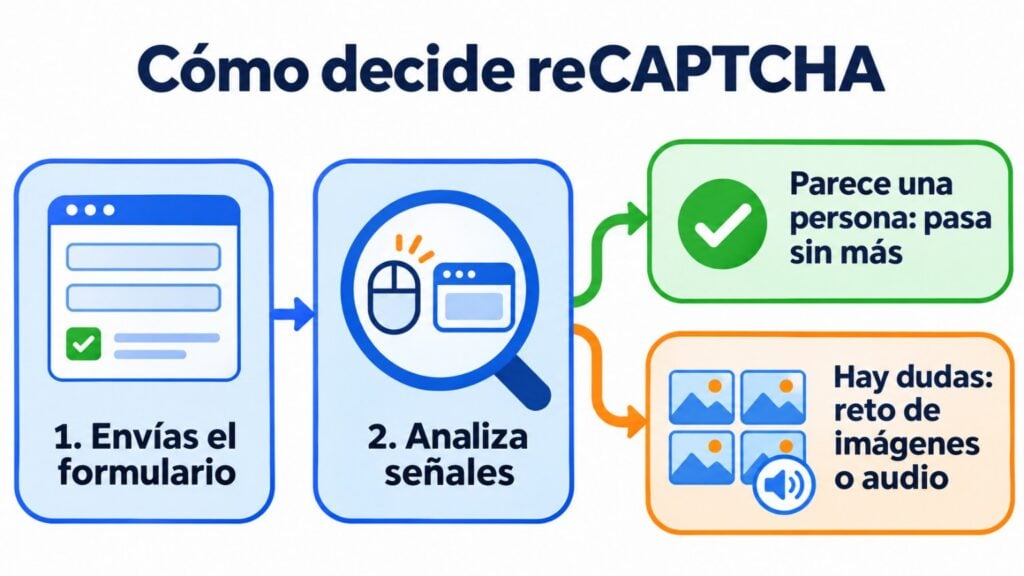
It doesn’t just look at whether you pass the test, but at how you behave on the page. It analyzes signals from the interaction and the browser to work out whether you look like a human or a program.
If the signal is clear, it simply lets the user through. If there’s doubt, it shows a challenge: picking images, listening to an audio clip or repeating the test.
A simple bot gets stuck there; a person takes a few seconds.
Subscription forms protected from day one
reCAPTCHA and double opt-in included in Mailrelay forms.
What versions of reCAPTCHA are there?
Google offers several versions. These are the ones you’ll come across most:
| Version | What it looks like | What it does | When it fits |
|---|---|---|---|
| reCAPTCHA v2 (checkbox) | “I’m not a robot” checkbox | If in doubt, shows images to choose from | Simple forms, when you accept one extra click |
| reCAPTCHA v2 invisible | Nothing, except a small badge | Triggers when the form is submitted and only asks for a challenge if it’s suspicious | When you want less friction |
| reCAPTCHA v3 | Nothing for the user | Gives a score from 0.0 (bot) to 1.0 (human) and the website decides what to do | High-traffic websites that want to filter without bothering anyone |
| reCAPTCHA Enterprise | Same as v3, with more options | More detailed analysis and protection for other actions (payments, accounts) | Large companies, within Google Cloud |
The fundamental difference between v2 and v3 is who decides. In v2, Google decides whether to let you through.
In v3 it only gives a score, and it’s you (or your developer) who sets the score from which you accept the submission.
What is reCAPTCHA for in a subscription form?
In email marketing, reCAPTCHA guards the entrance to your list, just like a doorman. A subscription form without a filter can run into three types of problems.
Fake sign-ups. Bots that fill in the form with made-up or stolen addresses. They inflate your list, generate hard bounces and worsen your statistics.
Mass subscription attacks. Your form is used to sign a victim’s address up to hundreds of lists at once. This is list bombing, and the victim ends up sending a spam complaint to every list.
Spam traps. Some addresses that come in this way are spamtraps: sending emails to them can land your domain on a blacklist.
All three lead to the same result: a worse sender reputation and domain reputation. Antispam filters become stricter, including for your real subscribers.
How do you add reCAPTCHA to your website?
The general process is similar on any website:
- Register your site in Google’s console with your domain and choose the version.
- Copy the two keys: the site key, which goes on the page, and the secret key, which the server uses to verify the response.
- Add it to the form. In WordPress, almost all form plugins have a field to paste the keys into.
- Test the form from another browser and check that real sign-ups are still coming in.
Keep in mind that Google has integrated the service into Google Cloud: keys created with the old console have been gradually moved to Google Cloud projects.
Usage has a free monthly tier and, above it, you pay by volume. If your website connects to other tools via API, the check is done on the server before the sign-up is sent.
If you use an email marketing tool with its own forms, you may not need to do any of this: the protection is already included.
Advantages, drawbacks and alternatives to reCAPTCHA
It’s free for most small websites, easy to install and stops almost all basic bots. But it also has its downsides.
Friction. Every challenge is one more step, and some users abandon the form. If you use it in a pop-up or alongside a lead magnet, try v3 or v2 invisible.
Accessibility. Image challenges are hard for people with visual impairments. There is an audio alternative, although it isn’t always convenient.
Privacy. The service sends visitor data to Google. Mention it in your privacy policy and check with your advisor how it fits with the GDPR and your cookie notice.
If you’re looking for other options, the best known are hCaptcha and Cloudflare Turnstile.
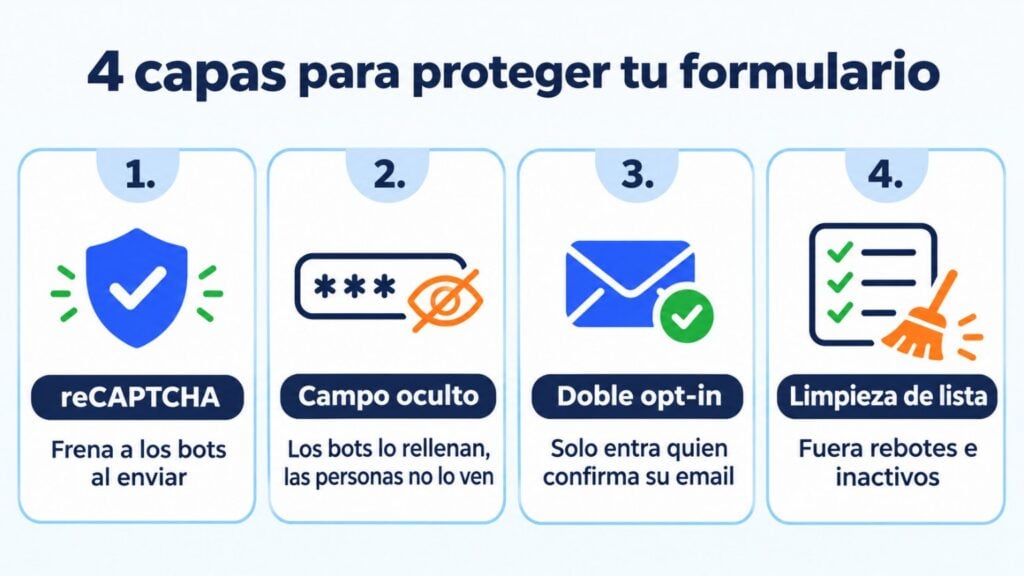
There’s also a simple trick that works alongside any of them: the hidden field, which people can’t see and bots fill in.
reCAPTCHA and double opt-in: why it pays to use both
The captcha filters out bots at the moment the form is submitted. Double opt-in goes one step further: the address only gets onto your list when its owner clicks the confirmation email.
One stops the machine and the other confirms the person. Together they prevent someone from signing up another person without permission, something the captcha alone can’t stop.
And once the list is in, list hygiene takes care of bounces and inactive contacts. That way your lead generation adds real contacts, not just numbers.
How Mailrelay helps you
Mailrelay subscription forms come with this protection built in:
- reCAPTCHA protection, to stop automated bot sign-ups.
- Double opt-in always on, so only addresses confirmed by their owner get in.
- Automatic list cleaning, which helps you keep your list healthy and protect your reputation.
You can create the form, put it on your website or on a landing page and start sending with the free account: up to 80,000 emails a month and 20,000 contacts.
Grow your list with real people only
Create your form and send up to 80,000 emails a month with the free account.
Frequently asked questions
Two common questions we haven’t answered above.
Why do I keep getting reCAPTCHA?
It usually happens when Google doesn’t have enough signals to trust you. For example, if you browse with a VPN, block cookies or scripts, or use a shared network with a lot of traffic.
Turning off the VPN or trying another browser is usually enough.
Is reCAPTCHA free?
For most small and medium-sized websites, yes: Google offers a free monthly tier. High-volume websites, or those that need reCAPTCHA Enterprise features, pay based on usage.