Contact form: what it is, which fields to include and how to make it work
The simplest way for your customers to write to you, without losing a single message
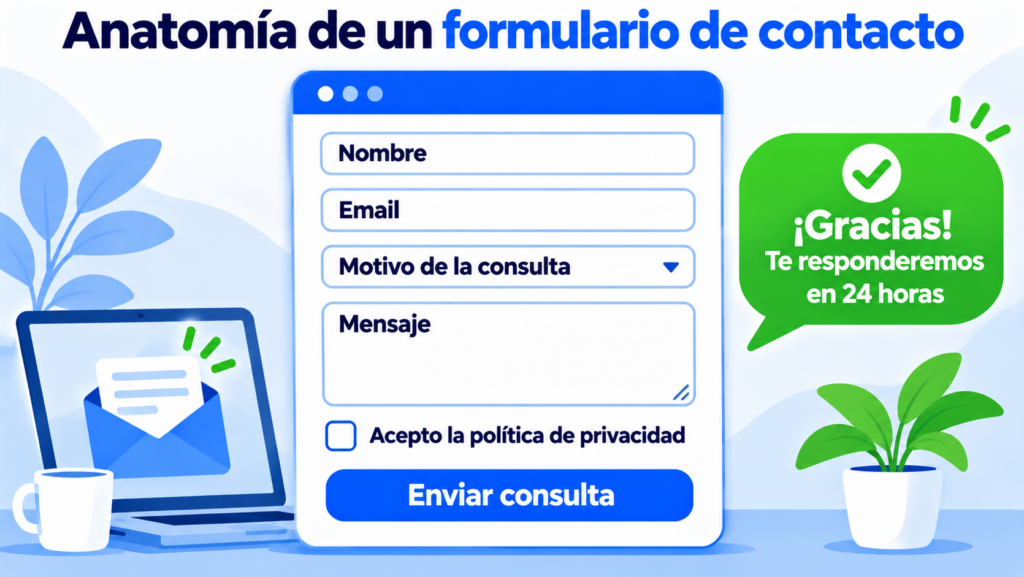
A contact form is a block on a website with a few fields so visitors can write to the company without leaving the page. It usually asks for name, email and message.
Here’s what it’s for, which fields to include, how to handle the data it collects and how it differs from a subscription form.
What is a contact form?
It’s the organized version of “write to us”. It doesn’t show an email address or a mailto link. The website collects the details and sends them to an inbox, a CRM or a support tool.
It has two advantages over a visible email address. Your address isn’t exposed to bots that copy it to send spam. And messages arrive with the same structure, so they get answered sooner.
It’s usually found on the contact page, in the website footer or at the end of a services landing page.
What is a contact form for?
It’s for any conversation the customer starts:
- Questions before buying or requesting a quote.
- Support requests or complaints.
- Requests for demos, partnerships or press.
- Capturing contacts in B2B, where every message can be a lead.
In many service businesses it’s the first door into the sales funnel. That’s why it’s worth treating it as a lead generation tool, not a formality.
Which fields should a contact form have?
As few as possible. Every extra field is a reason to give up, especially on mobile.
| Field | Required? | Purpose |
|---|---|---|
| Name | Yes | Address the person by name |
| Yes | Reply to them | |
| Message | Yes | Know what they need |
| Reason for inquiry | Recommended | Send the message to the right team |
| Phone | Optional | Only if you’re going to call |
| Company | Optional | Useful in B2B |
| Privacy checkbox | Yes | Comply with data protection law |
Only ask for what you’ll use to reply. If you want more details, you can ask for them during the conversation.
Also take care of what happens when the button is clicked. Specific text, such as “Send inquiry”, works better than a plain “Send”. And afterwards, an on-screen message confirming you’ve received it and saying when you’ll reply.
If you want to go a step further, send an automatic email reply with an autoresponder. That way the person knows their message hasn’t been lost.
Turn inquiries into subscribers
Add a subscription form to your website and send your newsletter for free to up to 20,000 contacts, with human support on every plan.
Contact form or subscription form
They look alike, but they don’t do the same thing. One opens a conversation and the other adds someone to your mailing list.
| Contact form | Subscription form | |
|---|---|---|
| Purpose | For visitors to write to you | For them to receive your emails |
| Fields | Name, email and message | Email and, at most, name |
| What happens next | Someone on your team replies | They join your list and receive your newsletter |
| Consent | To reply to their inquiry | To receive marketing communications |
| Tool | The website, a CRM or support | Your email marketing tool |
The difference in consent matters. Someone writing to you doesn’t give you permission to send them your newsletter.
Contact forms and data protection
A form collects personal data, so it has to comply with your country’s data protection law. It varies from country to country, but there are good practices that fit almost all of them.
Next to the send button, explain in one sentence who receives the data and what you’ll use it for. And link to your full privacy policy.
The consent checkbox shouldn’t be pre-ticked. And if you want to use the form to gain subscribers, add a second checkbox, separate and also unticked, for receiving marketing communications.
If someone ticks that second box, confirm their sign-up with double opt-in. It protects you and it protects your list.
If your customers are in Europe, these rules aren’t optional: the GDPR requires them.
Why don’t form messages arrive?
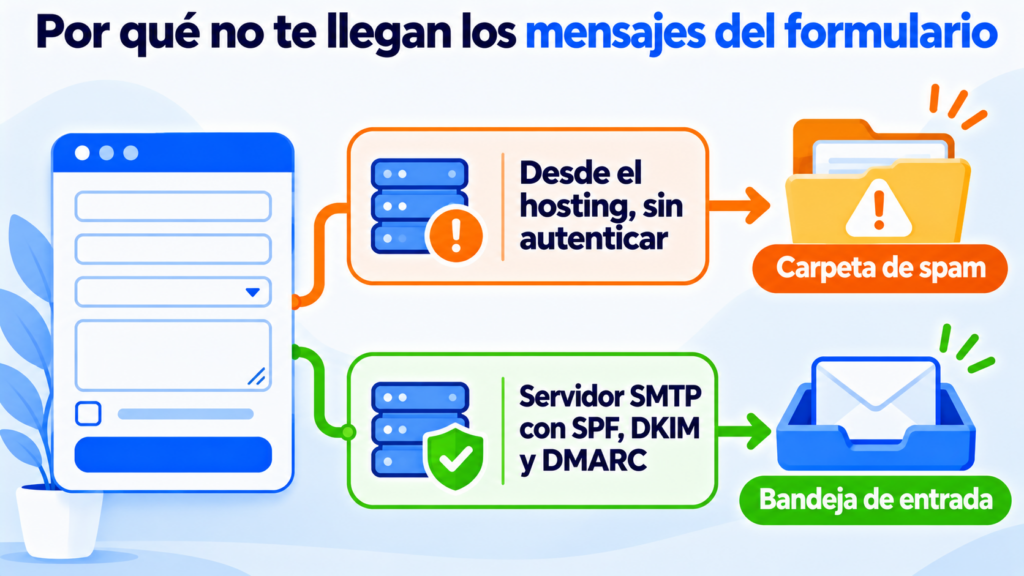
It’s one of the most common complaints on WordPress websites. The message is sent, but it never arrives or ends up in the spam folder.
The cause is usually how that email is sent. Many web servers send with their default mail function, without authentication, and Gmail or Outlook don’t trust it.
The solution comes down to three things:
- Send notifications through a professional SMTP server, not from the hosting itself.
- Set up SPF, DKIM and DMARC on your domain.
- Filter out submissions from bots with a captcha or a hidden field, so spam doesn’t bury the real messages.
How Mailrelay helps you
Mailrelay helps you with both sides of the form. For notifications, you get an SMTP server and API for transactional emails, with your domain authenticated so they reach the inbox.
And for people who agree to receive your emails, you create your subscription form, import contacts with their permission and send them an automatic welcome email.
For your newsletters, the free account includes up to 80,000 emails a month and 20,000 contacts, with human support on every plan. Terms for transactional sending are on the pricing page.
Make your forms deliver and grow your list
Notifications that reach the inbox and a list that grows with every subscriber.
Contact form FAQ
Three common questions when setting up yours.
How do I create a contact form in WordPress?
With a form plugin, such as Contact Form 7 or WPForms, or with your theme’s form block. Then connect the sending to an SMTP server so notifications don’t end up in spam.
Only if they ticked a specific checkbox to receive marketing communications. Writing to you with a question isn’t the same as subscribing.
Is it better to use a form or show your email address?
You can have both. The form organizes inquiries and protects your address from spam. A visible email address builds trust with people who prefer to write from their own email.