Subscription form
The gateway to your email list
Every day, people interested in what you offer pass through your website. Most leave without a trace and never come back. The subscription form is the piece that stops that leak: it gives them a simple way to stay in touch with you.
What is a subscription form?
A subscription form is a block on your website, blog, or landing page where a visitor leaves their email address to receive your communications. It could be a newsletter, offers, exclusive content, or updates.
Once you submit it, that contact joins your email list and becomes a subscriber. From there, you can start sending them campaigns.
It’s therefore the gateway to any email marketing strategy. Without subscription forms, your list doesn’t grow.
It’s also called a sign-up form, registration form, or enrollment form. You’ll also see it referred to as a signup form, opt-in form, or subscription form.
Create your subscription form for free
With Mailrelay, you design your form in minutes, paste it on your website, and new contacts join your list automatically. No credit card required, with up to 20,000 free contacts.
Create a free accountWhat it’s for
Its main function is lead generation. It turns your website’s anonymous traffic into named contacts with an address you can reach out to whenever you want.
And here’s its big advantage over social media. Your subscriber list is yours: it doesn’t depend on an algorithm that decides who sees your posts, or on a platform that could change its rules tomorrow.
A good subscription form also gives you information. You can find out which page each contact came from, what they’re interested in, or what language they prefer to receive your emails in. All of that will later help you segment your campaigns.
Types of subscription forms
There’s no single format. Each type fits better in a specific spot and at a specific moment of the visit:
- Embedded: stays fixed within the page, for example in the sidebar, at the end of an article, or in the website footer. It’s discreet and always visible.
- Pop-up: appears over the content after a few seconds, when scrolling, or when the user is about to leave the page (exit intent). It grabs a lot of attention, though it’s best not to overuse it.
- Floating bar: a thin strip at the top or bottom of the screen that follows the user as they browse.
- Landing page: a full page dedicated solely to getting the subscription, such as a squeeze page. It works very well with paid campaigns or a lead magnet.
- Direct link: a public URL for the form that you can share on social media, in your email signature, or in a QR code.
It’s common to combine several. An embedded form on your blog, an exit pop-up, and a landing page for your ads can all work together just fine.
Anatomy of a form that converts
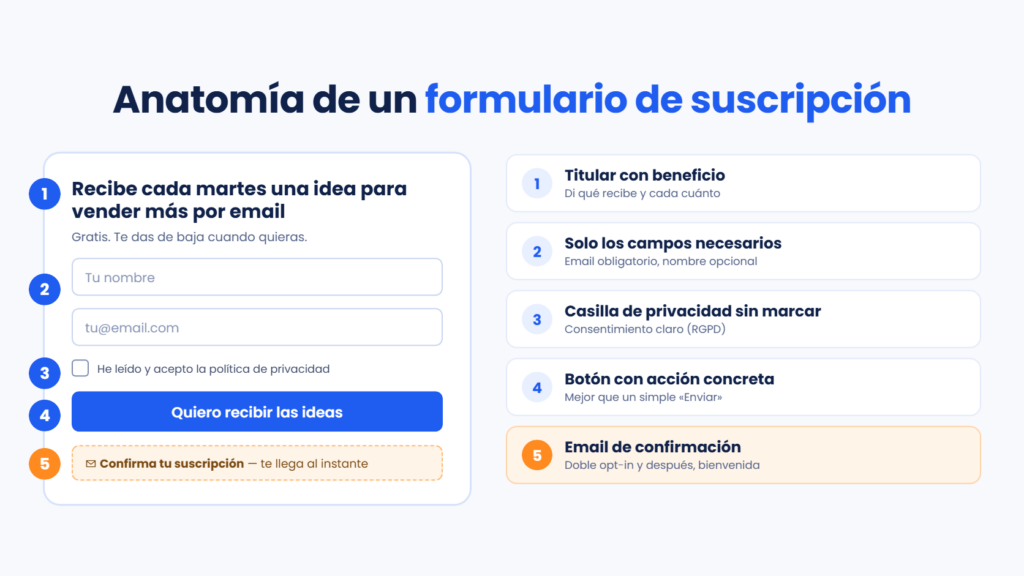
An effective form has few pieces, but each one plays its part.
The headline answers a question every visitor asks themselves: what’s in it for me? “Subscribe to our newsletter” doesn’t say much. “Get an idea every Tuesday to sell more by email” says a lot more. If you need inspiration, our blog explains how to write your opt-in form to capture more subscribers.
The fields should be kept to a minimum. Email is essential; name is recommended if you’re going to personalize your emails. Every extra field adds friction and reduces sign-ups, so ask yourself whether you really need the phone number or company name on first contact.
The privacy checkbox is mandatory in Europe. Further down, we explain what it should include.
The button is your call to action. Replace the classic “Submit” with something specific, like “I want to receive the offers” or “Download the guide”.
But the work doesn’t end when the user clicks the button.
After subscribing, the confirmation email arrives, followed by the welcome email. That’s the moment when your new subscriber is paying the most attention. Use it to introduce yourself and deliver what you promised.
Subscription forms and GDPR
In Spain and the rest of the European Union, collecting emails to send commercial communications requires complying with the GDPR and Spain’s LSSI law. In practice, your subscription form needs to meet several requirements.
Consent must be freely given, informed, and unambiguous. That’s why the consent checkbox can never be pre-checked. The user must check it themselves.
Basic data protection information must appear next to the form: who is responsible for the data, what you’ll use it for, what your legal basis for processing it is, and how the user can exercise their rights. This first layer usually links to your full privacy policy.
Since you also need to be able to prove that consent if someone asks for it, it’s a good idea to keep the date and origin of each sign-up. This is where double opt-in comes in. The subscriber receives an email and confirms their sign-up with a click, which provides proof that the address is theirs and that they wanted to subscribe.
Double opt-in isn’t required by law, but it’s the safest option. It also has another benefit: it prevents fake or mistyped addresses that would drive up your bounce rate.
Best practices for getting more sign-ups
Place it where the attention is. At the end of your most-read articles, on your homepage, and on your highest-traffic pages. Sometimes a simple change of location doubles subscriptions.
Offer something in return if your newsletter isn’t well known yet. A discount on the first purchase, a template, a checklist, or a mini email course all work well as incentives.
Take care of the mobile version. A large share of your visits come from mobile, and a form that doesn’t display well or has tiny fields loses contacts without you even noticing.
Protect it from bots with a captcha. You’ll keep your list from filling up with junk addresses that damage your sender reputation.
And measure. Compare which form converts better, test two different headlines with an A/B test, and keep the winner. Is your pop-up more annoying than helpful? The data will tell you.
How to create a subscription form with Mailrelay
In Mailrelay, you can create your forms right from the dashboard, with a visual editor and no code required. You choose the fields — including your custom fields —, add the privacy policy checkbox, and decide which subscriber group each sign-up is assigned to. The group can be visible, so the user picks their interests, or hidden, so you classify them automatically.
The form includes double opt-in, reCAPTCHA protection, and custom thank-you pages. Afterward, you can share its public URL or copy the HTML code and paste it into your website. If you work with WordPress, we walk you step by step through how to add the Mailrelay form to WordPress.
Each form also has its own conversions tab, where you can see which contacts came through it. That way you know which one works best. You’ll find more ideas in our article about forms and landing pages to grow your list.
All of this is available on our free plan, with up to 20,000 contacts and 80,000 emails a month. And if you get stuck, our support team can help you by chat, phone, or ticket, no matter which plan you’re on.
Start growing your list today
Forms with double opt-in, groups, and custom fields, then send your campaigns to 20,000 contacts without paying anything. Our support team helps you from day one.
Try Mailrelay for freeFrequently asked questions about subscription forms
What fields should a subscription form have? At minimum, the email address and the privacy policy consent checkbox. The name is optional, but useful if you’re going to personalize your emails.
Is double opt-in mandatory? The law doesn’t require it, but it’s highly recommended. It helps you prove consent and keeps your list free of fake addresses.
Can I add a subscription form to WordPress? Yes. You can paste the HTML code into a block or widget, or use a plugin. With Mailrelay, you have both options.
What’s the difference between a subscription form and a landing page? The form is the block where the user leaves their information. The landing page is a full page designed to get that conversion, and it usually contains a form.
To sum up
The subscription form is the tool that turns visits into contacts of your own. Ask only for what you need, clearly explain what the subscriber will receive, and comply with GDPR from day one. Then measure your results and keep adjusting: your list will grow with quality contacts who genuinely want to hear from you.