Email and SMS retention strategy: 6 workflows to copy
Six automations that combine email and SMS, with their timings and how to set them up step by step in Mailrelay
Six automations that combine email and SMS, with their timings and how to set them up step by step in Mailrelay
Winning a new customer costs more than keeping one who already knows you. Even so, many small businesses put almost all their effort into acquisition and leave their customer relationships to chance.
You don’t need complicated campaigns to retain customers. A few automated workflows that say the right thing at the right time, through the right channel, are enough.
In short: an email and SMS retention strategy relies on 5 or 6 automated workflows: welcome, post-purchase, abandoned cart, birthday, reactivation and payment reminder. Email is for explaining and SMS for anything urgent, at most once per workflow. Tools like Mailrelay, Brevo or Klaviyo combine both channels in the same automation. In Mailrelay you can do it on the free account too, with up to 80,000 emails a month and 20,000 contacts, and add SMS with prepaid credit.
Set up your retention workflows for free
Create your free account and combine email and SMS in the same automation, with human support on every plan.
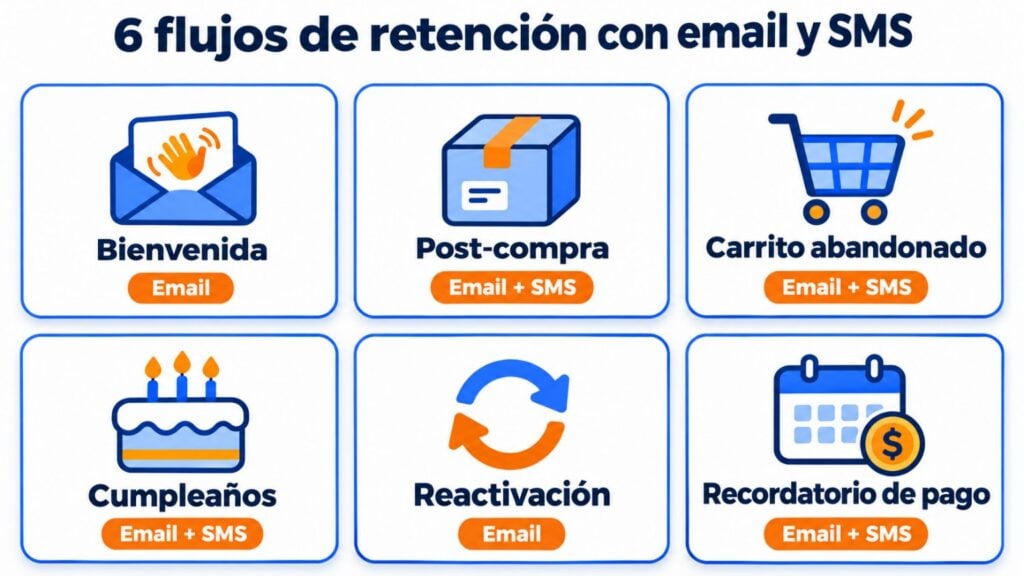
These are the six most useful workflows for a small business:
| Workflow | When it starts | SMS | Entry point in Mailrelay | |
|---|---|---|---|---|
| Welcome | When the subscription is confirmed | 2-4 emails over 1-2 weeks | Not usually needed | “When subscriber signs up using a signup form” |
| Post-purchase | After the purchase | Thank you, product use, review and related product | Optional: shipping notice | “When a subscriber is added to a group” (customers group) |
| Abandoned cart | When the cart is abandoned | 1 hour and 48 hours later | One after 24 hours | “When a cart is abandoned” (WooCommerce plugin) |
| Birthday | On the date, before or after | Greeting and gift | Optional: gift reminder | “When it’s the subscriber’s birthday” |
| Reactivation | After months without opening | 2-3 emails | No: if someone doesn’t open your emails, don’t bother them on another channel without permission | Segment by “Subscriber score” and “When a campaign is received” |
| Payment or renewal reminder | Before and after the due date | Advance notice, due-date notice and late notice | On the due date | “When a subscriber is added to a group” (pending payment group) |
This is the first workflow you should set up, because it arrives when interest is at its peak. Introduce your brand, answer the most common questions and explain what you’re going to send. In Mailrelay it starts when the contact confirms their subscription.
If you run a small business and don’t know where to start, set up a short introduction workflow first. Use it to answer the most common questions: that reassures your customers. It also shows them there’s a way to get in touch with your company, and that builds trust. My advice: before you write it, go through last month’s emails and calls and note down the five questions that come up most. That’s your first workflow.
Jose Argudo, CMO at Mailrelay
You’ll find ideas and examples in welcome email and, for a longer series, in lead nurturing.
After buying, the customer wants to know everything is going well. A useful sequence:
If you sell products that run out, like cosmetics or coffee, add a replenishment reminder for when you estimate they’ll be finished.
In Mailrelay, the automation doesn’t detect the purchase on its own. Add the buyer to a customers group, for example by import, through the API or with Make, and use the “When a subscriber is added to a group” entry point.
A short sequence: an email after an hour, an SMS the next day for anyone who hasn’t come back, and a final email after 48 hours. If your store runs on WooCommerce, the Mailrelay plugin starts the workflow with “When a cart is abandoned”. Anyone who buys during the sequence isn’t removed automatically: you have to take them out.
You’ll find the details in abandoned carts and in the WooCommerce guide.
It’s simple and always well received. Store the date in the “Birthday” field and choose whether the email goes out a few days before, on the day or after. If you give a discount as a gift, a short SMS before it expires can remind them.
You’ll find templates to copy in birthday email.
For contacts who haven’t opened anything in months. In Mailrelay you can find them with a segment by “Subscriber score”, for example 2 stars or less, and send them 2 or 3 reactivation emails. If they don’t respond, take them out of your regular sends: they hurt your sender reputation.
You’ll find the sequence in winback campaign and how to segment by score in lead scoring.
For subscriptions, fees or recurring services: one notice a few days before, another on the due date and one or two afterwards if the payment doesn’t arrive. SMS works well here, because it’s a notice the customer appreciates.
In Mailrelay, add the customer to a group when the date is getting close and use “When a subscriber is added to a group” with delays between notices. You’ll find 20 example messages in payment reminder.
Each stage of the funnel has its channel:
| Stage | SMS | |
|---|---|---|
| Acquisition | Welcome and useful content | No |
| Conversion | Nurturing, case studies and offers | Only for a real deadline |
| Purchase | Confirmation and post-purchase | Shipping or delivery notice |
| Repeat purchase | Related product and replenishment | One-off reminder |
| Reactivation | 2-3 reactivation emails | No |
Five rules so SMS adds value instead of annoying people:
To decide who gets the SMS, you can rely on the subscriber score. For example, send it only to people with 3 stars or more who still haven’t responded to the email. There’s more on when to use each channel in Email, SMS or WhatsApp?.
Compare each workflow with what happened before you set it up. If a workflow hasn’t improved anything in two or three months, change it or remove it. There’s more on building loyalty in customer loyalty.
| Tool | SMS in the same workflow | Free plan | Worth knowing |
|---|---|---|---|
| Mailrelay | Yes, on every plan, with SMS credit | 80,000 emails a month and 20,000 contacts | Automations on the free account too, and human support |
| Brevo | Yes, with SMS credits | 300 emails a day | Free plan automations have a contact limit |
| Klaviyo | Yes | 250 profiles and 500 sends a month | Strongly geared to online stores |
| ActiveCampaign | Yes, with the paid SMS add-on | No free plan | SMS only with the add-on |
| Mailjet | Not in its automations; through Zapier | Free plan with a daily limit | SMS is separate |
Email and SMS in a single tool
Up to 80,000 emails a month and 20,000 contacts for free, automations on every plan and SMS with prepaid credit.
The welcome one: it arrives when interest is at its peak and works for any business. If you have an online store, the next one is abandoned cart.
One per workflow at most, and only for alerts that can’t wait. Everything else goes by email.
Yes. Consent to receive emails doesn’t cover SMS. Ask for both separately in your form.
Retention measures whether the customer stays, for example whether they buy again or renew. Loyalty aims for them to stay because they want to and to recommend you. The workflows in this article serve both purposes.
Yes. Automations are included in the free account. To send SMS you only need to buy credit.
Email, SMS or WhatsApp?
Which channel to use for each of your business’s messages.
WooCommerce abandoned cart
A step-by-step guide to recovering sales with email and SMS.
Payment reminder: examples to copy
Email, SMS and WhatsApp messages to get paid without losing customers.
8 strategies to build customer loyalty via email
Ideas and examples to get your customers buying again.

Jose Argudo
CMO at Mailrelay. Writes about email marketing, copywriting and conversion for small businesses and entrepreneurs.