Noreply: what it means and whether an email you can’t reply to is safe
Why you shouldn’t use no-reply in your mailings
Why you shouldn’t use no-reply in your mailings
Noreply means “do not reply”. It is an email address, such as [email protected], from which a company sends automated messages but which doesn’t receive or read replies. If you reply to a noreply email, nobody will read your message.
Surely, on more than one occasion, you have tried to contact a company via an email they sent you and found an email like [email protected].
Surprise! Should I reply to that email address, or is it a robot, and no one is behind that inbox?
While it is true that this is a fairly common option, it can be a big mistake.
If you are also using noreply emails, we recommend reading this Mailrelay article carefully. And if you are thinking about creating one, don’t lift a finger until you finish reading this article.
Maybe you will change your mind…
A noreply email is an email address that uses the format we mentioned in the previous section: [email protected]. Companies use them to prevent users from replying to their emails, events, campaigns, etc.
The word noreply literally means “do not reply” to this email address. If we happen to send an email to reply to a message or ask a question, it will not be read.
Why would any company use this type of address? We will look at this in more depth in the next section:
Some organizations use noreply to raise awareness of their brand, reach new customers or simply share some news: they send out a series of email batches to users (sometimes making the mistake of sending them in bulk without segmenting the recipients).
Naturally, users may have plenty of questions about the email they received and may reply to it directly. Imagine the company receives thousands of emails; it may not have the resources or the right staff to answer them, or its inbox could even become overloaded.
It could also be that they don’t want to complicate things.
In any case, these companies use noreply emails to keep users from being tempted to reply to them.
From this point of view, using noreply may seem like the smartest decision, since it lets the company focus on other processes. But as you can imagine, neglecting customer service is not a good option, and we will explain in detail some of the reasons not to do it.
Using “noreply” email addresses is common practice in email marketing strategies. Here are some of the ways these emails are used:
Most people who look up what noreply means don’t send emails: they receive them. Let’s look at the three most common questions.
It depends on how the address is set up. In some cases, your reply bounces and you get a notice saying the address doesn’t exist. In others, the server accepts it, but it’s deleted without anyone reading it. And some companies send back an automatic reply with the right channel to contact them.
In all three cases the result is the same: your message won’t reach a person. If you need something, look in the email itself for a link to the help center, a phone number or a contact address.
A noreply sender is not, in itself, a sign of fraud. Banks, online stores, social networks and services like Google use it every day for automated notices and transactional emails.
But scammers imitate it too, using impersonation or spoofing techniques, to make their phishing emails look official. Before clicking, check three things:
| What to check | Good sign | Should make you suspicious |
|---|---|---|
| The domain after the @ | It is the company’s official domain | A similar domain, with letters changed or added |
| The content | Information you were expecting, such as an order or an appointment | Urgency, threats or prizes you didn’t ask for |
| What it asks you for | Nothing, or to log in to your account as usual | Passwords, codes or bank details through a link |
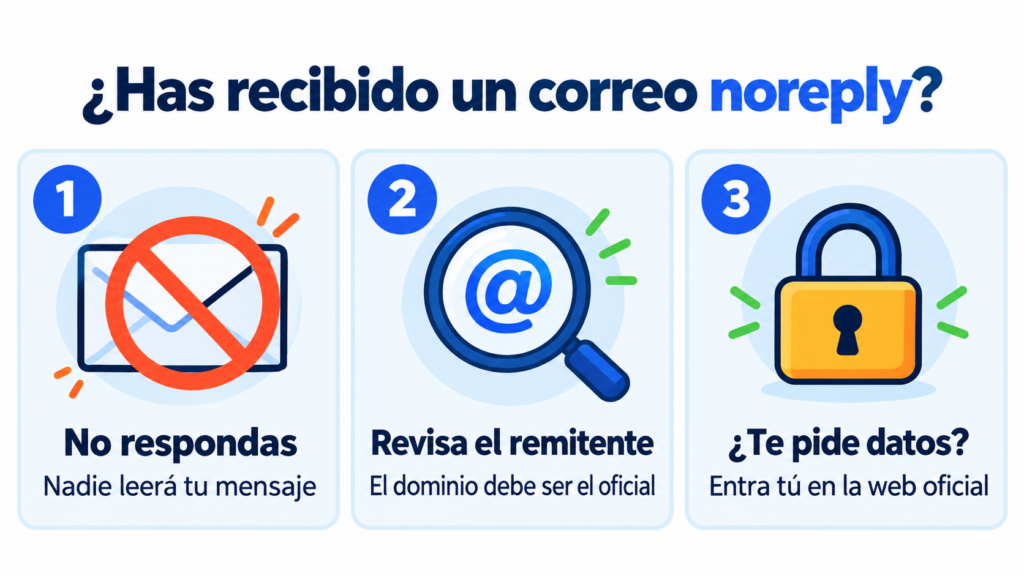
If in doubt, don’t use the links in the email. Go to the official website or app by typing the address yourself.
In Gmail you can check the real sender of a message. Open the email and click the small arrow below the sender’s name.
You’ll see the “mailed-by” and “signed-by” fields. If both show the company’s official domain, the message has passed SPF and DKIM authentication checks. That’s a good sign, although you should still use common sense.
Let your customers reply to you
With Mailrelay you send your campaigns from your own domain with a real reply address, no noreply.
After reading these reasons, you probably won’t feel like creating this kind of email address (or maybe you will). Let’s get started:
You may think noreply emails are helping you, even that they fit perfectly with an email marketing strategy, but quite the opposite is true.
The negative consequences of noreply emails will soon show, such as these:
When working with email strategies, you need to be very careful about user privacy in marketing. For example, sending mass emails without the user’s consent is a practice that is penalized, and the fine can be higher than we think.
And it’s not just us saying it, the Spanish government says so:
As stated in Law 34/2002:
“When communications are sent by email, that medium must necessarily include a valid email address where this right can be exercised, and sending communications that do not include such an address is prohibited.”
And if you operate in any Latin American country, your region will very likely have some legal provision dealing with this issue.
Note the nuance: the law does not prohibit using a noreply address as the sender. What it requires is that commercial communications include a valid address or procedure to unsubscribe. If your newsletter is sent from a noreply address and offers no way to do so, you would indeed be breaching the LSSI.
We have already seen that one of the main reasons a company uses noreply emails is to avoid having to answer certain emails, especially those sent in bulk.
Perhaps the company’s only goal with this strategy is to find a way to save time and money. While this may sound very positive, keep in mind that you are leaving users no option but to look for contact information on the website or elsewhere if they need help.
And this negatively affects the image of the company.
Imagine how they would feel if they had a problem, sent an elaborate email to solve it, and got no response. It would be almost like talking to a wall.
They will feel totally ignored because no one on the other end will respond.
You are wasting the opportunity to create touchpoints that could be decisive for keeping the business going.
As you can imagine, sending noreply emails shows an attitude that can be perceived as selfish, and it won’t do the brand any good.
Many of these users may quickly conclude that they are not interested in what you are sending because you are not interested in their opinion.
It is very easy to find special tools and filters that keep your emails from being delivered.
And the worst thing is that these tools are very easy to set up: all the user has to do is apply a series of filters to mark the email as unwanted if we have included specific keywords.
Let’s say they are giving us a taste of our own medicine: the email won’t be delivered, and they couldn’t reply even if they received it.
Improve your deliverability from your very first send
Authenticate your domain with SPF and DKIM in Mailrelay and protect your sender reputation.
Now that it is clear that noreply emails are not a solution to anything, it is important to see how we can manage these emails.
Here are some best practices you can try:
First of all, it is important to create personalized campaigns based on the interests and needs of your prospects. They should be attractive and persuasive.
The best way to achieve this is to show them the brand’s authentic personality without excluding anyone.
A good idea is to take inspiration from (not copy) the emails your competitors send.
Go for short copy, make it clear that it is a promotional email, and replace the dreaded noreply address with an email address bearing a person’s name (you can make it up, it doesn’t have to be a real one).
Even if it takes some investment of money and time, you should create an email address to manage the questions you may receive. It doesn’t matter whether we are talking about a small or a large company: this email address should always be there.
At this point, we may make the mistake of thinking about giving our own email address to receive these questions. As soon as it starts filling up with messages that never seem to end, you will realize where the mistake lies.
We can separate the tasks by creating an email specifically for this purpose. Set up a schedule, log into that new email, and start answering the questions. It may take time, but you will improve user engagement.
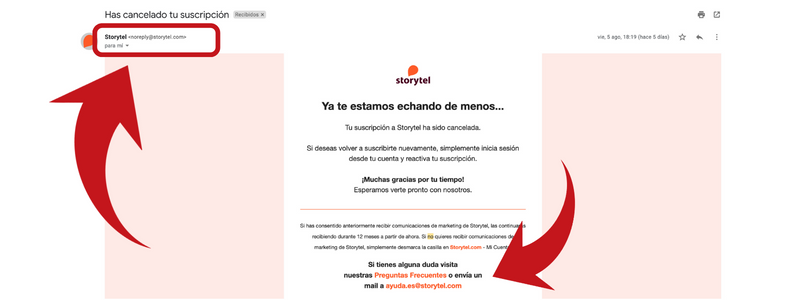
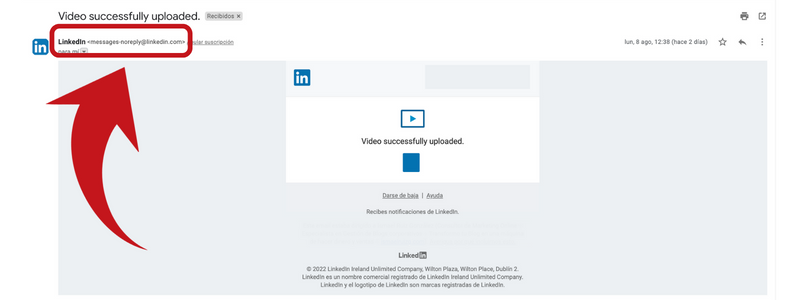
In this example you can see what we mean: the message is sent from a noreply email address. However, they tell you that if you have any questions, you should write to another address, such as “help@…”.
You might also be interested in these articles:
► Best Email Marketing Software
► How to Implement Your Daily Email Strategy
► How to Sell Online
After reading the previous point, you may find yourself missing noreply emails once you start getting hundreds of messages. Fortunately, before going back to this bad practice, we have an option: custom filters.
Look in your email provider’s settings and you’ll see how you can set up rules that filter emails based on certain conditions.
For example, you can filter those containing keywords such as message delivery notification or automatic reply.
We don’t mean that you should send these emails straight to the trash, but you can move them to a folder separate from your inbox so you can go through them when you have more time.
In short, filters can be very useful.
If you still can’t reduce the number of emails you receive even with filters, something is wrong.
One good practice that can help with this is making links to help resources more visible, such as an FAQ section, a help center or even a chatbot. These resources can answer most of your users’ questions, so they will think twice before sending that email.
We guarantee that this tactic will considerably reduce the number of emails you have to answer.
If the program you use to send emails is not enough, it is time to try advanced solutions. A good example is the ZenDesk tool, which is very handy for managing tickets.
You can start with a generic address to forward the replies you receive and then sort them.
Other tools offer you options to choose a sender address and a reply address for better managing everything related to the campaign.
Setting up your sending address properly requires understanding how the SMTP services used by your email marketing platform work.
However, keep in mind that these solutions are usually paid for.
If you send emails from your company, there is a simple way to make sure you don’t miss any replies. An email has two separate fields: the sender, who appears as the one sending it, and the reply address (Reply-To), which is where the customer’s reply goes.
You can send your campaigns from a branded corporate email address, such as [email protected], and have replies go to [email protected]. That way customers can write to you and your team gets every message in the right mailbox.
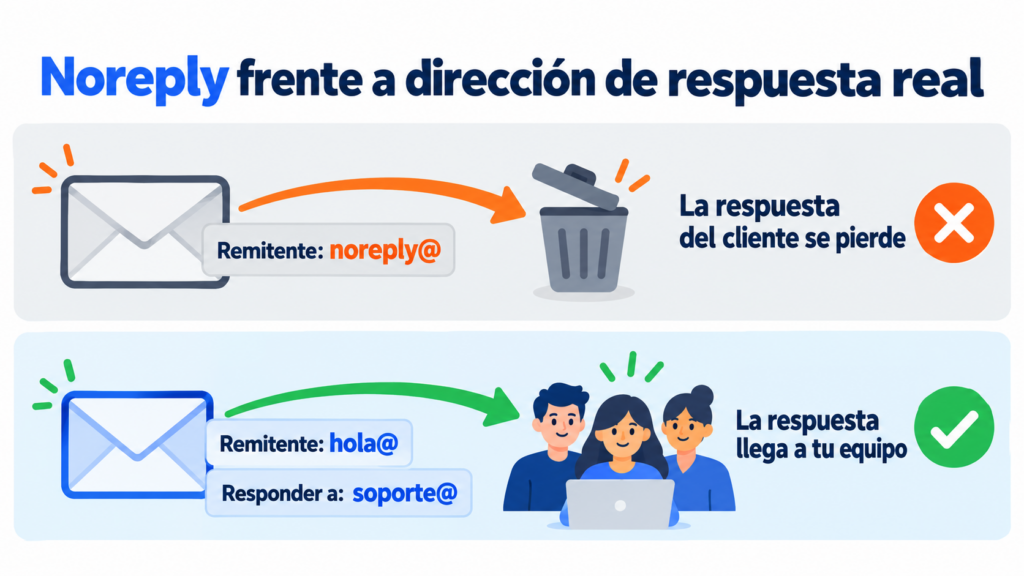
Most email marketing tools let you set the two fields separately. And if you also authenticate your domain, as Gmail and Yahoo’s requirements for bulk senders demand, your emails will reach the inbox more easily.
Send your campaigns for free with Mailrelay
Up to 80,000 emails per month and 20,000 contacts, with human support on all plans.
Now you know why noreply emails are a bad idea for your brand and how to manage them to improve your customers’ engagement and satisfaction.
One of the basic principles of email marketing is to put each customer’s needs first, so you can create ideal touchpoints that will help strengthen your brand’s impact in the marketplace.
If you were using this type of email address in your company, it is time to change course.
What does noreply mean in an email? It means “do not reply”. It indicates that the message was sent automatically from an address that doesn’t receive or read replies.
What happens if I reply to a noreply email? Your message will bounce or be deleted without anyone reading it. To contact the company, use the help link, phone number or contact address shown in the email or on its website.
Is a noreply email safe? In itself, yes: many legitimate companies use it for automated notices. But scammers imitate it too, so check the sender’s domain and don’t give out personal information through its links.
Why do companies use noreply? To send automated notices, such as confirmations or alerts, without having to handle replies. The problem is that it prevents customers from replying and harms their relationship with the brand.
Is it illegal to send emails from a noreply address? Not in itself. But in Spain, the LSSI requires commercial email communications to include a valid address or procedure to unsubscribe. A commercial email sent from noreply without that option would break the law.
Haven’t you tried the Mailrelay Free Account yet? Sign up now and enjoy all its benefits!
Using a noreply sender can also affect your email marketing deliverability, and it is related to why emails don’t reach Hotmail when the sender’s reputation is poor.