OTP
The one-time code that protects logins and payments, and how to deliver it on time
An OTP (One-Time Password) is a password or code that is valid for only one login or transaction and expires within a few minutes. It usually has 6 digits and arrives by SMS, by email or in an app.
You use it almost every day without thinking about it. When your bank asks you to confirm a payment, when you log in to an account from a different phone or when an online store verifies your email.
For a business, sending that code properly is part of the user experience. If it takes too long or ends up in spam, the customer gives up.
What does OTP mean and what is it used for?
OTP stands for one-time password: a password that can only be used once. It is also called a verification code or a one-time code.
It is used to check that whoever is trying to log in or pay really is the account holder. Your regular password may have been leaked; the temporary code can’t be, because it changes with every attempt.
These are its most common uses:
- Logging in from a new device or as a second step.
- Confirming payments in ecommerce stores and banks.
- Verifying sign-ups: checking that the email address or phone number belongs to the user, similar to the double opt-in of a subscription form.
- Password recovery without links that could be reused.
- Sensitive operations, such as changing the account email or bank details.
How does an OTP code work?
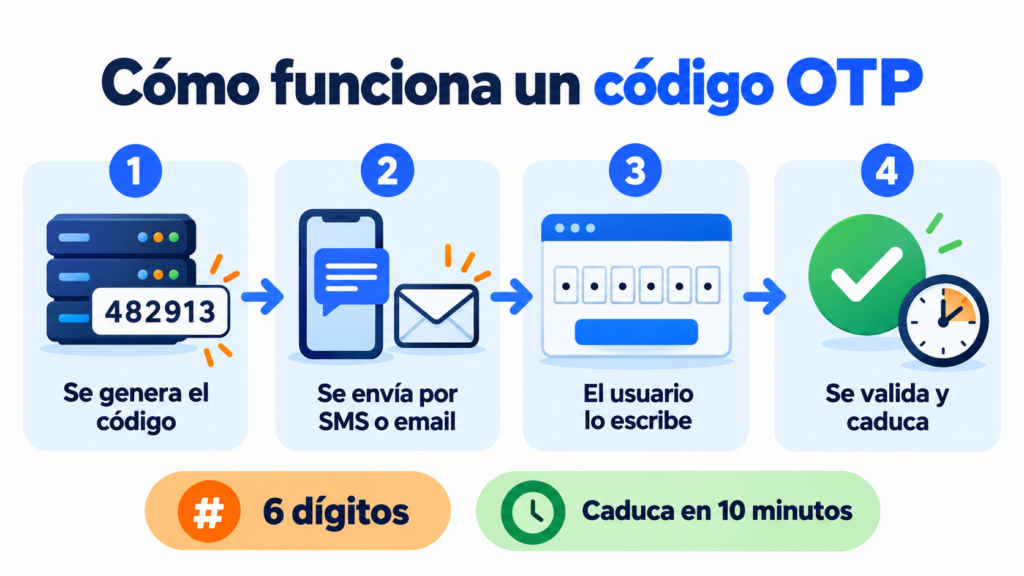
The process has four steps. The server generates a random number and stores it linked to your account with an expiration time.
It then sends it to you through the chosen channel. You enter it on the website or in the app, and the server checks that it matches and hasn’t expired.
If everything is correct, the code is invalidated. Even if someone sees it later, it’s no longer any use.
NIST, the US standards body, recommends in its SP 800-63B guidelines that the code have at least 6 digits.
It also requires the code to expire after 10 minutes and failed attempts to be limited.
Types of OTP
Not all codes are generated or delivered the same way. These are the most common formats:
| Type | How it is generated or delivered | Advantage | Weak point |
|---|---|---|---|
| SMS OTP | The server sends it to the phone number | Reaches any mobile phone, no apps needed | Exposed to SIM swapping |
| Email OTP | It is sent to the user’s email address | No per-message cost and easy to integrate | If the email account is stolen, so is the code |
| TOTP (authenticator app) | The app calculates a new code every 30 seconds | Works without mobile coverage | The app has to be installed and set up |
| HOTP | Generated from a counter on each use | Works with hardware keys and tokens | Less common in consumer services |
| Push notification | The app asks you to approve access with a tap | Very convenient | Risk of approving out of fatigue |
TOTP and HOTP are open IETF standards: RFC 6238 and RFC 4226. That’s why authenticator apps work with almost any service.
OTP and 2FA: what’s the difference?
2FA (two-step or two-factor authentication) is the method. The OTP is one of the tools that make it possible.
2FA combines two different factors: something you know, such as your password, and something you have, such as your phone. The temporary code proves that second factor.
The impact is huge. According to Microsoft (2019), enabling multi-factor authentication blocks more than 99.9% of account attacks.
In Europe, the PSD2 payments directive also requires strong authentication for many online payments. That’s why your bank sends you a code before confirming a purchase.
Your codes, in the inbox
With Mailrelay you send transactional emails via SMTP or API, with delivery statistics, and SMS from the same account.
Is SMS OTP secure?
It is much more secure than a password alone, but it has weak points. NIST considers it a “restricted” method because of the risk of SIM swapping, in which an attacker gets a copy of your SIM card.
The other big risk is phishing. A fake message asks you for the code and uses it immediately.
That’s why good messages always include a warning: “Don’t share this code with anyone”. Neither your bank nor any other company will ever ask you for it over the phone.
Even so, SMS is still the most universal option. It doesn’t need apps or mobile data, as we explain in the entry on SMS.
SMS or email OTP?
It depends on your audience and the situation. The usual approach is to combine both channels.
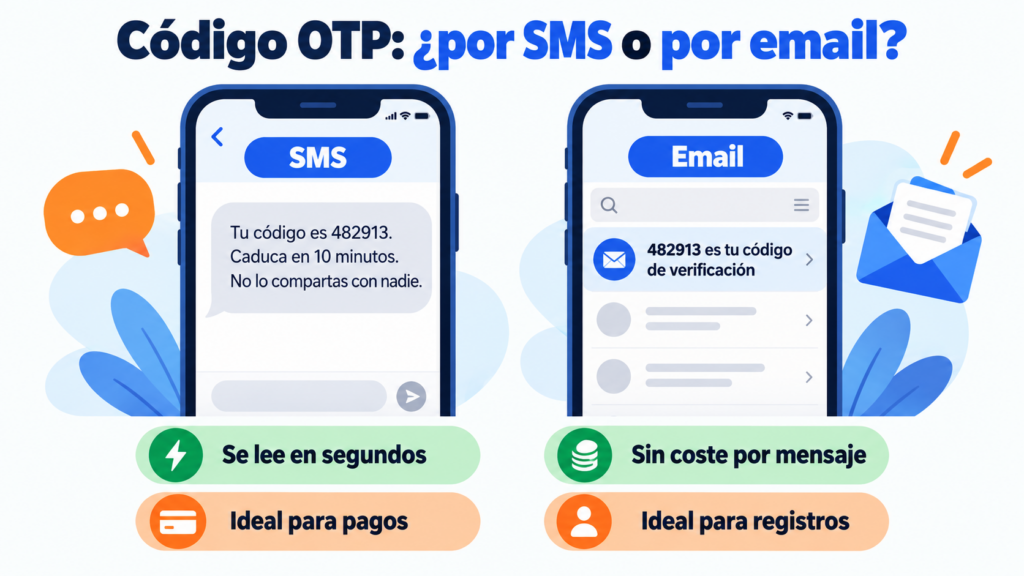
SMS is better for payments and urgent logins, because it is read within seconds. Email works well for verifying sign-ups, confirming account changes or as a fallback if the SMS doesn’t arrive. And if your customers use WhatsApp, the WhatsApp Business API lets you send the code in an authentication template.
In both cases, speed is what matters. A code that takes two minutes leads to retries, complaints and sign-up drop-offs.
If you choose email, take care of your deliverability. Authenticate your sending domain with SPF, DKIM and DMARC, or the code won’t reach the inbox.
Best practices for sending OTP codes
Put the code in the email subject line or at the start of the SMS. That way it can be seen in the notification without opening the message.
Say how long it is valid. “Expires in 10 minutes” avoids confusion and retries.
Always use the same recognizable sender. An unfamiliar name looks too much like a spoofing attempt.
Don’t mix the code with advertising. It’s a transactional email, not a newsletter, and it should be short and clean.
Send it from a service separate from your bulk campaigns, with its own domain reputation. That way a spike in marketing sends won’t delay the codes.
And limit resends. An unlimited “send again” button is an open door to bots and skyrocketing SMS bills.
How Mailrelay helps you send OTP codes
Mailrelay doesn’t generate the codes: your website or app does that. What it does is deliver them quickly and track every send, by email or by SMS.
For email, you have SMTP and the API. Your application sends each code as a transactional email, with statistics on delivery, bounces, opens and clicks.
You can tag these sends with SMTP tags to separate them from your campaigns in the reports.
We explain it in the post about SMTP and API for transactional emails.
For SMS, the API includes a function to send transactional SMS to one or more recipients.
You set the sender name and the text, and you can then check the status of each message. Rates are on the SMS pricing page.
With the free account you can try SMTP and the API for 30 days. After that, they are included in the Standard and Enterprise plans, or can be added to the free account.
And your campaigns stay in the same account: up to 80,000 emails a month and 20,000 contacts for free, with chat, ticket and phone support.
Email, SMS and campaigns in one place
Try SMTP and the API for 30 days with the free account, with up to 80,000 emails a month and chat, ticket and phone support.
Frequently asked questions about OTP
What is an OTP code? It is a temporary password that is valid for only one login or transaction. It usually has 6 digits and expires within a few minutes.
What does OTP mean? It stands for one-time password, a password that can only be used once.
Where do I receive the OTP code? Usually by SMS or email, although many services use authenticator apps or push notifications.
Why isn’t my OTP code arriving? Check your spam folder and your phone’s signal. If it still doesn’t arrive, request a new one after a few seconds: many services limit resends.
Is OTP the same as 2FA? No. 2FA is the two-step verification method, and the OTP is one of the codes used in that second step.