Spotify Wrapped: what it is, why it’s such a hit and how to create your business’s own “Wrapped” by email
Why millions of people share their data every December, and how to send your customers their own year in review

Why millions of people share their data every December, and how to send your customers their own year in review
Have you noticed that at the start of every December everyone shares the same thing? Their most-played song, their minutes of music, their genre of the year.
It’s Spotify Wrapped. And the most interesting part is that nobody makes you share it. People do it because it’s about them, not about Spotify.
In this guide you’ll find what Spotify Wrapped is, when the 2026 edition comes out and why it works so well. And then, what really matters if you run a business: how to create your own “Wrapped” by email, with ideas by sector and a template to copy.
Spotify Wrapped is the personalized annual summary that Spotify shows each user with their listening data for the year: artists, songs, genres, podcasts and total minutes.
It’s presented as stories, like Instagram’s, with bold colors and big numbers. Each screen can be shared on social media with a single tap.
A bit of history:
| Year | What happened |
|---|---|
| 2015 | Spotify launches “Year in Music”, a first, still simple summary |
| 2016 | Wrapped is born under that name |
| 2019 | It moves into the app in a stories format, designed to be shared |
| 2020 | It adds podcasts, games and personalized playlists, and wins several Webby Awards |
| 2025 | Over 200 million users open it in the first 24 hours |
Today it’s much more than an app feature. It’s the most anticipated marketing campaign of the year, and hundreds of millions of people promote it for free.
Your business also has data to show off
Send each customer their own year in review with custom fields and variables. The free account includes 80,000 emails a month.
Spotify hasn’t announced the Spotify Wrapped 2026 release date yet. But previous editions give a pretty clear clue:
| Edition | Release date |
|---|---|
| 2021 | Wednesday, December 1 |
| 2022 | Wednesday, November 30 |
| 2023 | Wednesday, November 29 |
| 2024 | Wednesday, December 4 |
| 2025 | Wednesday, December 3 |
Since 2021 it has always come out on a Wednesday, between November 29 and December 4. That’s why outlets like Official Charts point to Wednesday, December 2, 2026, although it’s a forecast, not a confirmed date.
How do you see it? When it’s available, it appears on the home screen of the Spotify app. If you don’t see it, search for “Wrapped” in the app’s search bar.
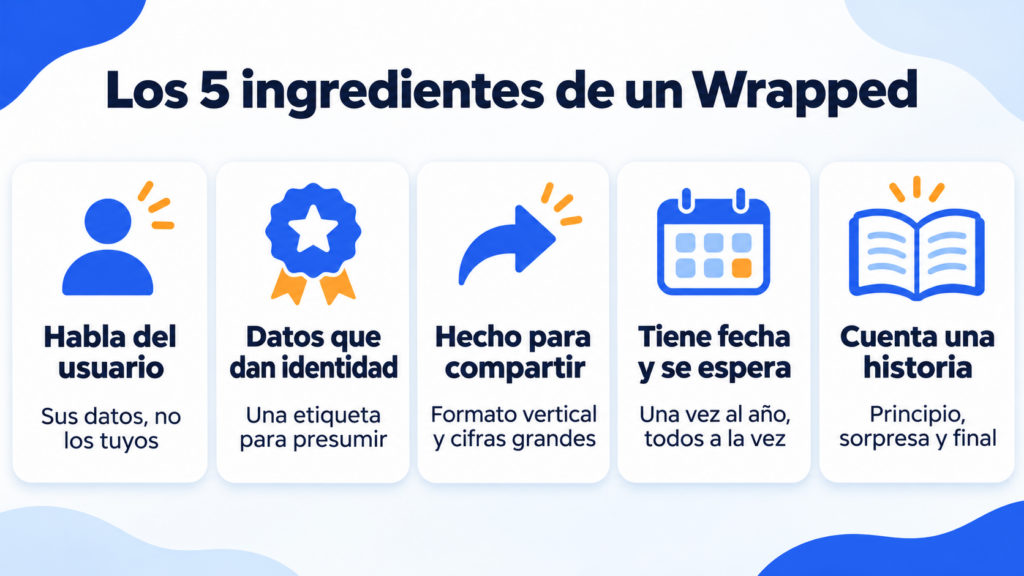
Spotify Wrapped doesn’t work by chance. It combines five ingredients you can use in your own email marketing:
1. It’s about the user, not the brand. The numbers are yours: your songs, your hours. It’s personalization taken to the extreme, and that’s why people want to see it.
2. It turns data into identity. “You’re in the top 1% of this artist’s fans” isn’t a statistic, it’s a label to show off. It taps into what has been called the narcissistic consumer: we like to show who we are.
3. It’s made to be shared. Vertical format, giant numbers and a button to post. Every user who shares it becomes an ad. According to TechCrunch, Wrapped 2025 was shared over 500 million times, 41% more than the year before.
4. It has a date and people wait for it. It comes out once a year and everyone sees it at the same time. That anticipation creates conversation and a bit of FOMO: nobody wants to be left out.
5. It tells a story. It’s not a data table. It’s a narrative with a beginning, a surprise and an ending, like any good storytelling. And it has a playful side, with questions and reveals, that brings it close to gamification.
The results show in the numbers. In 2025 it passed 200 million users in its first 24 hours. In 2024 it had taken 62 hours to get there.
Spotify’s success has created a format. Today many apps send their own year in review, and several also do it by email:
| Brand | Its year in review | What it highlights |
|---|---|---|
| Apple Music | Replay | Most-played songs and artists |
| YouTube Music | Recap | Music and artists of the year |
| Duolingo | Year in Review | Streak days, lessons and language |
| Strava | Year in Sport | Distance, activities and elevation |
| Goodreads | Year in Books | Books read and pages |
| Recap | Communities and comments |
Notice that none of these brands sells music. The format works for any business that has data on what its customers have done. And that includes an online store, a gym or a training school.
If you’re interested in more campaigns that people share on their own, you’ll find other cases in these viral marketing examples and in the post on experiential marketing.
You don’t need Spotify’s data team. With a spreadsheet and an email tool that supports personalization, you can send each customer their own year in review.
What if a customer has low numbers? Don’t send them a “you only bought once”. Use conditions to show them a different message, or send the Wrapped only to a segment of active customers.
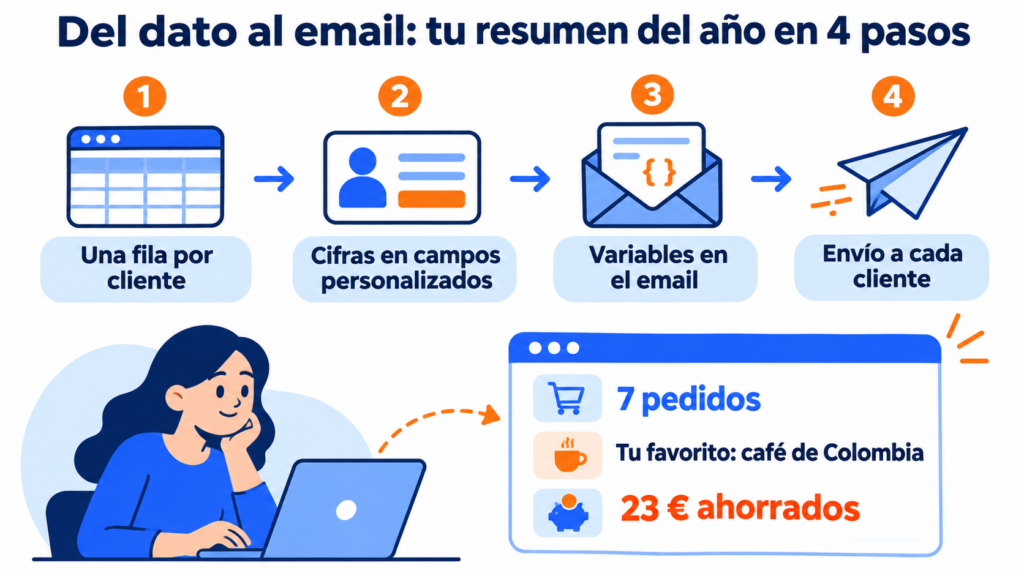
You can create a year in review from two different angles. One with everything your company achieved that year, thanking your customers. And another where customers see everything they achieved themselves. The choice is yours, but if you have data to show them, what they gained usually works better.
Jose Argudo, CMO at Mailrelay
Every business has its own numbers to show off. Here are seven ideas with opening copy you can copy and adapt.
Numbers: orders, favorite product, most-purchased category and savings from discounts. Close with a code for their first order next year.
Subject: Your 2026 at our store, in numbers
This year you placed 7 orders. Your favorite: the Colombian coffee, which you ordered 4 times. And you saved €23 with our deals. Thank you for trusting us. To kick off 2027, here’s 10% off your next order.
Numbers: visits, most-ordered dish and favorite day of the week. It works very well with a customer loyalty program or a points card.
Subject: 12 visits and a favorite dish: your year with us
You came 12 times this year, almost always on a Friday. And you ordered our house croquettes 5 times. We’ll see you in January with a dessert on us.
Numbers: classes, training hours, favorite activity and the month with the most attendance. It’s the Strava format brought to your gym.
Subject: 86 classes in 2026. Did you know?
This year you completed 86 classes and 64 hours of training. Your favorite activity was Pilates, and March was your most consistent month. Shall we go for more in 2027?
Numbers: courses completed, hours of learning, certificates and streak of consecutive days. The streak is Duolingo’s most-shared number.
Subject: 3 courses, 41 hours and an 18-day streak
You completed 3 courses and logged 41 hours of learning. Your best streak: 18 days in a row. In January we’re opening the advanced level, and your spot is reserved.
Numbers: tasks completed, time saved, most-used feature and comparison with the average. For a subscription service, it also reminds customers of the value they get for what they pay.
Subject: This year you saved 31 hours
In 2026 you created 240 invoices and saved about 31 hours of work. Your favorite feature: automatic reminders. You’re in the top 10% of most active users.
Numbers: donations, people helped and projects. Here the summary combines the member’s data with the organization’s year, and the tone is one of gratitude.
Subject: Thanks to you, this was 2026
With your 6 donations you helped keep the neighborhood soup kitchen running. Together with all our members, we served 14,000 meals. This is the story of our year.
Numbers: emails opened, favorite article and how long they’ve been following you. If you can’t give numbers per person, create a summary of the newsletter: the most read, the most commented and what’s coming next.
Subject: The 5 articles you liked most in 2026
This year we sent 48 newsletters. Here are the five most-read articles, and a question: what would you like us to talk about in 2027?
Get your “Wrapped” ready before the year ends
Import your customers’ numbers, design the email with a template and schedule it for the date you choose.
This template works for almost any business. The parts in double curly braces are the variables: replace them with the fields in your tool.
Subject: {{nombre}}, this was your 2026 with us
Preheader: Three numbers, a favorite and a surprise to start the year.
Hi {{nombre}},
The year is coming to an end and we wanted to look back. Here’s what we shared in 2026:
{{cifra_1}} {{lo que mide la cifra 1}}
{{cifra_2}} {{lo que mide la cifra 2}}
{{cifra_3}} {{lo que mide la cifra 3}}
Your favorite of the year: {{favorito}}.
Thank you for being there. To start 2027 on the right foot, here’s {{regalo o ventaja}}.
[Button: See my gift]
{{firma}}
If you’d rather use a ready-made design, with giant numbers on color blocks, start from the Year in numbers template or browse the rest of our email templates.
Spotify has made mistakes too. In 2018 its support team received many complaints from users who were seeing strange data. And in 2024 the edition was less popular because it had few statistics. Avoid these mistakes:
And be careful with the design: if you put the numbers inside images, anyone who blocks images won’t see them. Large text on a colored background works better, and it also looks good in dark mode.
You have three good moments to send it:
| Moment | Advantage | Watch out for |
|---|---|---|
| First half of December | You ride the buzz around Spotify Wrapped | It competes with Christmas campaigns |
| December 26 to 31 | Quieter inboxes and a reflective tone | Many people are on vacation |
| First week of January | It fits with New Year’s resolutions | It’s no longer news |
If you already have a lot of campaigns in December, review your calendar in the Christmas guide and in the 2027 marketing calendar. And if you also send Christmas greetings, don’t combine them with the year in review: they’re two emails with different goals.
Before choosing the subject line, you can run an A/B test with two versions on part of your list.
With Mailrelay you can send each customer their own year in review.
You store their numbers in custom fields, which you fill in by importing a spreadsheet or via the API. In the editor you insert each number with its variable, for example {{ subscriber.custom_fields.pedidos }}, and use conditions to show different text to anyone whose field is empty.
You also have ready-made seasonal templates, such as Year in numbers, and you can add animated GIFs to bring it to life. Then you can see in the statistics who opened and who clicked, so you can keep the conversation going with the most active ones.
The free account includes 80,000 emails a month and 20,000 contacts, with automations and human support on every plan.
End the year talking about your customers, not about yourself
Create your free account and send your year in review, with human support on every plan.
Spotify Wrapped works because it turns data into a story about the user. That idea works for any business.
Choose three numbers your customer wants to see, make them big and finish with a little something for the year ahead. You don’t need to be Spotify. You need to know your customers.
The most common questions about Spotify Wrapped and how to create a similar year in review.
It uses your Spotify activity since January 1: songs, artists, genres, podcasts and minutes listened. Spotify doesn’t publish the exact day it stops counting, which falls a few weeks before the release date.
Yes. Both free and Premium users get it, although some extra features may vary between editions.
Yes. Create a year in review of your business: new customers, orders shipped, new features launched and what’s coming next. It’s not as personal, but it keeps the big-numbers format and the story of the year.
Between three and six. With fewer it falls short, and with more it turns into a report. Choose the ones that say something good about your customer or about what you’ve done together.
How to use dynamic variables to personalize your emails
How to put each subscriber’s data in every email, step by step.
Christmas greetings for businesses: original phrases and examples
Ideas for wishing your customers happy holidays without falling back on the usual.
2027 marketing calendar: key dates and ready-to-copy email subject lines
All of next year’s dates to plan your campaigns.
Email marketing trends 2027
The changes that are already here, and a template for each one.

Jose Argudo
CMO at Mailrelay. Writes about email marketing, copywriting and conversion for small businesses and entrepreneurs.