Responsive email
How to make sure your emails are easy to read on mobile, tablet and desktop
You open a newsletter on your phone and have to zoom in to read the text. The images spill off the screen and the button is so small that you tap the wrong link. Chances are you’ll close the email within a few seconds. That’s exactly what a responsive email prevents.
What is a responsive email?
A responsive email, or adaptive email, is an email designed to automatically adjust to the size of the screen it is opened on. It looks good on a computer, a tablet and a phone.
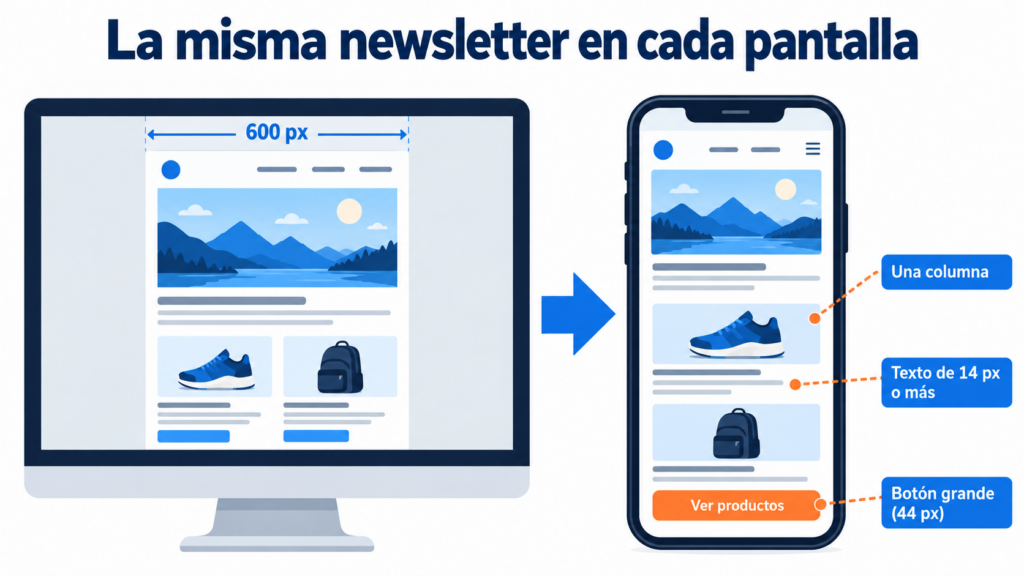
To achieve this, the design rearranges its elements according to the space available. On large screens it can display two or three columns. On mobile, those columns stack one on top of the other, the text stays at a readable size and the buttons get bigger so they are easy to tap. It’s also the foundation of an accessible email.
The concept comes from responsive design for websites. But email has its own rules, because each email client interprets the code in its own way.
Why it’s essential
A large share of your subscribers will read your campaigns on their phones. They will often do so in short moments: on public transport, during a break or while they wait. If the email isn’t easy to read the first time, they won’t give it a second chance.
A responsive design improves the reading experience, and that shows in your results. It increases clicks, because links and buttons are easy to use. It reduces unsubscribes and complaints, because subscribers don’t get frustrated. And it strengthens your brand image, which looks more polished and professional.
What’s more, an email that is comfortable to read generates more engagement. That positive engagement also helps your deliverability in the medium term.
How a responsive email works
The email is built with HTML and CSS styles. There are three main approaches to making it adapt:
Fluid design. Widths are defined in percentages instead of pixels. The content stretches or shrinks to fit the screen. It’s simple, although it offers little control.
Media query design. These are CSS rules that apply different styles depending on the screen width. For example: “if the screen is less than 600 pixels wide, stack the columns and enlarge the text”. Gmail and Apple Mail support them, but some versions of desktop Outlook don’t.
Hybrid design. It combines the two previous approaches so the email looks good even in clients that ignore media queries. It’s the most robust method and the one used by many professional templates.
Keys to designing a responsive email
These are the most important best practices:
- Use a single column on mobile: it’s the easiest structure to read on narrow screens.
- Limit the width to around 600 pixels: it’s the standard that looks good in most desktop clients.
- Watch the font size: at least 14 pixels for body text and a little more for headlines.
- Make buttons large: Apple’s design guidelines recommend touch targets of at least 44 × 44 points. A button that size can be tapped with a finger without mistakes.
- Adapt your images: they should take up no more than 100% of the available width and be lightweight so they load quickly on mobile data.
- Write good alternative text: the alt text appears when images are blocked.
- Put the important content at the top: on mobile, the subject line, the preheader and the first block should make the message and the call to action clear.
A modular email design makes this work much easier. Each block is ready to be rearranged without breaking the whole layout.
How to check that your email looks good
Never send a campaign without reviewing it first. Send yourself a test and open it on your phone and your computer, in different email clients if you can.
Check whether the text can be read without zooming, whether the images fit and whether the buttons are easy to tap. It’s also a good idea to check how it looks in dark mode, which is increasingly common.
If you want to understand why the same email changes from one client to another, we explain it in our post on email rendering.
After sending, analyze your metrics. If your mobile CTR is much lower than on desktop, it’s a sign that something is wrong with the mobile version.
How we help you at Mailrelay
At Mailrelay we make it easy for you to create responsive emails without touching any code. Our editor generates responsive emails automatically, and you can start from an email template that’s already mobile-ready. You can also send yourself tests before launching each campaign.
All of this on a free plan of up to 80,000 emails a month and 20,000 contacts. If you want to try it, you can create your email marketing account at Mailrelay today.
Frequently asked questions about responsive email
What’s the difference between a responsive email and a mobile-friendly one? A mobile-friendly email displays correctly on mobile, often because it’s simple and has a single column. A responsive one goes further: it changes its structure depending on the screen.
Do I need to know how to code to create a responsive email? No. The drag-and-drop editors in email marketing tools generate the responsive code for you.
How wide should a newsletter be? The usual width is between 600 and 640 pixels on desktop. On mobile, the design adjusts to the width of the screen.
In conclusion
A responsive email ensures your message reaches every subscriber properly, whatever their device. It’s the foundation for the rest of your campaign to work: the content, the design and the call to action.
Use a simple structure, pay attention to the size of text and buttons, and always review your emails before sending them. That way, every email will have the best chance of getting clicks.