MTA (Mail Transfer Agent): what it is and how it works
The program that carries each email from one server to the next until it reaches the inbox
An MTA (Mail Transfer Agent) is the program that receives an email and sends it on to the next server until it reaches the recipient’s server. Put simply, it’s the agent that transfers your mail.
It’s the internet’s mail carrier: you write the message, but it’s the one that delivers it.
Every email you send passes through at least two of these agents: your provider’s and the recipient’s. They talk to each other using the SMTP protocol.
What does MTA mean?
In email, MTA stands for Mail Transfer Agent. You’ll also see Mail Transport Agent, which means the same thing.
But the acronym has other meanings, depending on the context:
| Context | What MTA means |
|---|---|
| Mail Transfer Agent: the program that carries emails between servers | |
| Chats and WhatsApp | A vulgar slang abbreviation, common in Mexico, used as an exclamation |
| Transportation | Metropolitan Transportation Authority, New York’s public transit authority |
| Certifications | Microsoft Technology Associate, a Microsoft certification retired in 2022 |
In this glossary, we’re talking about the first one.
How does an MTA work?
When you hit “Send”, your message goes through these steps:
- Your email client hands the message to your provider’s server, usually on port 587 and with a username and password.
- Your provider’s server queries DNS for the MX record of the recipient’s domain, which says which server receives their mail.
- It connects to that server over SMTP, on port 25, and transfers the message, encrypted with TLS if both support it.
- If the destination server doesn’t respond, the sending server keeps the message in a queue and keeps retrying for hours or days. If it’s rejected permanently, it returns a bounce.
- The destination server accepts the message and drops it in the recipient’s mailbox, where they read it via IMAP or POP3.
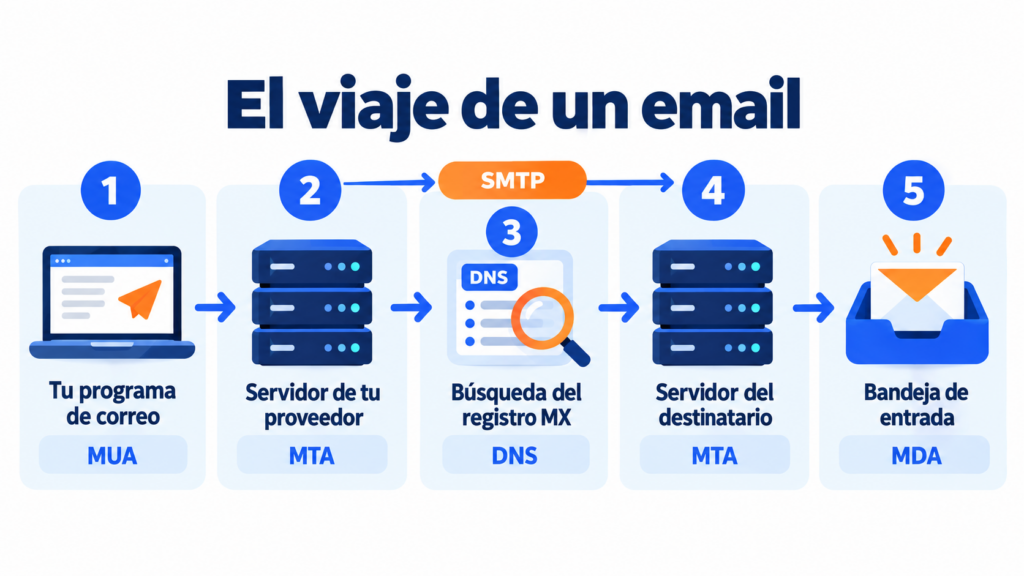
Sometimes the message passes through more intermediate servers.
When a server receives an email and forwards it to another, it’s said to act as a relay. We explain this in our entry on relay mail.
MTA, MUA, MDA and MSA: the differences
The transfer agent is just one piece of the system. These are the others:
| Agent | Full name | What it does | Example |
|---|---|---|---|
| MUA | Mail User Agent | The program you use to write and read email | Outlook, Thunderbird or the Gmail app |
| MSA | Mail Submission Agent | Receives the message from your email client and checks that you’re allowed to send | Your provider’s server on port 587 |
| MTA | Mail Transfer Agent | Carries the message from server to server | Exim, Postfix or Sendmail |
| MDA | Mail Delivery Agent | Drops the message in the recipient’s mailbox | Dovecot or Procmail |
In practice, a single email server usually handles the last three roles at once.
That’s why people often say MTA when they mean the whole server.
Send your campaigns without worrying about servers
Mailrelay takes care of sending, authentication and bounces. Start for free with up to 80,000 emails a month.
MTA examples
These are some of the best-known transfer agents:
| MTA | Type | Note |
|---|---|---|
| Exim | Free software | The most widespread: a March 2023 E-Soft survey put it at around 59% of public mail servers |
| Postfix | Free software | Widely used on Linux servers for its security and simple configuration |
| Sendmail | Free software | One of the first, created by Eric Allman in the 1980s |
| Microsoft Exchange Server | Commercial | Microsoft’s mail server for businesses |
| PowerMTA | Commercial | Built for sending large volumes, widely used by email marketing platforms |
For office email, a well-configured free software program is enough.
But bulk sending needs one that’s built to handle millions of messages, per-provider queues and thousands of bounces.
Why does the MTA matter in email marketing?
If you send newsletters, the MTA determines much of your deliverability. These are its most important tasks:
- Signing and authenticating each message with DKIM and sending it from IPs authorized in your SPF.
- Throttling the sending speed to each provider, because Gmail, Outlook and Yahoo limit how many emails they accept from a single IP.
- Handling bounces, retrying temporary ones and stopping sends to addresses that don’t exist.
- Protecting the reputation of the sending IPs, which providers monitor to decide whether your email reaches the inbox.
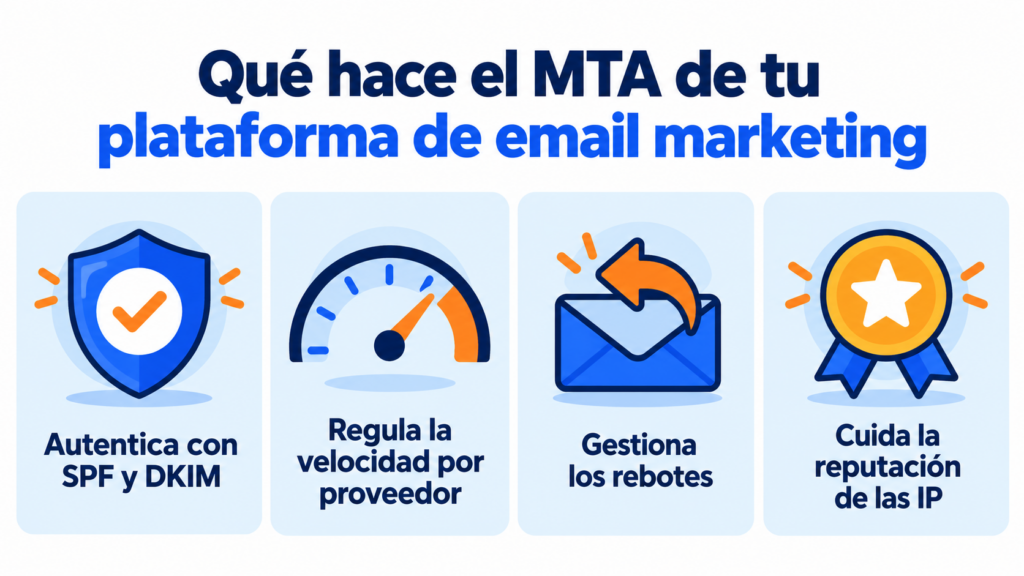
The good news is that you don’t have to install or maintain one to send your campaigns. Your email marketing provider takes care of that.
How Mailrelay helps you
Mailrelay runs its own sending servers, built for large volumes.
You create the campaign and the platform takes care of delivery, authentication, bounces and sender reputation.
If you need to send emails from your website or app, you can use Mailrelay’s SMTP service or API.
And if you send high volumes, you can get a dedicated IP with annual billing.
The free account lets you send up to 80,000 emails a month to 20,000 contacts, with chat, ticket and phone support.
Your emails, in good hands from the very first send
Try Mailrelay for free, with servers built for large volumes and chat, ticket and phone support.
MTA FAQs
What does MTA mean in email? It stands for Mail Transfer Agent: the program that carries emails between servers.
What’s the difference between an MTA and an MUA? The MUA is the program you use to write and read email, such as Outlook. The MTA carries it to the recipient.
What port does an MTA use? Port 25 is used between servers. For messages you send from your email client, port 587 is used, or 465 with encryption.
What’s the most widely used MTA? Exim is the most widespread on public mail servers, followed by Postfix. Sendmail dominated the early years of the internet.
Do I need an MTA to send newsletters? No. Your email marketing platform already has its own sending servers and takes care of sending, authentication and bounces.