Mandrill: what it is, 2026 pricing and an alternative to Mailchimp Transactional
Mailchimp's transactional service: what it is, how much it costs and when another option suits you better
Mandrill is Mailchimp’s service for sending transactional emails from a website or an app. We’re talking about order confirmations, password resets or account notifications.
Today it’s officially called Mailchimp Transactional and works as a paid Mailchimp add-on.
Many developers still call it by its original name. And many people come across it without looking for it, when they see “mandrillapp.com” in an email.
What is Mandrill?
It’s a platform for sending transactional emails: the messages a website or an app sends automatically when the user does something.
Mailchimp launched it in 2012 as a standalone service. For years it had a free plan that was very popular with developers and software companies.
That changed in 2016. According to MediaPost, Mailchimp turned it into a paid add-on for its accounts.
From March of that year, new accounts needed a paid Mailchimp plan. Existing ones had until the end of April to merge or move to another provider. Since then, it can’t be purchased on its own.
What is mandrillapp.com and why does it appear in my emails?
mandrillapp.com is Mandrill’s domain. If you see it in an email, the company or app writing to you uses this service to send its emails.
It can appear in several places:
- Next to the sender. Gmail sometimes shows “via mandrillapp.com” when the sending domain doesn’t match the sender‘s. This usually happens when the company hasn’t authenticated its domain.
- In the links. The service can rewrite the email’s links to count clicks. That’s why you see a mandrillapp.com address when you hover over them.
- In the technical headers. When you view the original message, its servers and signatures show up.
An email going through Mandrill doesn’t mean it’s fraudulent. Many software tools use it for their notifications.
But it doesn’t make it safe either. If you weren’t expecting the message, check the sender’s address and don’t click or share any data until you’ve verified it. We explain how to spot it in our post on phishing.
Are you the sender and want to get rid of that “via”? You need to authenticate your domain.
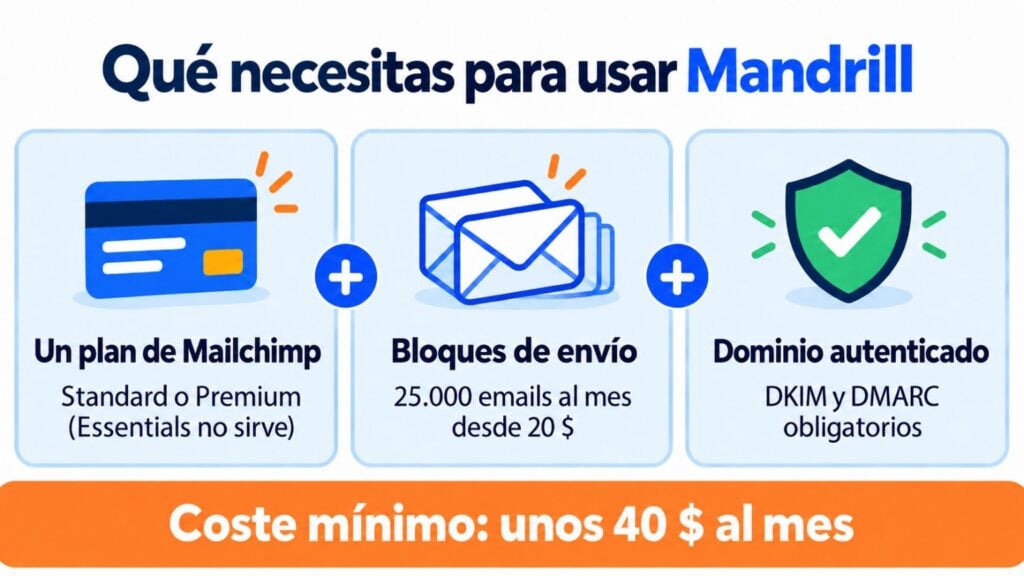
Since March 15, 2024, Mailchimp requires every sending domain to have two DKIM records and a DMARC policy. If it doesn’t, the email is sent from a mandrillapp.com subdomain.
Paying for two services to send your transactional emails?
With Mailrelay you get SMTP, API and newsletters in the same account, with human support on every plan.
What is Mandrill used for?
It’s used to send automated emails from a website, an online store or an app. Its most common uses are:
- sign-ups, account confirmations and password changes;
- order confirmations, invoices and shipping notifications;
- activity notifications, alerts and reminders.
It connects in two ways. Via API, to integrate it into your app’s code.
Or via SMTP, with the smtp.mandrillapp.com server, ports 25, 587, 2525 or 465 and an API key as the password.
It also lets you use templates created in Mailchimp. It reports deliveries and bounces through webhooks and shows statistics for each send.
How much does Mandrill cost in 2026?
Mandrill has no free plan.
To use it you need two things: a paid Mailchimp plan (Standard or Premium) and sending blocks. The Essentials plan won’t do.
Each block lets you send 25,000 emails a month. These are the prices published by Mailchimp in October 2026:
| Blocks per month | Emails per month | Price per block |
|---|---|---|
| 1-20 | Up to 500,000 | $20 |
| 21-40 | 500,000 to 1 million | $18 |
| 41-80 | 1 to 2 million | $16 |
| 81-120 | 2 to 3 million | $14 |
| 121-160 | 3 to 4 million | $12 |
| 161 or more | Over 4 million | $10 |
On top of that comes the Mailchimp plan. Standard starts at about $20 a month for 500 contacts.
So the smallest transactional setup costs at least about $40 a month.
There are more details worth knowing. Emails you don’t use in a month don’t roll over to the next. And when your blocks run out, sending stops unless you turn on automatic purchasing.
A dedicated IP costs $29.95 a month. To try the service, Mailchimp lets you send 500 free emails to a verified domain.
Mandrill pros and cons
| Pros | Cons |
|---|---|
| Mailchimp’s infrastructure, experienced in high-volume sending | Can’t be purchased without a paid Mailchimp plan |
| Mature, well-documented API | No free plan: only 500 test emails |
| Templates shared with your Mailchimp campaigns | Unused emails are lost every month |
| Webhooks and detailed statistics | Technical documentation in English only |
| Price per block drops as volume grows | For small volumes, the minimum cost is high |
How does Mandrill differ from other transactional email services?
It competes with services such as SendGrid, Mailgun, Postmark, Amazon SES, Brevo or Mailrelay.
All of them let you send via SMTP or API. But they vary a lot in entry price and in what they include.
| Service | To get started | Transactional sending | Marketing plan included |
|---|---|---|---|
| Mandrill (Mailchimp Transactional) | 500 test emails | Blocks of 25,000 from $20 + Mailchimp plan | Required (Standard or Premium) |
| SendGrid | 60-day trial, 100 a day | From $19.95 a month | Separate |
| Mailgun | 100 a day free | From $15 for 10,000 | No |
| Postmark | 100 a month free | From $15 for 10,000 | No |
| Amazon SES | No free tier for new accounts | $0.10 per 1,000 | No |
| Brevo | 300 a day free | From $9 a month | Yes |
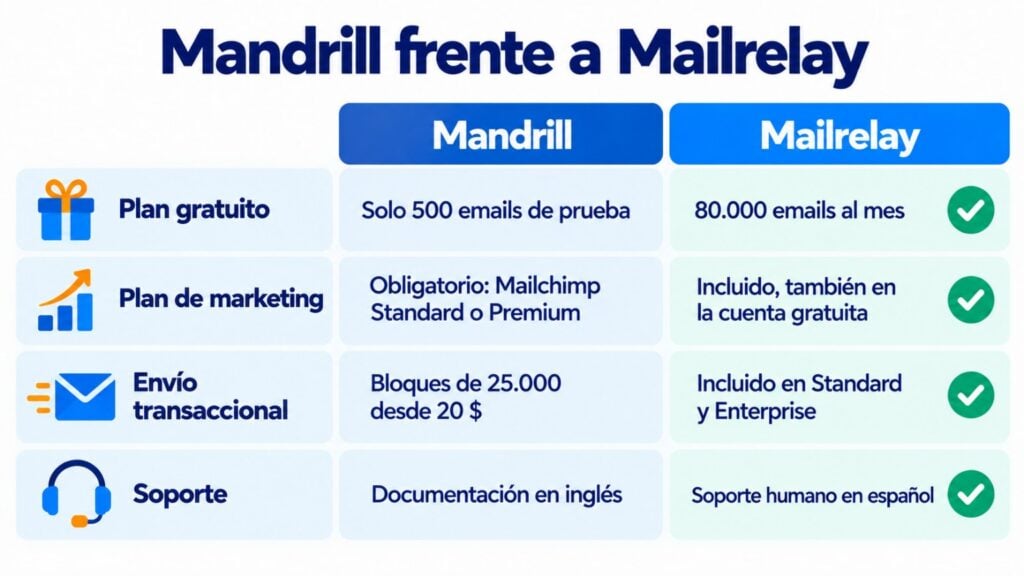
| Mailrelay | 30-day trial on the free account | Included in Standard and Enterprise; on the free account, €14.95 a month | Yes, also on the free account |
Data published by each provider, checked between September and October 2026. Prices change often: check them before signing up.
The main difference is that Mandrill also makes you pay for a marketing plan.
If you already use Mailchimp Standard, it makes sense. If not, you’re paying for something you may not need.
How do you migrate from Mandrill to another provider?
Switching transactional email providers isn’t complicated if you do it in order:
- Take inventory. Note which apps send through this service, which templates they use and which webhooks you have set up.
- Authenticate your domain with the new provider. Add its SPF and DKIM records, and keep your DMARC policy.
- Change the credentials. Replace the SMTP host and key with the new service’s, or adapt the calls to its API.
- Test with real sends. Send to Gmail and Outlook accounts and check that they reach the inbox and that the statistics work.
- Retire the old setup. Once everything works, deactivate the old API keys and remove their DNS records.
A security tip, whether or not you switch providers: keep API keys out of your code and give them only the permissions they need.
And rotate them if someone who knew them leaves the team.
How Mailrelay helps you as an alternative to Mandrill
With Mailrelay you can send your transactional emails via SMTP or API without buying a separate marketing plan.
SMTP and API sending is included in the Standard and Enterprise plans. On the free account you can try it for 30 days and then add it for €14.95 a month (see pricing).
And in the same account you get your newsletters, with a free plan of up to 80,000 emails a month and 20,000 contacts.
You get statistics on deliveries, bounces, opens and clicks for every send. Plus authentication with SPF, DKIM, DMARC and a custom domain, to look after your deliverability.
The servers are in the European Union and you get human support on every plan.
All the details are on our transactional emails page. And if your website runs on WordPress, we explain how to connect it in our guide to setting up SMTP in WordPress.
Switch from Mandrill to Mailrelay with no hassle
Try SMTP free for 30 days with your free account.
Frequently asked questions about Mandrill
These are the most common questions about Mailchimp’s transactional service.
Is Mandrill free?
No. Since 2016 you need a paid Mailchimp plan and sending blocks.
You can only send 500 free test emails to a verified domain.
Are Mandrill and Mailchimp the same thing?
They belong to the same company, but they aren’t the same thing. Mailchimp is for email marketing campaigns.
Mandrill, now Mailchimp Transactional, is for a website’s or app’s automated emails. It’s purchased as a Mailchimp add-on.
What is mandrillapp.com?
It’s the service’s domain. It appears in emails from companies that use it to send: in the sender (“via mandrillapp.com”), in the links or in the headers.
On its own, it doesn’t mean an email is fraudulent.
How do I protect my Mandrill API keys?
Don’t write them in your code or share them by email. Store them in environment variables or in a secrets manager.
Create one key per app and deactivate the ones you no longer use.
What is the best alternative to Mandrill?
It depends on what you need. If you want transactional emails and newsletters in the same tool without paying for two services, Mailrelay includes SMTP and API in its paid plans.
To compare more options, check out our guide to Mailchimp alternatives and our post on SMTP services.