Google Workspace: what it is, what it includes and how to set up your business email
Gmail with your domain, Drive and Meet for your team: plans, differences from free Gmail and how to get started
Google Workspace is Google’s paid suite for businesses: Gmail with your business domain, Drive, Meet, Calendar and Docs, all managed from an admin console.
Here’s what it includes, how it differs from a free Gmail account, how to set up your business email and what limits it has for sending emails.
What is Google Workspace?
It’s the professional version of Google’s apps. It was called G Suite until October 2020, when Google renamed it.
It works as SaaS: you pay a fee per user per month, and Google takes care of the servers, backups and security.
What people look for most is corporate email: you use the same Gmail interface, but with addresses like [email protected] instead of an @gmail.com one.
What does Google Workspace include?
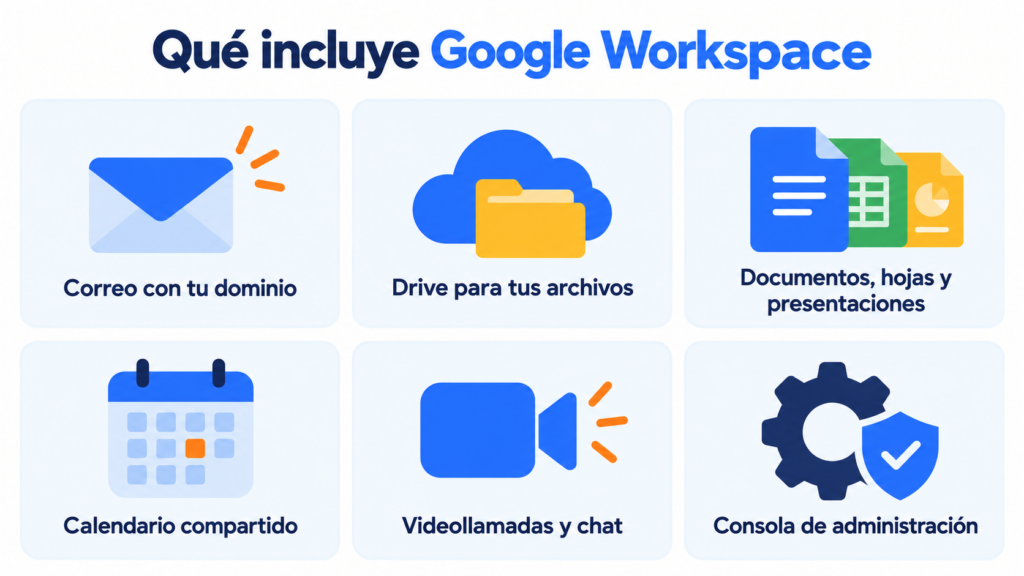
Every plan includes the same core apps:
- Gmail with your domain and no ads, in the browser as webmail or on your phone.
- Drive to store and share files.
- Docs, Sheets and Slides to work as a team on the same document.
- Calendar with shared calendars and appointment booking.
- Meet for video calls and Chat for internal messaging.
- Admin console to create users, apply security policies and recover accounts.
What changes from one plan to another is the storage, the number of Meet participants and the Gemini AI features.
Do you use Google Workspace for your business email?
Send your newsletters from your business address too with Mailrelay, without Gmail’s daily limits. Free account with up to 80,000 emails a month.
Google Workspace plans
Google has four business plans. The first three support up to 300 users.
| Plan | Storage per user | Meet participants | Gemini |
|---|---|---|---|
| Business Starter | 30 GB | 100 | Limited |
| Business Standard | 2 TB | 150 | Full |
| Business Plus | 5 TB | 500 | Full |
| Enterprise | 5 TB, expandable | 1.000 | Full |
All of them come with a 14-day free trial, except Enterprise, which you buy through Google’s sales team. With an annual commitment, the price is around 16% lower than on the Flexible Plan. Prices change often, so check them on the Google Workspace website before you decide.
Google Workspace or free Gmail: what’s the difference?
The main difference is the domain. But it’s not the only one.
| Free Gmail | Google Workspace | |
|---|---|---|
| Address | [email protected] | [email protected] |
| Storage | 15 GB shared with Drive and Photos | From 30 GB to 5 TB per user |
| Administration | Each account is on its own | Console to manage users |
| Ads | Yes | No |
| Support | Online help | Google support |
| Price | Free | Per user per month |
If you run a business, an address with your domain builds more trust and doesn’t depend on any one person. If someone leaves the company, their mailbox is still yours. And you don’t depend on your internet provider, as happens with Movistar email.
How to set up your email with Google Workspace
Signing up takes a few minutes, plus however long your domain takes to activate:
- Go to the Google Workspace website and start the free trial.
- Enter your company, the number of employees and your domain (or buy one while signing up).
- Verify that you own the domain with a TXT record at your DNS provider.
- Change the MX records so that Google becomes your email server.
- Create the users and addresses for your team.
A tip for every email address: keep it simple and always follow the same pattern, for example [email protected].
Google Workspace or Microsoft 365?
Both offer email with your domain, storage and video calls. Which to choose depends on how your team works.
| If your team… | Your best choice |
|---|---|
| Works in the browser and shares documents in real time | Google Workspace |
| Uses desktop Word and Excel every day | Microsoft 365 with Outlook |
| Only needs email with its domain | A simpler business email, like the one from your hosting provider (Ionos Webmail, for example) |
| Wants to send newsletters | Either of the two, plus an email marketing tool |
It’s not a good idea. Gmail in Google Workspace allows about 2,000 messages a day per user, and 1,500 if you use mail merge. During the free trial, the limit drops to 500.
Since 2024, Gmail has stricter requirements for anyone who sends more than 5,000 emails a day to its users. These are the bulk sender requirements: SPF, DKIM, DMARC and one-click unsubscribe, the same as Outlook and Yahoo require.
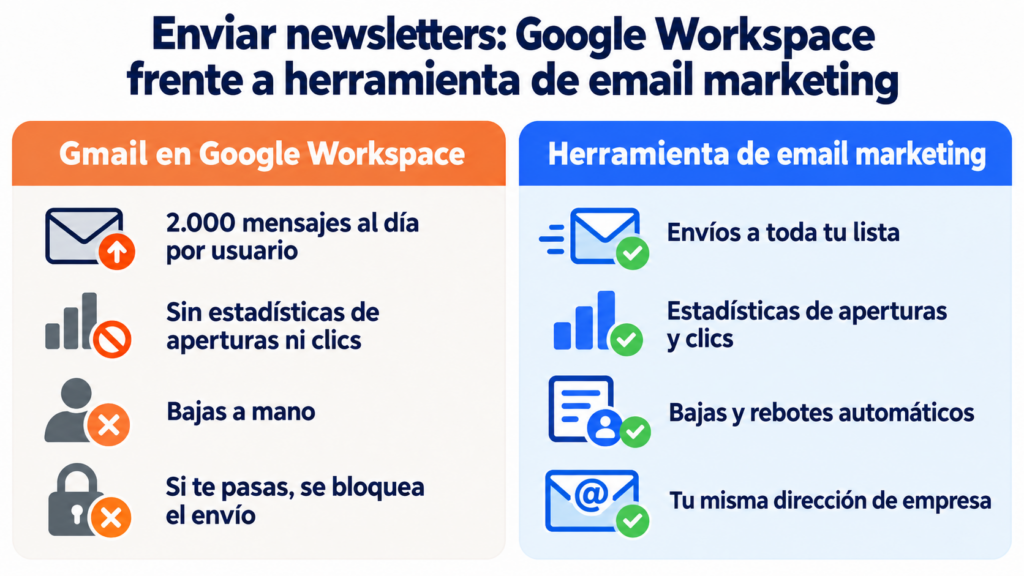
That’s what bulk email tools are for. If you go over the sending limits, Google blocks sending from that account for hours. And if what gets blocked is your business address, your whole team feels it.
How Mailrelay helps
Mailrelay and Google Workspace complement each other. You keep using Gmail for your day-to-day email, and you send your newsletters from Mailrelay with the same business address and your authenticated sending domain.
The free account includes up to 80,000 emails a month and 20,000 contacts, with no daily limit.
You get a visual editor, automations, open and click statistics and automatic handling of unsubscribes and bounces, with human support on every plan. Details on our pricing page.
Gmail for your team, Mailrelay for your newsletters
Templates, automations and statistics, with human support on every plan.
Google Workspace FAQ
These are the most common questions.
Is Google Workspace free?
No. You pay per user per month, with a 14-day trial. There is a free version for teams, Essentials Starter, but it doesn’t include Gmail with your domain.
Are G Suite and Google Workspace the same thing?
Yes. G Suite was renamed Google Workspace in October 2020.
Do I need my own domain?
Yes, to have addresses with your company name. If you don’t have one, you can buy it while signing up.
How many emails can I send a day with Google Workspace?
Up to 2,000 messages a day per user, 1,500 with mail merge and 500 during the trial.
Can I use Google Workspace with Mailrelay?
Yes. You keep your email in Gmail and send your campaigns from Mailrelay with the same address, after authenticating your domain.