Microsoft 365: what it is, what each plan includes and how it differs from Office 365
What it includes, which plan suits your home or your business, and how it differs from Office 365
Microsoft 365 is Microsoft’s subscription that brings together Word, Excel, PowerPoint, Outlook, Teams and OneDrive, with plans for personal and business use.
Here’s what it includes, how it differs from Office 365, which plan suits you and why it isn’t the right tool for sending newsletters.
What is Microsoft 365?
It’s Microsoft’s suite of office apps sold as a subscription. You pay monthly or yearly, and in return you always have the latest version of the apps, cloud storage and services such as email and video calls.
It works as SaaS: Microsoft takes care of the servers, the updates and the backups. You use the apps on your computer, on your phone or in your browser.
On the business plans, email runs on your own domain. It’s corporate email like [email protected], which you read in Outlook.
Are Office 365 and Microsoft 365 the same thing?
Almost. Office 365 was the name of the suite until April 21, 2020. On that day Microsoft renamed most of its plans to Microsoft 365, at the same price.
Office 365 still exists on some plans for large enterprises and education. And Office 2024 is something else: a one-time purchase license, with no subscription, no cloud storage and none of the new features as they come out.
What does Microsoft 365 include?
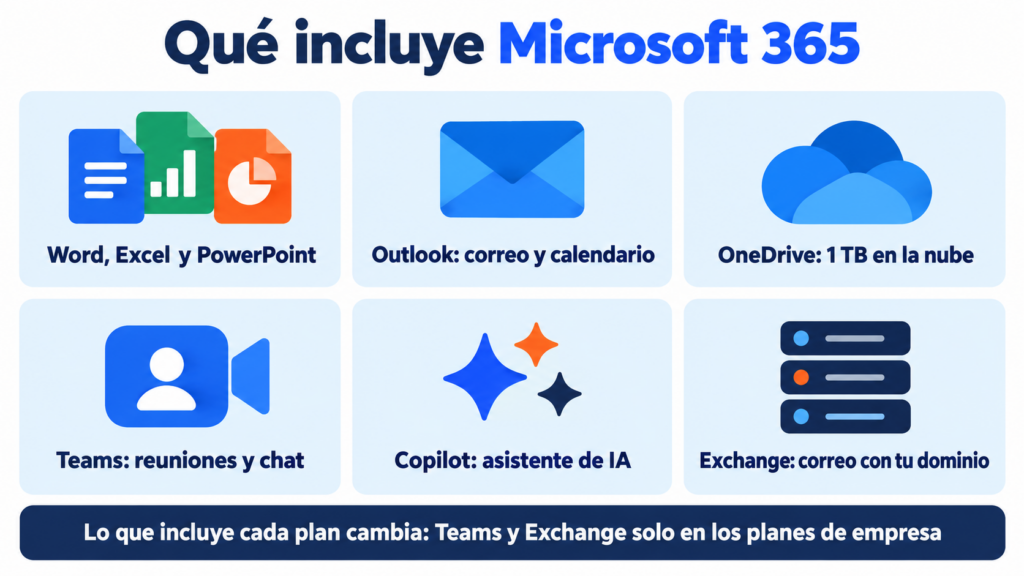
It depends on the plan, but these are the usual pieces:
- Word, Excel and PowerPoint for documents, spreadsheets and presentations.
- Outlook for email, calendar and contacts.
- OneDrive with 1 TB of cloud storage per person.
- Teams for meetings and chat, on the business plans.
- Copilot, Microsoft’s AI, built into the apps depending on the plan.
- Exchange, the email server with your domain, on the business plans.
Word, Excel, PowerPoint and Outlook also have a free web version with any Microsoft account. It’s more limited, but it’s fine for basic use.
Do you send emails to your customers from Outlook?
With Mailrelay you send your newsletters to your whole list without putting your business email at risk, with statistics and automatic unsubscribes. Free account with up to 80,000 emails a month.
Microsoft 365 plans for home
They’re for personal use. They don’t include email with your domain.
| Plan | People | OneDrive storage | Copilot |
|---|---|---|---|
| Personal | 1 | 1 TB | Yes, with limited use |
| Family | Up to 6 | 1 TB per person | Account holder only |
| Premium | Up to 6 | 1 TB per person | Higher usage, account holder only |
Microsoft also keeps “Classic” versions of Personal and Family, without Copilot. They don’t always show up on its website.
Microsoft 365 plans for business
The Business plans support up to 300 users. They all include 1 TB of OneDrive storage per user.
| Plan | Desktop apps | Email with your domain | What it adds |
|---|---|---|---|
| Business Basic | No, web and mobile only | Yes, 100 GB mailbox | Teams and SharePoint |
| Business Standard | Yes | Yes, 100 GB mailbox | Copilot in the apps |
| Business Premium | Yes | Yes, 100 GB mailbox and archive | Security and device management |
| Apps for business | Yes | No | Only the apps and OneDrive |
In Europe, versions without Teams are also sold, at a slightly lower price. For more than 300 users there are the Enterprise plans (E3 and E5). Prices change often: check them on Microsoft’s website before you decide.
Microsoft 365 or Google Workspace?
Both give you email with your domain, storage and video calls. The choice depends on how your team works.
| If your team… | Your best choice |
|---|---|
| Uses desktop Word and Excel every day | Microsoft 365 |
| Works in the browser and shares documents in real time | Google Workspace |
| Already uses Teams or Windows on every computer | Microsoft 365 |
| Only needs email with its domain | A simpler email service, like the one from your hosting provider (Ionos Webmail, for example) |
| Wants to send newsletters | Either one, plus an email marketing tool |
If you’re only looking for free personal email, you don’t need to pay for a subscription. Outlook.com, Gmail and iCloud Mail are free.
It’s not a good idea. Exchange Online limits each mailbox to 10,000 recipients a day and 30 messages a minute. By default, each email allows up to 500 recipients.
You can do a mass email in Outlook with Word’s mail merge. It works for a few dozen contacts. But you won’t get open or click statistics, or automatic unsubscribes.
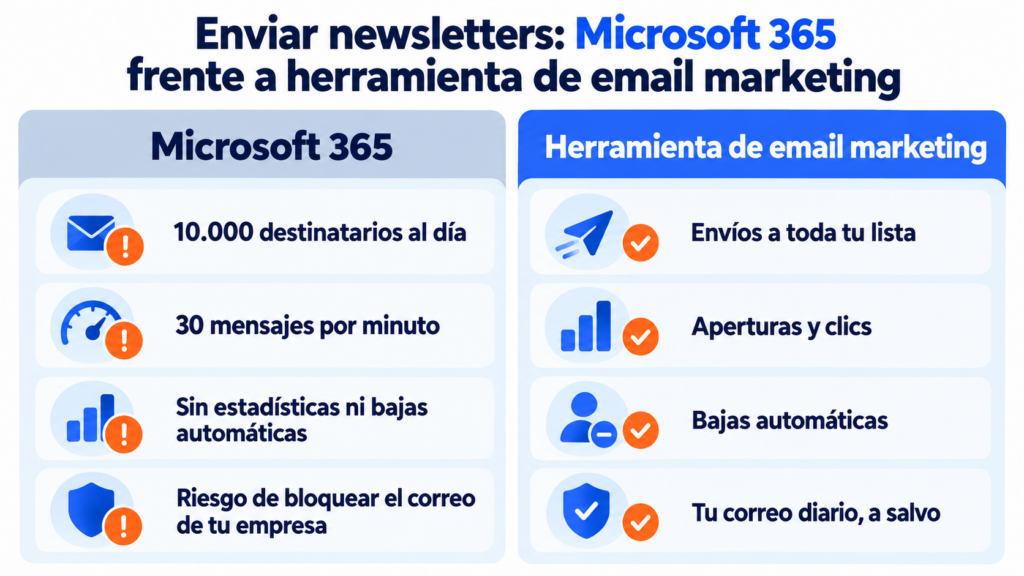
And there’s a bigger risk. If you go over the sending limits or get flagged as spam, Microsoft can block sending from that mailbox. If it’s your business address, the block leaves you without email for your day-to-day work.
On top of that, Outlook, Gmail and Yahoo require SPF, DKIM and DMARC from anyone who sends in volume. These are the bulk sender requirements. That’s what bulk email tools are for.
How Mailrelay helps you
Mailrelay and Microsoft’s suite complement each other. You keep using Outlook for your day-to-day email, and you send your newsletters from Mailrelay with your same business address and your authenticated sending domain.
The free account includes up to 80,000 emails a month and 20,000 contacts, with no daily limit.
You get a visual editor, automations, open and click statistics, and automatic management of unsubscribes and bounces, with human support on every plan. All the details are on the pricing page.
Microsoft 365 for your team, Mailrelay for your newsletters
Templates, automations and statistics, with human support on every plan.
Frequently asked questions about Microsoft 365
These are the questions we hear most often.
Is Microsoft 365 free?
No. It’s a paid subscription. What’s free are the web versions of Word, Excel, PowerPoint and Outlook, with a Microsoft account.
What’s the difference between Microsoft 365 and Office 2024?
Microsoft 365 is a subscription with updates, OneDrive and Copilot. Office 2024 is paid for once, for a single computer, and doesn’t get new features.
How much storage does Microsoft 365 email have?
On the Business plans, the mailbox is 100 GB per user. Files are kept separately, in the 1 TB of OneDrive.
Can I use my domain with Microsoft 365?
Yes, on the business plans. You verify the domain and change its DNS records so your email moves to Microsoft.
Can I use Microsoft 365 with Mailrelay?
Yes. You keep your email in Outlook and send your campaigns from Mailrelay with your same address, after authenticating your domain.