9 free online video editors (and their real limits)
Clipchamp, Canva, CapCut and 6 more: what their free plan really includes, with watermark, resolution and limits compared
Clipchamp, Canva, CapCut and 6 more: what their free plan really includes, with watermark, resolution and limits compared
Have you ever spent an hour putting a video together, only for the editor to ask you to pay to remove its logo right when you export it? It happens all the time when you try to edit videos online for free.
Almost every tool advertises itself as free, but each one puts the limit in a different place.
Some export without a watermark and in 1080p. Others add their logo, drop the quality to 480p or only let you export a few minutes a month.
In this guide I compare 9 free online video editors that work today, with what their free plan really includes. If you’re in a hurry, here’s the short answer:
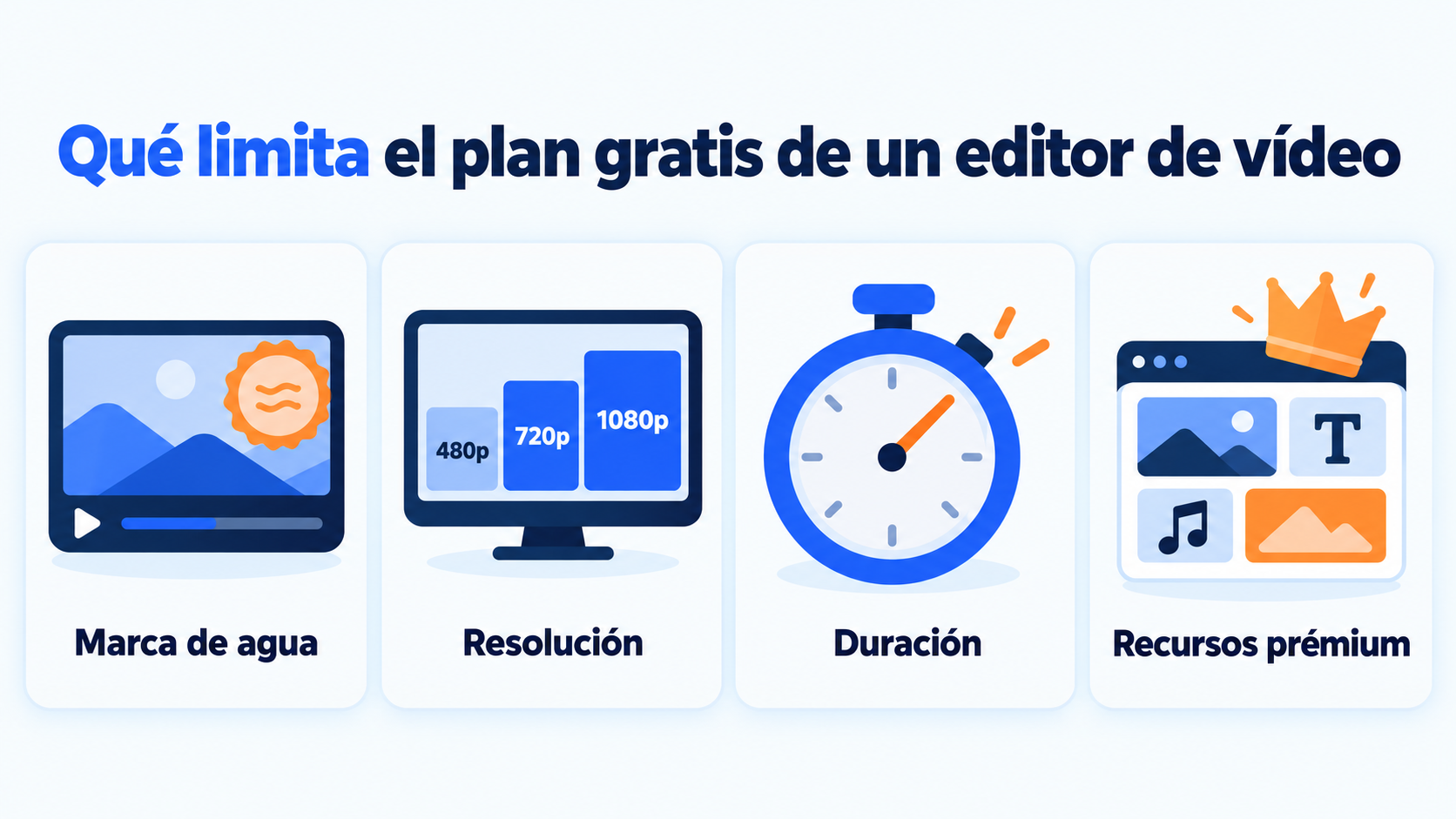
Before choosing a free online video editor, look at four limits. They’re what separate a useful tool from one that makes you pay right when you export.
The watermark is the first. It’s the editor’s logo on top of your video and, for a branded video, it usually rules the tool out.
Export resolution is the second. Today, 1080p is the reasonable minimum for social media and YouTube. At 480p or 720p the loss of quality is noticeable, especially on large screens.
The third is length. Some free plans limit the minutes per video or the minutes you can export each month.
The fourth is premium assets. If you use a paid template, song or effect, the free export is blocked or the watermark appears.
Almost all of them ask you to create an account, even if it’s free. That’s what lets them save your projects in the cloud so you can pick them up again from another computer.
| Editor | Best for | Resolution (free plan) | Watermark (free plan) | Other free-plan limits |
|---|---|---|---|---|
| Clipchamp | Full editing in the browser | Up to 1080p | No | Requires a personal Microsoft account; 4K and premium assets are paid |
| Canva | Social media videos with templates | Not stated | No, if you only use free elements | AI features and stock videos, Pro only |
| Adobe Express | Adobe Stock templates and assets | No 4K (Premium only) | Premium assets require a paid plan | Videos up to 30 minutes; 5 GB of storage |
| CapCut (web) | Vertical videos and auto captions | Up to 1080p | Yes, if you use Pro elements | 4K and most AI features, Pro only |
| Kapwing | Captions and short videos | 720p | Yes | Exports up to 4 minutes |
| VEED | Auto captions | 720p | Yes | Videos up to 10 minutes |
| WeVideo | Team editing and education | 480p | Yes | 5 minutes of export per month; 1 GB |
| YouTube Studio editor | Trimming and blurring videos already uploaded | Same as the original video | No | Only for videos on your channel; can’t add new clips |
| Lumen5 | Turning text into video | 480p | Yes | 5 videos per month |
Data from the official pricing and help pages, and from 2026 comparisons when the tool doesn’t publish it. Checked in October 2026. These plans change often: check them before starting a long project.
They’re ordered from the most to the least generous free plan. For each one you’ll see what it’s best for, what limits it has and who it’s for.
Clipchamp is Microsoft’s video editor. It works in the browser and comes built into Windows.
Its free plan is the most generous on this list. According to its official pricing page, it exports without a watermark and at up to 1080p HD. All you need is a personal Microsoft account.
It has a multi-track timeline, templates, transitions, animated text and auto captions.
4K export, premium assets and the brand kit are reserved for Microsoft 365 Personal or Family subscribers.
Ideal for: small businesses and creators who want to edit videos online for free without another company’s logo.
If you already use Canva for your images or your templates, its video editor will feel familiar. It has a multi-layer timeline, transitions, animations and captions.
Canva doesn’t add a watermark if you only use free elements: images, videos and music included in the free plan. As soon as you add a paid element, the watermark appears.
The most eye-catching features (removing backgrounds, creating videos with AI, removing voice noise or accessing stock videos) are in Canva Pro.
Ideal for: short social media videos with the same look as the rest of your brand.
Adobe Express is the simple, online version of Adobe’s tools.
Its free plan includes more than 100,000 static and video templates, over a million Adobe Stock assets and standard editing tools.
It allows the longest videos without paying: up to 30 minutes, according to its pricing table.
You get 5 GB of storage and can caption, trim, merge and resize videos. 4K export, video background removal and voice enhancement are paid.
Ideal for: promotional videos built from templates, especially if your team already works with Adobe.
CapCut started as a mobile app and is very popular for TikTok, Instagram Reels and YouTube Shorts. Its web version offers a multi-track timeline, effects and auto captions.
The free plan exports in 1080p.
But be careful: if the project includes templates, effects or tools marked as Pro, you won’t be able to remove the watermark without subscribing, as its own help center explains. Since the 2026 restructuring, 4K and a good part of the AI features are paid.
Ideal for: quick vertical videos, as long as you check that you aren’t using Pro elements.
Kapwing stands out for its auto captions, resizing for each social network and collaborative editing in the browser.
Its free plan has clear limits, according to its help center: it exports in 720p, with a watermark and for videos of up to 4 minutes.
Ideal for: testing formats or creating short captioned clips when the watermark isn’t a problem.
VEED is another online video editor focused on captions, translation and social media videos. Its interface is one of the simplest.
The free plan exports in 720p and with a watermark, for videos of up to 10 minutes. AI features, such as avatars or text-to-video, are paid.
Ideal for: captioning videos quickly and evaluating the tool before paying.
WeVideo is one of the veterans of cloud editing and is widely used in schools. It lets you record your screen, edit as a team and work with multiple tracks.
Its free plan is the most limited. According to its plans page, it exports in 480p and with a watermark. On top of that, it only allows 5 minutes of export per month and 1 GB of storage.
Ideal for: learning to edit or running tests, not for publishing branded videos.
The old YouTube Editor is gone, but YouTube Studio still has a basic editor for the videos on your channel.
Its big advantage is that it trims without re-uploading the video, so you don’t lose the URL or the views.
According to YouTube’s official help, you can cut the beginning, the end or sections in the middle. You can also blur faces or areas of the image, add music from the YouTube Audio Library and create end screens.
It works with videos shorter than 6 hours. If a video has more than 100,000 views, you’ll only be able to save face blurring, unless your channel is in the YouTube Partner Program.
Ideal for: fixing a video that’s already published without losing its URL or its views.
Lumen5 turns a text, such as a blog post, into a video with scenes, stock images and on-screen text. It’s useful for repurposing content on social media.
The free plan is very limited: according to 2026 comparisons, it allows 5 videos a month in 480p and with a watermark.
Ideal for: testing how your articles work as videos within your content marketing strategy.
From video to inbox
Share your videos with your subscribers in newsletters that look good on any device. Create your free account.
This guide was first published in 2019. Some of the tools on that list are no longer a good option for editing videos online for free.
The classic YouTube Editor is gone: today its role is covered by the YouTube Studio editor (number 8).
Kizoa’s website now redirects to InVideo, an AI video platform, and Video Toolbox’s website no longer responds.
Mixerfactory and Rocketium are also off the list. I’ve replaced them with more complete editors with a verified free plan.
Choose based on what you’ll use it for, not on the list of features. This table sums up which free online video editor fits each need:
| If you need… | Your best option |
|---|---|
| Publish without a watermark | Clipchamp, or Canva with free elements |
| Vertical videos for social media | CapCut or Canva |
| Auto captions | Clipchamp, Kapwing or VEED |
| Trim a video that’s already on YouTube | YouTube Studio |
| Repurpose blog posts | Lumen5 |
| Templates and stock assets | Adobe Express |
| Videos longer than 10 minutes | Clipchamp or Adobe Express |
If you’re not sure, try two free online video editors with the same one-minute video. In half an hour you’ll know which one you find more comfortable and how the export turns out.
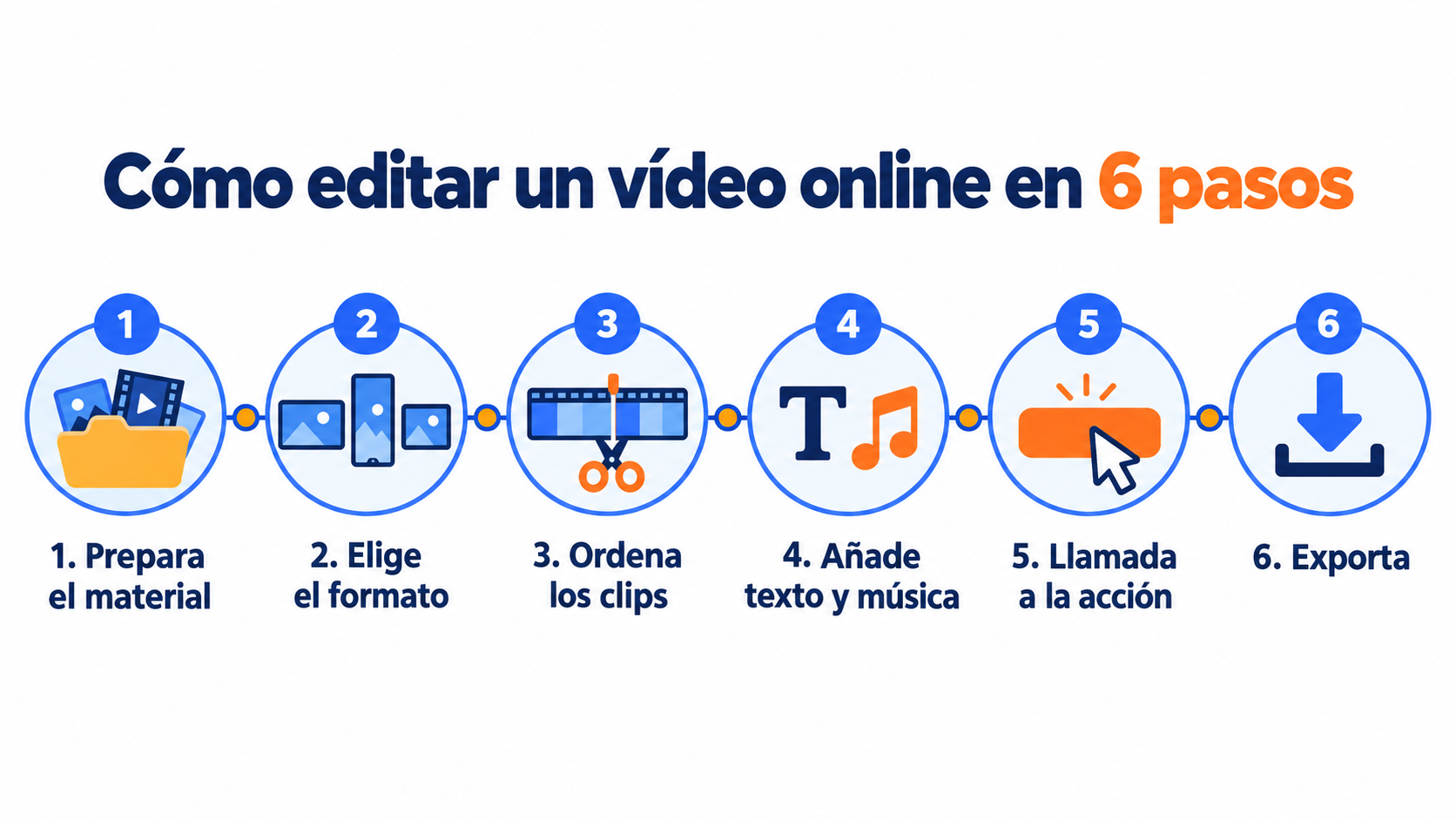
The process is almost identical in every tool. Here are the 6 steps:
Editing videos online for free and in good quality is only half the job. For the video to achieve its goal, pay attention to these details.
Hook viewers in the first few seconds. Attention is scarce: start with the most interesting part, not the logo.
Tell a story. Storytelling works just as well in a video as in an email.
Take care of the thumbnail. A good thumbnail drives a lot of clicks, both on YouTube and in your emails.
Keep your visual identity. Always use the same colors, fonts and logo. It’s the foundation of visual marketing.
Adapt each video to its channel. Don’t post the same file everywhere. Check out our guide to social media for businesses to see what works on each one.
Measure the results. Look at retention, clicks and engagement, not just views.
If you want to go deeper into strategy, you’ll find more ideas in our post on video marketing and in these content marketing examples.
Once it’s edited, your video can also work for you in your newsletter. Keep in mind, though, that most email clients don’t play videos inside the email.
What works best is an image of the video with a “play” button that links to YouTube, your website or a landing page.
Another option is a short GIF with a few seconds of the video: it moves inside the email and encourages clicks.
And don’t forget the subject line. If it mentions the video, subscribers know what they’ll find and are more likely to open it.
We explain it in more detail in how to include videos in your email marketing strategy. You can also get inspired by these email marketing examples and these original and creative email ideas.
Add your videos to your emails in minutes
With the Mailrelay editor you insert the thumbnail with its link and see who clicks. Up to 80,000 emails a month for free.
A well-edited video performs better when it goes straight to the inbox of people who already know you.
With Mailrelay’s drag-and-drop editor you add the video thumbnail with its link in a few minutes, or start from ready-made templates.
You can send the video only to the people who are interested thanks to subscriber groups and custom fields. And with real-time email marketing metrics you know who has clicked on the video.
Plus, you can start without paying: the free account lets you send up to 80,000 emails a month to 20,000 contacts.
You can see all of Mailrelay’s features or, if you’re just starting out, read what email marketing is first.
These are the most common questions from people looking for a free online video editor.
To edit videos online for free in most cases, Clipchamp: it exports without a watermark and at up to 1080p with a free Microsoft account. If you already work with Canva or Adobe, their video editors are good alternatives.
Yes. Clipchamp exports without a watermark on its free plan, and Canva doesn’t add one either if you only use free elements.
The YouTube Studio editor doesn’t add any branding to the videos on your channel. Kapwing, VEED, WeVideo and Lumen5 do add one on their free plan.
Practically all of them ask you to create a free account to save the project and export the video.
If you don’t want to sign up for another service, use one with an account you already have. Clipchamp works with your Microsoft account, and the YouTube Studio editor with your Google account.
It depends on the editor. Adobe Express allows videos of up to 30 minutes on its free plan, and VEED up to 10.
Kapwing limits exports to 4 minutes, and WeVideo to 5 minutes a month. Check this limit before you start editing.
Yes, but not as an attachment or embedded, because most email clients don’t play it. The recommended approach is to upload the video to YouTube or your website.
Then include a thumbnail in the email with a “play” button that links to it.
Is your video ready?
Send it to your subscribers with Mailrelay: up to 80,000 emails a month to 20,000 contacts without paying.
With any of these editors you can edit videos online for free and get a professional result, as long as you know the limits of their free plan.
My recommendation: start with Clipchamp and, if you already work with Canva or Adobe, try their editor before opening another account.
Make a short video and, once it’s ready, don’t leave it only on social media: take it to your subscribers’ inbox too.

Jose Argudo
CMO at Mailrelay. Writes about email marketing, copywriting and conversion for small businesses and entrepreneurs.