Out of office message: 30 examples to copy for vacations, Christmas, sick leave and more
Ready-to-copy templates for every situation and how to turn on the automatic reply in Gmail, Outlook and Teams

Ready-to-copy templates for every situation and how to turn on the automatic reply in Gmail, Outlook and Teams
An out of office message is the automatic reply your email account sends to anyone who writes to you while you’re away: it says you’re away, until when, and who to contact if it’s urgent. You set it up once and it works on its own during your vacation, sick leave or a trip.
It may seem like a formality, but it’s the first contact clients, suppliers and colleagues have with you while you’re away. A good message prevents calls, repeated emails in your inbox and missed opportunities.
In this guide you’ll find 30 out of office message examples ready to copy, organized by situation. You’ll also see what they should include and how to turn them on step by step in Gmail, Outlook and Teams.
It’s an automatic reply that your email provider sends on your behalf to everyone who writes to you during a specific period. It’s also called an away message, a vacation auto-reply or, for short, an OOO.
Don’t confuse it with an email marketing autoresponder. An out of office message replies to whoever writes to you. An autoresponder sends a sequence of emails to your subscribers when certain conditions are met, such as signing up to your list.
The two complement each other. If your company closes for a few days, the away message takes care of anyone who writes, and a newsletter lets all your customers know before you close.
Let your customers know before you leave
Send a newsletter with your closing dates and schedule it so it goes out even if you’re already on vacation. Free for up to 80,000 emails a month.
A good message answers the three questions of whoever writes to you: did you get it? When will you reply? And what do I do if it can’t wait?
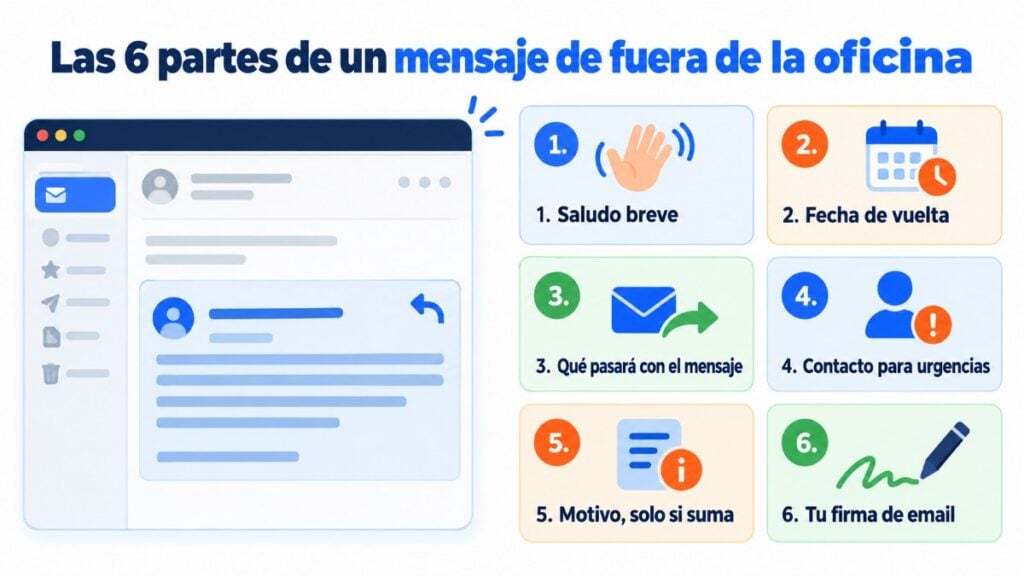
This is the basic template you can adapt to any situation:
Subject: Out of office until [date]
Hi,
Thank you for your message. I’m out of the office until [date] and will read it when I get back.
If it’s urgent, you can write to [name] at [email].
Best regards,
[Signature]
These are the most common. Choose the tone based on who usually writes to you: clients, suppliers or colleagues.

1. Vacation, formal
Thank you for your message. I am on vacation from [date] to [date], inclusive, without access to email. I will respond to your inquiry upon my return.
For any urgent matter, please contact [name], [job title], at [email].
2. Vacation, short
I’m on vacation until [date]. I’ll get back to you when I return. If it’s urgent, write to [email].
3. Vacation, with contacts by topic
Hi, I’m on vacation until [date].
For quotes and orders: [name], [email].
For billing: [name], [email].
For anything else, I’ll get back to you as soon as I return.
4. Company closed in August
Thank you for writing to us. Our offices are closed from [date] to [date] for the summer vacation.
We’ll be back on [date] and will reply to your message in the order it was received.
5. Digital disconnection
I’m on vacation until [date] and, to truly disconnect, I won’t be checking my email.
If your message is still important when I’m back, I’d appreciate it if you could resend it after [date].
6. Vacation, friendly tone
Hi! I’m recharging my batteries until [date]. Your email is waiting for me here and I’ll read it at my leisure when I’m back.
If it can’t wait, [name] will be happy to help you at [email].
In December, many companies shorten their working hours or close between Christmas and early January. Use the message to wish people happy holidays, just as you would in your Christmas greetings.

7. Christmas, formal
Thank you for your email. I will be out of the office from [date] to [date] for the Christmas holidays.
I will reply to you upon my return. We wish you happy holidays and a prosperous new year.
8. Christmas, friendly
Hi! I’m enjoying the holidays until [date]. I’ll read your message as soon as I’m back.
Merry Christmas, and may the new year be full of good news!
9. Company closed for the holidays
Our team is taking a break from [date] to [date]. During those days we won’t be answering email or the phone.
Orders placed on our website will be shipped from [date]. Happy holidays!
10. Easter
I’m out of the office for Easter until [date]. I’ll get back to you when I return.
For anything urgent, contact [name] at [email].
11. Long weekend or local holiday
Today is a public holiday in [city] and our offices are closed. We’ll be back on [date] and will reply to your message as soon as possible.
The rule here is discretion. There’s no need to explain the reason for your absence, let alone share health details.
12. Sick leave
Thank you for your message. I’m temporarily out of the office and won’t be able to answer emails.
For any matter, please contact [name] at [email], who will take care of your request.
13. Absence with no return date
I’m currently out of the office and don’t have a confirmed return date.
To avoid delaying your request, please write to [name] at [email]. Your message will not be forwarded automatically.
14. Parental leave
Hi! I’m on parental leave following the birth of my child until [date].
During this time, [name] is looking after my projects: [email].
15. Personal day
I’m not in the office today. I’ll reply to your message tomorrow, [date].
If it’s urgent, call [work phone number].
16. Leave of absence
I’m on a leave of absence until [date]. During this period, [name] is the contact person for everything related to [area]: [email].
Closing for vacation or the holidays?
Let your whole list know in a few minutes and segment by clients, suppliers or distributors.
In these cases you can read your email, even if it takes you longer to reply. Say so, so nobody expects an immediate response. And if you’re the one organizing the event, here’s how to do email marketing for events.
17. Business trip
I’m on a business trip until [date], with limited access to email. I’ll reply as soon as possible, although it may take a little longer than usual.
For urgent matters, call [work phone number].
18. Trade show or event
This week we’re at [trade show name] in [city]. If you’re coming, visit us at booth [number].
I’ll reply to your message from [date].
19. Training
I’m attending a training course until [date] and will only check my email at the end of the day. I’ll get back to you as soon as I can.
20. A day of meetings
I’m in meetings outside the office today. I’ll reply to your email tomorrow morning.
If you leave the company or change roles, the automatic message keeps emails from getting lost in an inbox nobody reads anymore. Even so, it’s a good idea to send your main contacts a personal goodbye email beforehand.
21. Leaving the company
Thank you for your message. As of [date], I’m no longer with [company].
For any questions, you can write to [name] at [email], who now handles [area]. It’s been a pleasure working with you!
22. Retirement
As of [date], I’m retired. Thank you for all these years of working together.
From now on, [name] will handle your requests at [email].
23. Change of role or department
As of [date], I’m in charge of [new area] and no longer handle [previous area].
For those matters, write to [name] at [email].
Shared mailboxes, like info@ or orders@, also need their own automatic reply, especially in an online store. Here the goal is for the customer to know what will happen and not write again.
24. Outside business hours
Thank you for contacting [company]. We received your message outside our business hours, Monday to Friday from [time] to [time].
We’ll reply on the next business day.
25. Weekend
We’ve received your message. Our team is off for the weekend and will reply on Monday.
In the meantime, you may find the answer in our [FAQ].
26. Online store during a closure
Thanks for writing to us! We’re closed for vacation from [date] to [date].
Our online store is still open, but orders will be prepared from [date]. You’ll get an email when your package ships.
27. Moving or stocktaking
From [date] to [date] we’re moving to our new offices at [address], so service may be slower.
We’ll answer all messages in the order they were received. Thank you for your patience.
If you work with clients or suppliers in other countries, add a version in a second language below your main message.
28. Bilingual Spanish-English
Estoy fuera de la oficina hasta el [fecha]. Si es urgente, escribe a [email].
I am out of the office until [date]. For urgent matters, please contact [email].
29. English only
Thank you for your email. I am currently out of the office with limited access to email and will return on [date].
For urgent matters, please contact [name] at [email].
It works if you know the person writing to you well and your company culture allows it. With new clients, stick to one of the earlier ones.
30. With humor
Right now I’m somewhere with lots of sun and very little signal. I’ll be back on [date], tanned and full of fresh energy.
If your message can’t wait, [name] is in the office (and not tanned): [email].
Each tool calls it something different, but the steps are similar: turn on the reply, choose the dates and write the text.
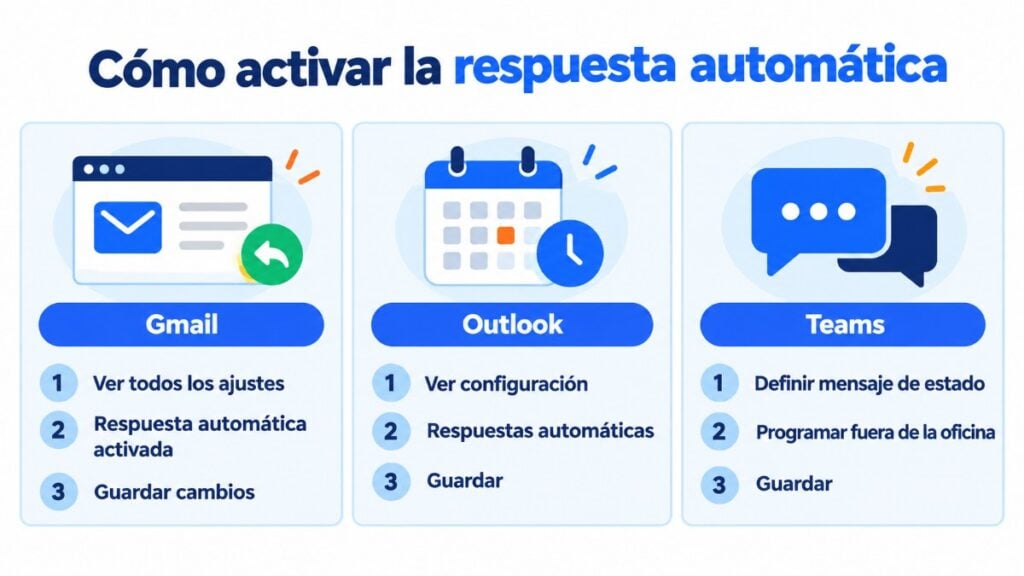
Gmail sends the reply only the first time someone writes to you. If that person writes to you again after four days, or if you change the reply text, they get it again. It doesn’t reply to emails that land in spam or to emails from mailing lists.
With work accounts, you can write a different message for people outside your organization.
This option is available for work or school accounts. For Gmail, Yahoo, POP or IMAP accounts added to classic Outlook, the reply is set up with rules.
Teams and Outlook share this setting, so the message appears in both.
A poorly configured automatic message can cause more problems than not having one at all. These are the most common mistakes:
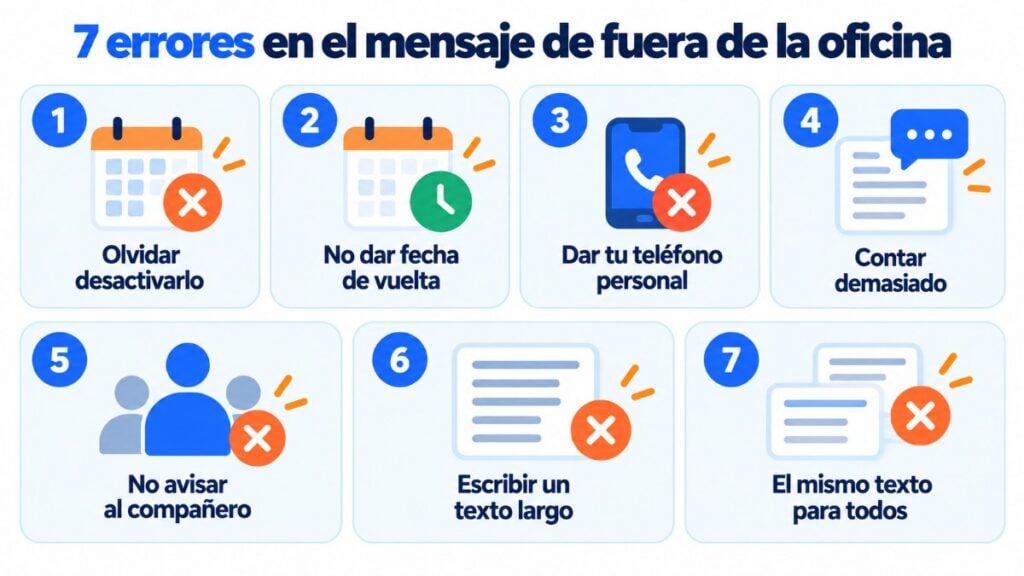
If you take care with the subject line and wording of your everyday emails, apply the same standard to your automatic reply.
An out of office message only replies to whoever writes to you. If your business closes in August or at Christmas, the best option is to give advance notice to all your customers with an email.
With an email marketing tool like Mailrelay, you can do it in a few minutes:
With Mailrelay’s free account, you can send up to 80,000 emails a month to 20,000 contacts, with support by chat, ticket and phone.
Don’t let your email marketing go on vacation
Schedule campaigns and automations so your list keeps growing while you take a break. Start free with 20,000 contacts.
These are the most common questions when preparing an automatic reply.
Until when you’re away, whether you’ll read the message when you’re back, and who to contact if it’s urgent. Three or four lines are enough.
It stands for out of office, and it’s often used for the automatic reply itself. A basic message would be: “I am out of the office until [date]. For urgent matters, please contact [email].”
It depends on your email provider. Gmail sends it the first time someone writes to you and again if they write after four days. Outlook usually sends it once per sender while the reply is turned on.
No. It’s enough to say you’re out of the office and who they can contact. The reason for sick leave is personal information.
Schedule it before you leave with a start and end date. That way it turns on first thing on your first day away and turns off on its own when you’re back.
An out of office message replies to whoever writes to you while you’re away. An autoresponder sends scheduled emails to your subscribers, such as a welcome email or a sequence of automated emails, and is set up in your email marketing tool.

Jose Argudo
CMO at Mailrelay. Writes about email marketing, copywriting, and conversion for small businesses and entrepreneurs.