Outlook: what it is, how to sign in, create your account and set up your email
How to sign in, create a free account and set up Outlook on your phone or in another program
Outlook is Microsoft’s email service: a free webmail, Outlook.com, and an app for reading your email on your computer or phone.
Here’s how to sign in, how to create an account, the settings to use it in other programs and when it suits you better than Gmail.
What is Outlook?
“Outlook” can mean three things. Outlook.com is the free webmail you open in your browser. The Outlook app is free for Windows, Mac, Android and iPhone. And classic Outlook is the desktop program that comes with Microsoft 365.
Addresses can end in @outlook.com, @outlook.es, @hotmail.com or @live.com. They are all Microsoft accounts and work the same way.
What about Hotmail? It’s the same service. Microsoft merged it into Outlook.com in 2013, and old Hotmail addresses still work.
How do you sign in to your Outlook email?
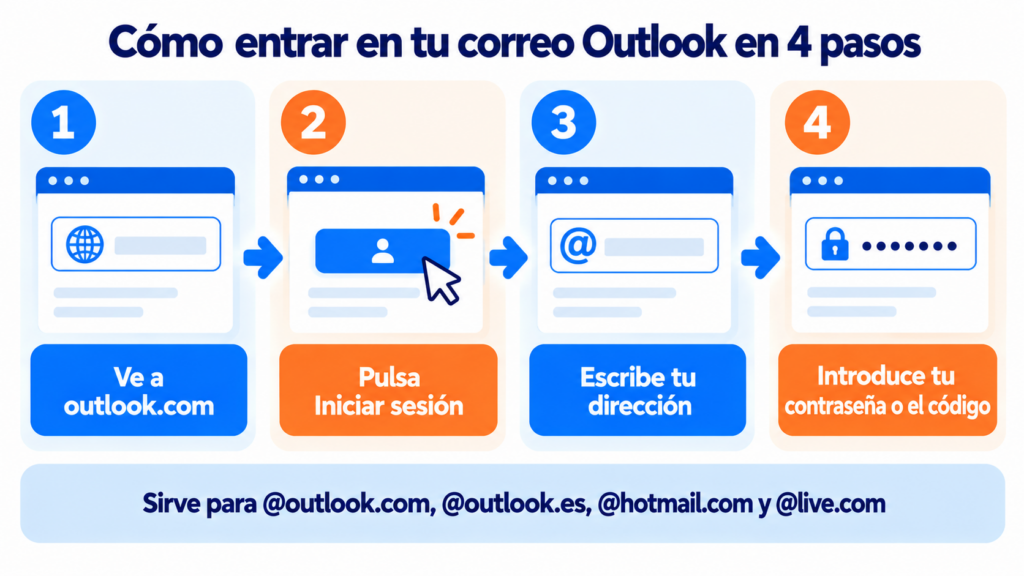
From your browser it takes less than a minute:
- Go to outlook.com and click “Sign in”.
- Enter your full address.
- Enter your password or the code Microsoft sends you.
- You’ll land in your inbox.
At work, with Microsoft 365, the sign-in address is outlook.office.com. You sign in with the account your company gives you.
Do you send your newsletters from Outlook?
With Mailrelay you reach your whole list without the daily limits of a personal mailbox, with statistics and automatic unsubscribes. Free account with up to 80,000 emails a month.
How do you create a free Outlook account?
On outlook.com, click “Create free account”. Choose the name of your new address and the domain (@outlook.com, @outlook.es or @hotmail.com), create a password and fill in your details. Microsoft may ask for a mobile number or an alternative email to recover the account.
A tip for your email address: keep it simple, without accents or random numbers. If it’s for your business, a corporate email with your own domain is better.
Outlook IMAP, POP and SMTP settings
To read your email in another email client, use Microsoft’s official settings:
| Setting | IMAP | POP | SMTP |
|---|---|---|---|
| Server | outlook.office365.com | outlook.office365.com | smtp-mail.outlook.com |
| Port | 993 | 995 | 587 |
| Encryption | SSL/TLS | SSL/TLS | STARTTLS |
| Authentication | OAuth2 (modern) | OAuth2 (modern) | OAuth2 (modern) |
Two things often cause problems. First: IMAP and POP3 access is turned off by default. Turn it on in Settings > Mail > Forwarding and IMAP.
Second: since September 16, 2024, Microsoft only accepts modern authentication (OAuth2).
Programs that only ask for a username and password, such as 2016 versions or a misconfigured Thunderbird, stop connecting. In Thunderbird, switch authentication to OAuth2 for both the incoming server and SMTP.
New Outlook and classic Outlook: what changes?
Microsoft is moving everyone to the new Windows app, based on the web version. It replaced the Windows Mail and Calendar apps, which stopped working on December 31, 2024.
The classic version is still available with Microsoft 365, supported until at least 2029. If you use add-ins or PST files, you’re better off sticking with it for now.
How much storage does Outlook have?
A free account has 15 GB for email.
Attachments count separately, against the 5 GB of free cloud storage shared with OneDrive. With Microsoft 365 the mailbox goes up to 100 GB.
If it fills up, you can’t send or receive. The trash empties itself after 30 days, and junk mail after 10.
Outlook or Gmail? Which one suits you
Both are free and reliable, so the choice depends on the tools you already use.
| If you… | Go with |
|---|---|
| Work with Word, Excel and Teams | Outlook |
| Use Android and Google services | Gmail |
| Want more space without paying | Gmail (15 GB shared with Drive and Photos) or Outlook (15 GB for email only) |
| Need an address for your business | Neither: email on your own domain, such as Google Workspace or Microsoft 365 |
| Want to send a newsletter | Neither: an email marketing tool |
For a few recipients, yes. You can do a mass email in Outlook with Word’s mail merge.
But there’s a ceiling. Microsoft limits daily recipients, and large sends from a personal account end up blocked (see the sending limits).
You also won’t get open or click statistics, or automatic unsubscribes.
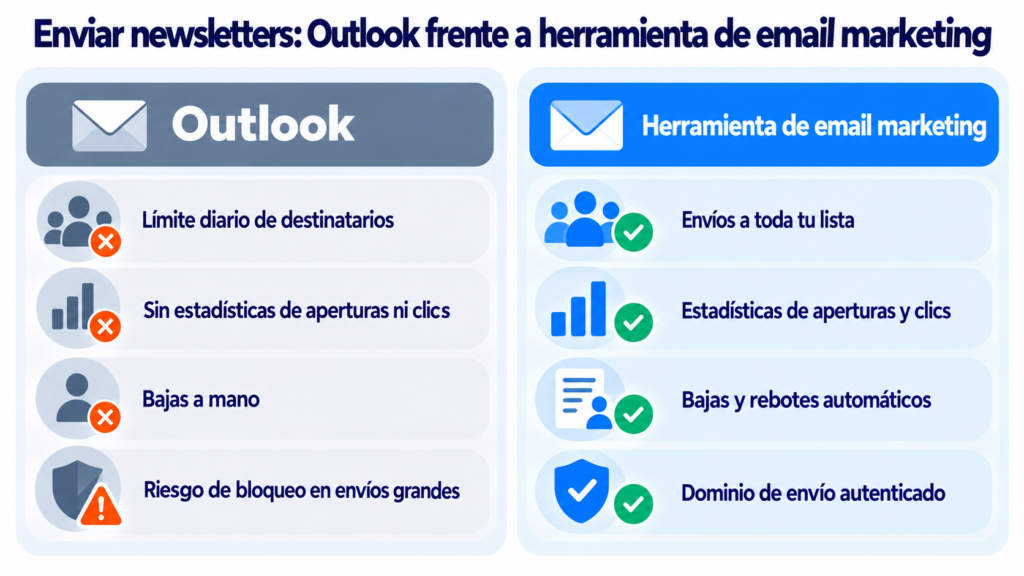
And if you put everyone in CC, each contact sees everyone else’s address. BCC prevents that, but doesn’t solve the rest. Above a certain volume, Microsoft requires you to authenticate your domain, just like Gmail and Yahoo.
How Mailrelay helps
With Mailrelay you send your newsletters to your whole list from your own address and with an authenticated sending domain, without the daily caps of a personal mailbox.
The free account includes up to 80,000 emails a month and 20,000 contacts.
You get a visual editor, automations, open and click statistics and automatic handling of unsubscribes and bounces, with human support on every plan. Details on our pricing page.
Move from Outlook to an email marketing tool
Templates, automations and statistics, with human support on every plan.
Outlook FAQ
These are the most common questions.
Is Outlook free?
Yes. Outlook.com and the app are free. You only pay if you want Microsoft 365, with more storage and the classic version.
Are Outlook and Hotmail the same thing?
Yes. Hotmail has been part of Outlook.com since 2013, and @hotmail.com addresses are used on the same website.
What is the website to sign in to Outlook?
For personal accounts, outlook.com. For work accounts with Microsoft 365, outlook.office.com.
Why can’t I set up my email in another program?
It’s almost always for one of two reasons: IMAP or POP access is turned off, or the program doesn’t support OAuth2. Turn on access in the settings and use a version that supports modern authentication.
Can I change my Outlook address?
You can’t change it, but you can add an alias: a new address on the same account, with the same mailbox and the same contacts.