iCloud Mail: what it is, how to sign in, create your address and set up Apple's email
Everything you need to use Apple's email, even if you don't have an iPhone
iCloud Mail is Apple’s free email service: an @icloud.com address you read in the Mail app on your iPhone, iPad or Mac, or in a browser at icloud.com.
Here’s how to sign in, how to create your address, the settings for using it in other apps and what limits it has.
What is iCloud Mail?
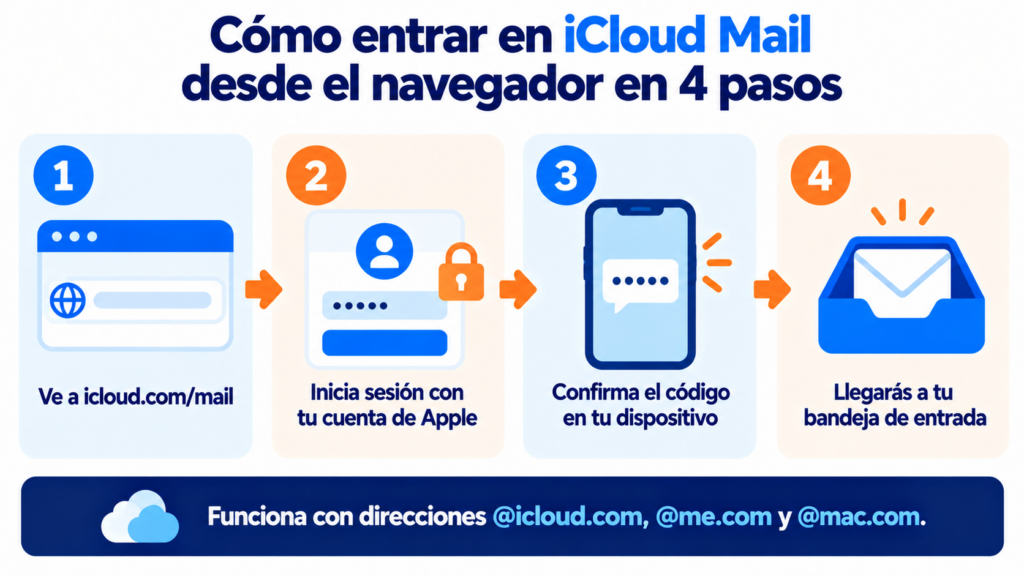
It’s the email that comes with your Apple Account. Addresses end in @icloud.com, although the older @me.com and @mac.com addresses still work.
It’s integrated with your Apple devices, but you don’t need them to use it. From any browser, including on Windows or Android, it works as a webmail service.
Don’t confuse iCloud Mail with Apple’s Mail app. The app is an email client where you can read iCloud, Gmail or Outlook accounts.
How do you sign in to iCloud Mail?
On an iPhone, iPad or Mac, just open the Mail app if iCloud Mail is turned on in your settings. From a browser:
- Go to icloud.com/mail.
- Sign in with your Apple Account (formerly Apple ID).
- Confirm the verification code on one of your devices.
- You’ll land in your inbox.
In the browser you also have the settings: rules, signature, automatic reply and forwarding to another address.
Do you email your customers from iCloud Mail?
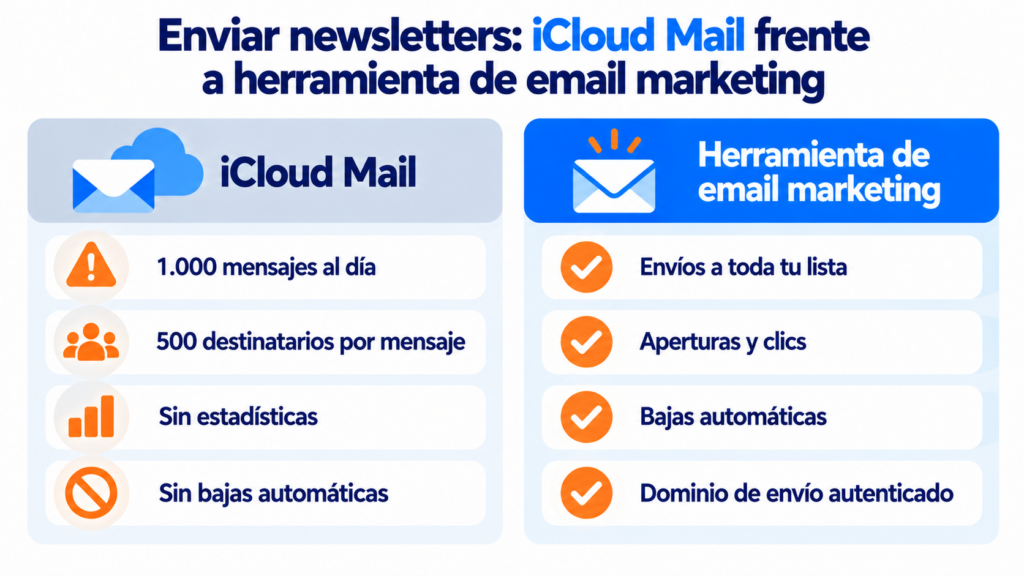
With Mailrelay you send your newsletters to your whole list, without the 1,000-emails-a-day cap, with statistics and automatic unsubscribes. Free account with up to 80,000 emails a month.
How do you create an @icloud.com address?
On your iPhone, go to Settings, tap your name, go to iCloud and turn on iCloud Mail. Apple will ask you to choose the name of your new address.
Think carefully about that email address: the primary one can’t be changed later. What you can do is create up to three @icloud.com aliases, 3 to 20 characters long, that arrive in the same mailbox.
iCloud Mail IMAP and SMTP settings
To read iCloud Mail in another app, use Apple’s official settings. iCloud Mail doesn’t support POP, only IMAP and SMTP.
| Setting | Incoming (IMAP) | Outgoing (SMTP) |
|---|---|---|
| Server | imap.mail.me.com | smtp.mail.me.com |
| Port | 993 | 587 |
| Encryption | SSL (or TLS if you get an error) | SSL/TLS or STARTTLS |
| Username | The part before the @ (or the full address) | The full address |
| Password | An app-specific password | The same one |
The password isn’t your Apple Account password. You need an app-specific password, which you generate on your Apple Account website with two-factor authentication turned on.
How much storage does it have and how many emails can you send?
Email uses your iCloud storage: 5 GB free, shared with photos, backups and iCloud Drive. If it fills up, you can’t send or receive. To get more, you need to subscribe to iCloud+.
Each message can be up to 20 MB. With Mail Drop, large attachments are uploaded to iCloud and you can send up to 5 GB.
And there’s a sending cap: 1,000 messages a day, 1,000 recipients a day and 500 recipients per message.
Hide My Email and custom domain
With an iCloud+ subscription you get two more features.
Hide My Email creates random addresses that forward to your mailbox. They’re useful for signing up on websites without giving your real address, similar to a temporary email but permanent.
Custom Email Domain lets you use iCloud Mail with your own domain: up to five domains and ten addresses per domain. It isn’t available in every country.
iCloud Mail, Gmail or Outlook?
All three are free. What changes is the ecosystem you already use.
| If you… | Best choice |
|---|---|
| Use an iPhone, iPad and Mac | iCloud Mail |
| Use Android or Google services | Gmail |
| Work with Word, Excel and Teams | Outlook |
| Want more storage without paying | Gmail or Outlook (15 GB vs. 5 GB) |
| Need email for your company | A corporate email service like Google Workspace |
It’s not a good idea. With 1,000 messages a day and 500 recipients per send, any medium-sized list falls short. You also don’t get statistics or automatic unsubscribes, and if you CC everyone, each contact sees everyone else’s addresses.
If you send newsletters, subscribers who read in Apple’s Mail app affect you in a different way. Since 2021, its privacy protection downloads images in advance, so many opens aren’t real. Look at CTR rather than open rate.
For sending to your whole list, there are bulk email tools, which respect each provider’s sending limits.
How Mailrelay helps you
With Mailrelay you send your newsletters to your whole list with your own address and an authenticated sending domain, without the daily cap of a personal email account.
The free account includes up to 80,000 emails a month and 20,000 contacts.
You get a visual editor, automations, open and click statistics and automatic handling of unsubscribes and bounces, with human support on every plan. Details on our pricing page.
From Apple’s email to an email marketing tool
Templates, automations and statistics, with human support on every plan.
iCloud Mail FAQ
These are the most common questions.
Is iCloud Mail free?
Yes. It comes with your Apple Account and includes 5 GB of shared storage. You only pay if you want more storage or the iCloud+ features.
Can I use iCloud Mail on Android or Windows?
Yes. From a browser, at icloud.com/mail, or in the email app you use, with the IMAP and SMTP settings and an app-specific password.
Can you change your @icloud.com address?
Not the primary one. You can create up to three @icloud.com aliases that arrive in the same mailbox.
Does iCloud Mail support POP?
No. It only works with IMAP for receiving and SMTP for sending.
How many emails can I send per day with iCloud Mail?
Up to 1,000 messages a day, to a maximum of 1,000 recipients a day and 500 per message.