Forwarding
The button that gives your emails (and your newsletters) a second life
You get a quote that your business partner needs to see. Or a newsletter you know a friend will love. Instead of copying the text, you click a button and the message goes out to someone else. That’s forwarding an email.
It’s one of the most common things people do with email. But it has its own rules, a few risks and a curious effect on your email marketing campaigns.
What does forwarding an email mean?
Forwarding an email means sending a message you’ve received to someone else, with its original content and, usually, its attachments. In Spanish, it’s called reenviar.
When you do, your email program creates a new message that is sent from your account. The subject line stays the same, with a prefix in front: “Fwd:” in Gmail and “RV:” in the Spanish-language versions of Outlook. And the email body shows the original message with its sender, date and subject line.
You choose the new recipient and can add a comment above it. The person who wrote to you (the original sender) gets no notification that you’ve shared their message.
“Reenviar” or “renviar”?
Both spellings of the Spanish verb exist, but they don’t carry the same weight. The RAE (Royal Spanish Academy) says that “reenviar” is the most widely used spelling today, although it doesn’t consider “renviar” incorrect. Fundéu recommends the form with a double e.
Watch the accents when conjugating it, too: “yo reenvío”, “ella reenvía”. And pronouns are attached to the verb: “reenvíamelo”.
Forward, reply and reply all
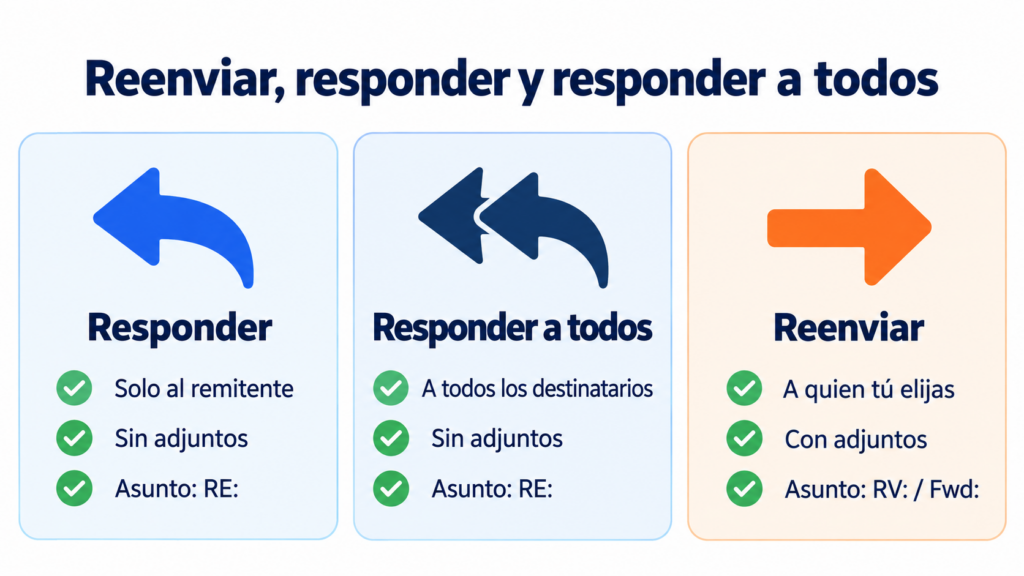
These three buttons sit side by side, and they’re often confused. Here are the differences:
| Action | Who it goes to | What it includes | Subject line prefix |
|---|---|---|---|
| Reply | Only the sender | Your reply and the quoted message | RE: |
| Reply all | The sender and all recipients and CC’d addresses | Your reply and the quoted message | RE: |
| Forward | Whoever you choose | The original message and its attachments | RV: / Fwd: / FW: |
The key difference is attachments. When you reply, they’re usually left out; when you forward, they’re included. If someone needs a file that came with the email, forwarding the email is the quickest way.
How to forward an email
It works the same way in almost every email program. Open the message, click “Forward” (an arrow pointing right), type the recipient’s address, add a comment if you want and send it.
In Gmail you can also forward an email as an attachment: select the message, open the more options menu and choose “Forward as attachment”. Outlook has the same feature. It’s useful when you want to keep the original headers, for example to report a phishing attempt to your security team.
You can also set up automatic forwarding. In Gmail, you turn it on in your account settings, and the destination address has to confirm it with a code. In Outlook, you do it with a rule. In Microsoft 365 business accounts, automatic forwarding to external addresses has been turned off by default since 2021. If you try it, you’ll get the error “5.7.520”.
Best practices for forwarding an email
It’s an easy thing to do, and that’s exactly why you should take care when forwarding an email:
- Add context. Explain in a line or two why you’re sending it and what you expect from the recipient. If it’s just to keep them in the loop, an “FYI” at the top makes that clear.
- Clean up the thread. Delete old messages that add nothing and repeated signatures.
- Protect email addresses. If you’re sending it to several people who don’t know each other, use BCC.
- Check the attachments. Remove any you don’t need and make sure there’s no confidential information.
- Ask for permission if the content is private. A personal email shouldn’t be shared without its author knowing.
- Don’t forward chain letters or hoaxes. And if a message looks suspicious, don’t pass it on to your contacts: alert your security team.
What happens to authentication when you forward an email
There’s a technical detail here that affects deliverability. When a server automatically forwards a message, it sends it from its own IPs. That’s why the original domain’s SPF check usually fails.
The DKIM signature, on the other hand, survives as long as the message isn’t modified along the way. That’s why you should always sign your emails with DKIM, as well as publish a DMARC policy. There’s also a standard, ARC, that lets providers record that a message was already authenticated before it was forwarded.
Make your newsletters worth forwarding
With Mailrelay you create engaging campaigns and see in real time who opens and clicks.
Forwarding in email marketing
A subscriber forwarding your newsletter is a good sign. It means they found the content useful and are recommending you. It’s word-of-mouth marketing in its purest form.
But it has two effects you should know about. First: the forwarded email keeps the original subscriber’s unsubscribe link. If the person who receives it clicks “unsubscribe”, they may unsubscribe the person who sent it to them. Second: opens and clicks on that copy are credited to the original subscriber, so your open rate may be slightly inflated.
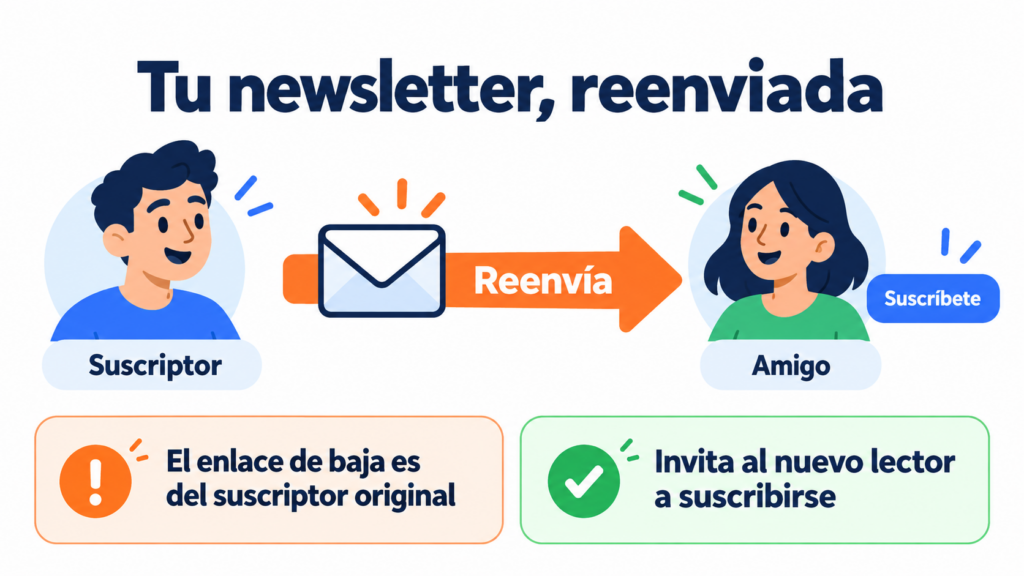
How can you encourage forwarding without these problems? Add a line to the email like “Was this forwarded to you? Subscribe here”, with a link to your double opt-in form. That way the new reader gets their own emails, with their own unsubscribe link. You can also share the web version of the campaign instead of the email.
Be careful with “send to a friend” forms where the company emails the address the subscriber enters directly. That person hasn’t given their consent, and the GDPR requires a legal basis for sending them commercial communications.
How Mailrelay helps
With Mailrelay you can publish an archive of your newsletters and share each campaign with a link. You can also create double opt-in forms so anyone who gets your newsletter from a friend can subscribe in one click. And the statistics show you the opens and clicks for every send in real time.
The free account includes up to 80,000 emails a month and 20,000 contacts. There’s human support on every plan: by ticket on the free plan, by ticket and chat on Standard, and by ticket, chat and phone on Enterprise.
Turn every forward into a new subscriber
Double opt-in forms and up to 80,000 free emails a month, with human support on every plan.
Forwarding FAQ
What does forwarding an email mean? Sending a message you’ve received to someone else, with its content and attachments. The subject line starts with “RV:” or “Fwd:”.
In Spanish, is it spelled “reenviar” or “renviar”? The most common and recommended form is “reenviar”. The RAE doesn’t consider “renviar” incorrect, but it’s used much less.
What’s the difference between replying to and forwarding an email? When you reply, the message goes to the sender. When you forward, it goes to someone else you choose, usually with the attachments.
Does the sender know if I forward their email? No. The original sender gets no notification, unless you copy them in.
How do you forward an email automatically? In Gmail, from your account settings, by confirming the destination address. In Outlook, with a rule. In business accounts, it may be blocked by the administrator.