Business Model Canvas: what it is, its 9 building blocks and a free template
How to sum up your business on a single page, with an example and a free template to create your own

How to sum up your business on a single page, with an example and a free template to create your own
Could you explain your business on a single page? Who you sell to, what you offer them, how they find you and where the money comes from. If you find it hard, you’re not alone.
That’s what the Business Model Canvas is for. It’s a visual tool that lays out your whole business on one page, and it has become the most widely used way to design or review a business model.
The Business Model Canvas is a one-page template that describes how a company creates, delivers and captures value, divided into nine building blocks. Those blocks range from customers to costs, covering the value proposition, channels and revenue along the way.
In this guide you’ll see what it is, how to fill in each block, a complete example and a free PDF template to create your own.
The Business Model Canvas was created by Alexander Osterwalder. It grew out of Osterwalder’s 2004 doctoral thesis at the University of Lausanne, supervised by Yves Pigneur.
The tool became popular in 2010 with the book Business Model Generation, which the two of them wrote together with hundreds of contributors from dozens of countries.
Since then it has been used in business schools, incubators and companies of all sizes.
It goes by several names: the Canvas model, the business model canvas or, in its original form, Business Model Canvas. They all refer to the same thing.
The Business Model Canvas isn’t just for people starting out. It’s useful in four different situations:
To launch a business. It forces you to think everything through before investing: who will buy, how much they’ll pay and how much it will cost you to reach them.
To review one that’s already up and running. Over the years, businesses change and sometimes nobody writes it down. The canvas shows you what has changed and what no longer fits.
To compare alternatives. You can create two canvases, one per option, and see which one makes more sense. It’s useful before a product launch or before entering a new market.
To explain your business. To a partner, an investor or your own team. A single page is easier to understand than a long document.
In every case, the canvas is part of strategic marketing: first you decide what kind of business you want to be, and then how to communicate it.
Its big advantage is the overall picture.
Instead of a fifty-page document, you have your entire business model on one page. And you can see at a glance how a change in one block affects the others.
The canvas is divided into nine building blocks. The right-hand side is about your customers. The left-hand side is about how your company works on the inside. And in the middle is your value proposition, which connects the two.
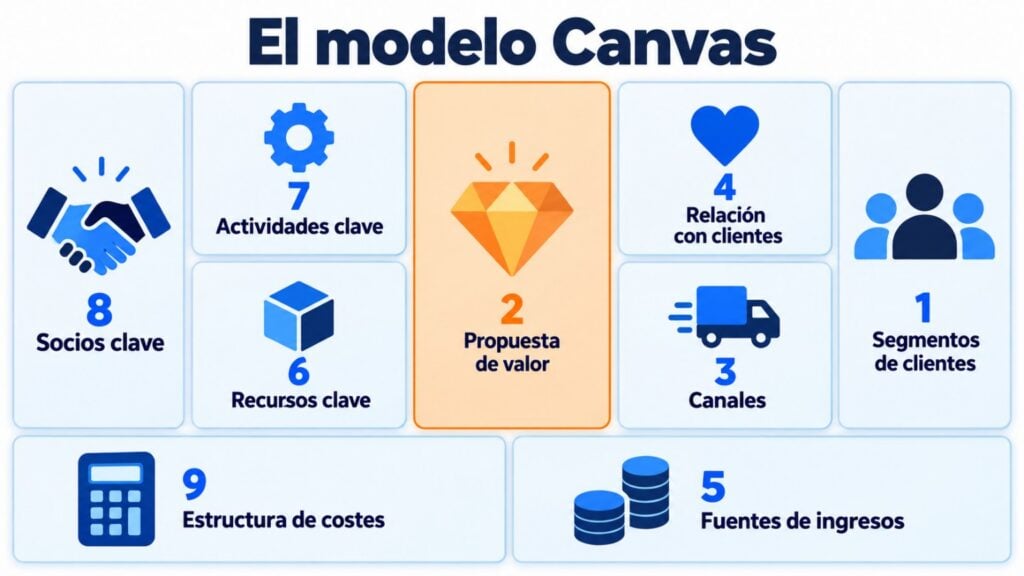
Let’s go through each block with the question you need to answer.
Who are you creating value for? This is where you define the groups of people or companies you’re targeting. There can be one or several, and each one may need something different.
The more specific you are, the better. Defining your target and creating a buyer persona for each segment will help.
What problem do you solve and why would they choose you? This is the heart of the canvas. Describe what you offer each segment and your competitive advantage over other options.
If you struggle to sum it up in one sentence, start with your USP, your unique selling proposition.
How do you reach your customers? This includes how they find out about you, how they buy and how they receive the product. A physical store, a website, a marketplace or a newsletter are all channels.
Also review your distribution channels: they don’t all cost the same or reach each segment equally well.
What kind of relationship do your customers expect? It can be personal, automated, self-service or community-based.
This block is often left half-finished. Yet it carries a lot of weight in customer loyalty, because keeping a customer costs less than acquiring a new one.
What are your customers willing to pay for, and how do they pay? One-off sales, subscriptions, commissions, advertising or licensing are different revenue streams.
Also note down the price of each one and how much it contributes to the total.
What do you need to make everything work? They can be physical, intellectual, human or financial resources: a warehouse, a brand, a team or a line of credit.
What do you absolutely have to do well? Manufacturing, selling, providing support, developing software or running a platform, depending on your business.
Who do you team up with? Suppliers, distributors, partner companies or outside services that do what you can’t or don’t want to do.
What are your most important costs? They come from your resources, activities and partners.
Compare them with what each customer brings in over time, their lifetime value. Also include what it costs you to acquire each customer, the acquisition cost.
Fill your channels block with a channel you own
Create your newsletter and send up to 80,000 emails a month for free with Mailrelay.
Now you know the blocks. Time to fill them in. These six steps will help you do it in an hour or two.
Use the PDF template from this article or draw the canvas on a whiteboard. What matters is seeing all nine blocks at once.
Fill in the right-hand side first: segments, value proposition, channels and relationships. Without clear customers, the rest of the canvas makes no sense.
Write down how and how much your customers pay. If a segment pays nothing, explain how you fund it.
Resources, activities, partners and costs. Ask yourself what you need to deliver what you promise on the right-hand side.
Write one idea per note. That way you can move, change or throw them away without redoing the whole canvas.
A canvas is made of hypotheses, not certainties. Test each block against real data and review it every few months or whenever something important changes. For example, when your product moves into another stage of its life cycle.
Here’s a PDF template ready to fill in on your computer or print out. It has three pages:
Download the Business Model Canvas template
Fillable PDF: the canvas, the guiding questions for each block and a complete example. Free, no sign-up required.
Imagine a small online store that sells natural cosmetics made in Spain. This is what its Business Model Canvas would look like:
| Block | Natural cosmetics store |
|---|---|
| Customer segments | Women aged 30 to 50 in Spain looking for natural, locally made products |
| Value proposition | Natural cosmetics, free of harsh ingredients and made in small batches |
| Channels | Online store, Instagram, newsletter and a few neighborhood shops |
| Customer relationships | Newsletter with skincare tips, customer service by email and a loyalty points program |
| Revenue streams | Online sales, gift packs and a monthly moisturizer subscription |
| Key resources | Own formulas, brand and subscriber list |
| Key activities | Manufacturing, order shipping and content creation |
| Key partners | Manufacturing lab, courier company and packaging suppliers |
| Cost structure | Raw materials, shipping, advertising and an email marketing tool |
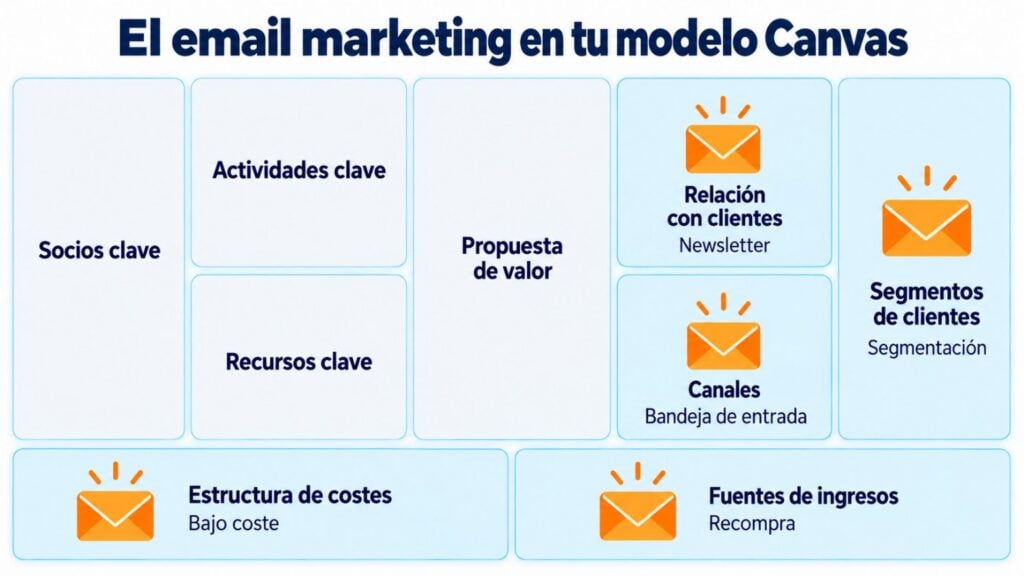
Look at the subscriber list. It appears as a key resource, as a channel and as a way of building relationships.
It’s one of this store’s most valuable assets, because the store owns it and it doesn’t depend on an algorithm.
With the canvas in front of it, the store can ask itself useful questions.
Is advertising worth it compared with the newsletter? Could the monthly subscription become its main source of revenue? To decide which products to push, it can also rely on the BCG matrix.
The Lean Canvas is an adaptation of the Business Model Canvas created by entrepreneur Ash Maurya. It’s designed for startups and new projects, where there are still more questions than answers.
It keeps the same single-page idea, but changes four blocks:
| Business Model Canvas | Lean Canvas |
|---|---|
| Key partners | Problem |
| Key activities | Solution |
| Key resources | Key metrics |
| Customer relationships | Unfair advantage |
Which one should you use? If your business is already up and running and you want to review it, the Business Model Canvas. If you’re validating an idea, the Lean Canvas, together with a minimum viable product to test it with real customers.
Email isn’t just a communication tool. It appears in several blocks of your canvas at once:
| Block | The role email plays |
|---|---|
| Channels | Bringing your news to the inbox of people who already know you |
| Customer relationships | Staying in touch with a newsletter and welcome emails |
| Customer segments | Getting to know each group better and speaking to each one differently with segmentation |
| Revenue streams | Selling more to people who already buy and recovering abandoned carts |
| Cost structure | A low-cost channel compared with paid advertising, with a good ROI |
Email also helps you validate the hardest block of all: the value proposition.
How do you know which value proposition will work best? Ask your customers. Email lets you get to know them, because it’s a two-way, private channel: each contact can reply to you comfortably, without exposing themselves in front of anyone. Ask your subscribers what they value most about your product and build your proposition from their answers. With that same data, you’ll also be able to segment your list. My advice: include a single open-ended question in your next newsletter and pay attention to the words they use. Those are the ones that will work best in your value proposition.
Jose Argudo, CMO at Mailrelay
With mailing automation, each segment gets its own message with no extra work. And if you store your customer data in a CRM, your customer relationships block will be much more complete.
Ask your customers what they value
Send a survey to your list, segment by their answers and measure which message works best.
The canvas is simple, but it’s easy to fall into a few traps:
The Business Model Canvas works best alongside other tools.
A SWOT analysis gives you a snapshot of your starting point, Porter’s 5 forces show you your industry and the Ansoff matrix helps you choose how to grow. The 4Ps of marketing define how you’ll sell. Then all of that turns into actions in your marketing plan.
With Mailrelay you can fill several blocks of your canvas from a single tool. You build your subscriber list with forms, send your newsletter and segment your contacts based on what they buy or what they tell you.
Automations let you welcome new customers and stay in touch with the ones you already have. And the statistics for each campaign tell you which messages work.
The free account includes up to 80,000 emails a month and 20,000 contacts.
It’s a way to add a channel you own to your business model without increasing your cost structure. If you sell online, here are some ideas for email marketing for ecommerce.
From canvas to action
Get your customer relationships going with newsletters and automations, with human support on every plan.
These are the most common questions about the Business Model Canvas.
It’s a one-page template that describes a company’s business model in nine building blocks: customer segments, value proposition, channels, customer relationships, revenue streams, resources, activities, partners and costs.
It’s used to design a new business, review one that’s already up and running or compare alternatives. With everything on one page, you can see how the parts relate to each other and where the weak spots are.
Alexander Osterwalder, building on a 2004 doctoral thesis. It became popular with the book Business Model Generation (2010), co-written with Yves Pigneur.
The Lean Canvas, by Ash Maurya, adapts the Business Model Canvas for startups. It replaces partners, activities, resources and customer relationships with problem, solution, key metrics and unfair advantage.
Yes. You don’t need to be a large company: an hour and the template are all it takes. For a small business, it’s a way to organize ideas, spot gaps and decide where to put its budget.

Jose Argudo
CMO at Mailrelay. Writes about email marketing, copywriting and conversion for small businesses and entrepreneurs.