What is a prompt and how to write a good one: 10 techniques and examples for your emails
The instruction that turns a generic AI answer into an email that sounds like your brand

The instruction that turns a generic AI answer into an email that sounds like your brand
You ask ChatGPT to write this month’s newsletter and it gives you back a text that is correct, polite… and that any company could sign.
The problem is almost never the tool. It’s the instruction you gave it.
That instruction has a name: prompt. In this article you’ll see what a prompt is, what parts a good one has and 10 techniques to write them better. All the examples are designed for what people ask an AI for most in marketing: writing emails, subject lines and newsletters.
A prompt is the text you use to ask an artificial intelligence for something: a question, an order or a task with all its context. It’s what you type into the ChatGPT, Gemini or Claude box.
Right before you press Enter.
The word comes from English. In the theater, to prompt is what the prompter does when they whisper the lines to an actor. In computing, the prompt was the indicator the command line showed to ask you for a command.
You may also hear it called an instruction, request or directive. They are valid synonyms and you’ll see them in this text.
There are many types. These are the ones you’ll come across most often:
| Type of prompt | What it is | Example |
|---|---|---|
| Simple instruction | A short order, without context | “Write a subject line for Black Friday” |
| With context | The order plus details about you, your reader and your goal | “I have an online coffee shop and my subscribers are…” |
| With examples | You show it one or more models so it imitates the style | “This is how we write: [paste one of your emails]” |
| System prompt or custom instructions | Fixed rules the AI applies in all your conversations | “Always write informally and without emojis” |
| Chained | A big task split into several prompts in a row | First the outline, then each section |
| Image | The description of the image you want to generate | “Flat illustration of a coffee cup on an envelope” |
If you want to understand what’s behind these tools, you’ll find more detail in our entry on ChatGPT.
And if you’re interested in the full picture, see how artificial intelligence is used in digital marketing.
An AI agent goes one step further: it doesn’t just answer, it also carries out tasks.
In 2024, Google published a guide to writing prompts in Gemini for Workspace. According to that guide, a good prompt covers four areas: who you are, what you need, the context and the format of the answer. You don’t always need to use all four, but each one you add improves the result.
The same guide gives a curious fact: the prompts that worked best in its tests were about 21 words long on average. You don’t need to write a huge paragraph. Just give the information the AI can’t guess.
This is how each part would look in an email marketing task:
| Part | What it adds | Example |
|---|---|---|
| Role (who you are) | The point of view and level of the answer | “You are the marketing manager of a language school” |
| Task | What it has to do, with a clear verb | “Write the welcome email for new subscribers” |
| Context | What the AI doesn’t know about your business and your reader | “They sign up through a free level test. They want to improve their English for work” |
| Format | How you want to receive the answer | “Subject line under 45 characters, 120 words and a single button” |
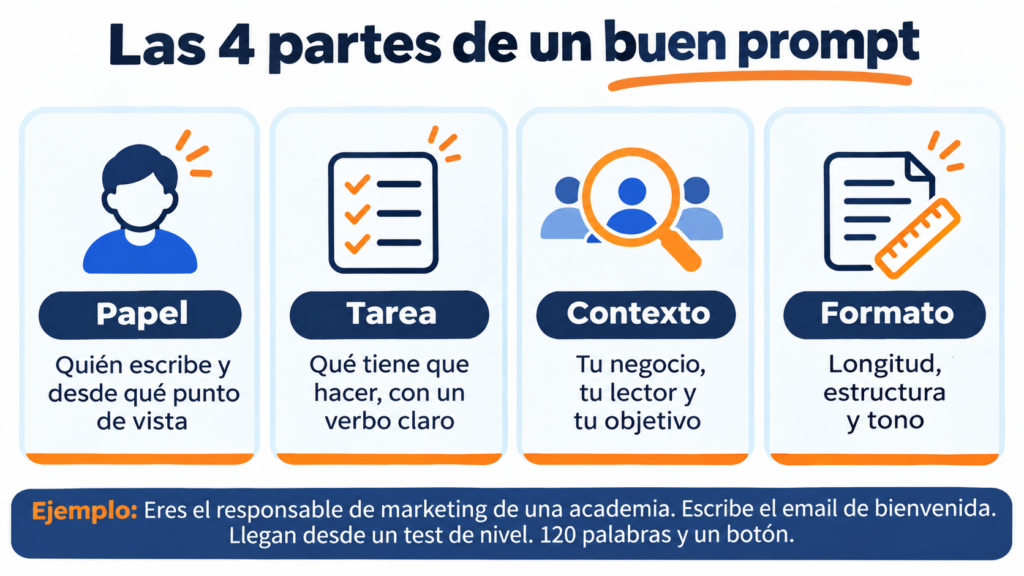
Together, these four pieces make a prompt of about 50 words. And the difference from a plain “write a welcome email” shows from the very first line.
Try your prompts in the Mailrelay editor
The editor’s AI helps you with subject lines and content, on the free account too: up to 80,000 emails a month to 20,000 contacts.
These techniques work with any tool. Each one includes an example for your email campaigns that you can adapt and copy.
The first sentence should say what you want: write, summarize, rewrite, suggest, correct. OpenAI recommends putting the instructions at the beginning and separating them from the rest of the text.
If you start by telling the story of your company, the AI has to guess what you’re asking for. It’s the same principle as a good call to action: what you want, up front and without beating around the bush.
Prompt to copy: “Rewrite this email so it can be read in under a minute. Keep the offer and the button. [paste your email here]”.
The AI doesn’t know your business, your list or what you’ve already sent.
It doesn’t know who you’re writing to. The better you describe your reader, the less generic the text will be.
Think about your buyer persona: what they do, what worries them and why they joined your list.
An example you can adapt: “My subscribers own small online stores. They signed up to get sales ideas. Many sell only through Instagram and don’t have time to read long texts”.
Asking it to act as someone specific changes the vocabulary and the point of view. A “copywriter for a natural cosmetics brand” doesn’t write the same way as a “marketing expert”.
Choose a role close to your own. If you ask it to be a guru, it will give you guru phrases.
Prompt to copy: “Act as the person who handles support at a bicycle store. Reply to this customer who is asking about the delay in their order”.
Length, number of options, structure, tone. If you don’t ask for it, the AI decides for you, and it tends to choose long texts with lots of bullet points.
In email this is easy to pin down: the email subject line has a reasonable length, the preheader another, and the body, one or two buttons.
Try it like this: “Give me 5 subject lines under 45 characters and a preview text under 90 for each one. Present it in a table”.
This is the technique that changes the result the most. Paste one or two of your emails that worked and ask it to imitate the style. Specialists call it few-shot prompting: learning from a few examples.
That way the newsletter sounds like your brand and not like everyone else’s. If you’re not yet clear on that style, start by defining your value proposition and the words you use to tell it.
Prompt to copy: “This is one of our emails that worked really well: [paste the email]. Write this month’s one about [topic] with the same tone, the same length and the same way of closing”.
“Don’t use an aggressive tone” leaves many doors open. “Use a friendly tone, as if you were writing to a customer you know” is much easier to follow. OpenAI recommends this in its best practices guide.
Prohibitions work as a complement, but it’s best to pair them with the alternative.
If you want to use humor, here are ideas for funny emails that work.
For example: “Write informally, with short sentences and a touch of humor. Avoid multiple exclamation marks in a row and words in capital letters”.
Asking for “a complete newsletter” in a single instruction produces flat texts. Chaining several prompts works better: first the ideas, then the structure, then each section.
At each step you can correct course before moving on.
And the conversation keeps the context of what came before.
For the ideas, check what it suggests against your marketing calendar.
Prompt to copy: “First, suggest 5 topics for a travel agency’s December newsletter. Don’t write anything else until I choose one”.
The first answer isn’t necessarily the best. Asking for three or five variants gives you material to compare and, while you’re at it, for an A/B test.
It works especially well with subject lines, calls to action and opening sentences.
This is how it could look: “Write 3 versions of the first paragraph: one with a question, another with a fact and another with an everyday situation from my customer’s life”.
When you don’t know what context to give it, ask it to ask you for it. It’s the fastest way to make sure you don’t forget anything important.
You’ll answer four or five questions and the final text will be much more accurate.
Prompt to copy: “I want to write an email to win back customers who haven’t bought anything in six months. Before you write it, ask me any questions you need”.
The first result is a draft, not the email you’re going to send. Read it, mark what doesn’t convince you and ask for specific changes. Good copywriting is still up to you.
“Improve it” tells it nothing. “Shorten the second paragraph and change the button to something more direct” does.
To copy and try: “I like it, but the second paragraph repeats the first one and the button says ‘Learn more’. Shorten it and suggest 3 button texts that talk about the benefit”.
Let’s see the difference in six common tasks. On the left, what almost everyone writes. On the right, the same task using the techniques above.
| Task | Vague prompt | Improved prompt |
|---|---|---|
| Subject line for an offer | “Write a subject line for my sale” | “Write 5 subject lines under 45 characters for a children’s clothing store’s January sale. 30% off until Sunday. No capital letters and no more than one emoji” |
| Monthly newsletter | “Make me a newsletter” | “Write the introduction to a dental clinic’s November newsletter. Readers: patients aged 30 to 50. Topic: how to prepare children for their checkup. 80 words, friendly tone” |
| Welcome email | “Write a welcome email” | “Write the welcome email for an online academy. People arrive from a free level test. Remind them of their result, explain what they’ll receive and end with a button to the first course” |
| Abandoned cart | “Remind the customer that they left their cart” | “Write the first abandoned cart email for a coffee store. It’s sent one hour later. No discount. Friendly tone, 70 words and a button to return to the cart” |
| Follow-up email | “Write a follow-up on my quote” | “Write a follow-up for a client who received a web design quote a week ago and hasn’t replied. Without pressure. Offer a 15-minute call” |
| Reactivation | “Write an email for inactive subscribers” | “Ask me 4 questions about my business and my inactive subscribers. Then write an email asking them if they want to keep receiving our news” |
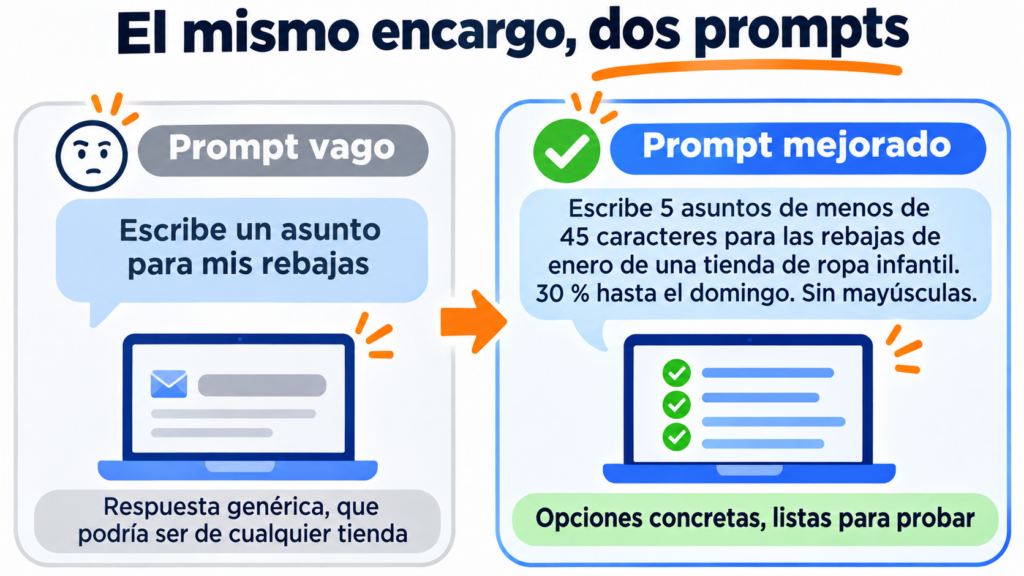
As you can see, the improved prompts aren’t much longer. They add what the AI can’t know: the business, the reader, the timing and the format.
If you’re looking for more ready-to-copy prompts, organized by task, you’ll find them in our guide to AI in email marketing.
A good prompt avoids half the problems; the other half lies in how you use the answer. The most sensitive mistake is pasting your contacts’ personal data: names, emails or purchase histories shouldn’t go into an external tool without checking its privacy terms. To personalize, use your email tool’s dynamic variables.
Don’t take figures at face value either. AI can make up data, dates or studies that sound believable, so check every number before sending it to your list. And avoid contradictory instructions: “short but very thorough” or “formal but very funny” confuse anyone, AI included.
The last step is yours. Don’t copy and send without reading: clichés, exaggerated promises or too many exclamation marks can push your email closer to spam filters. And don’t reuse the same prompt for everything, because what works for a subject line doesn’t work for an apology email: adjust the context to each task.
The best prompts don’t focus only on what you want. Also include your target audience and the constraints (what not to do). That way, the AI will better understand what you want to achieve and what your goals are.
Jose Argudo, CMO at Mailrelay
Once you have the text, the next step is to build it, send it and measure it. Also deciding how often, something we cover in the post on sending frequency. And that’s where your email marketing tool comes in.
The Mailrelay editor includes AI to generate subject lines and newsletter content, on the free account too. You give it the instruction right in the editor and the text appears in your design, without copying and pasting between tabs.
If you prefer to work from ChatGPT or Claude, you can connect Mailrelay with ChatGPT or Claude through our MCP server. That way the assistant can work with your account based on your prompts.
For personalization without passing data to the AI, you have segmentation and custom fields. And to find out which version works best, A/B testing and the statistics for each campaign.
All this with the free account: up to 80,000 emails a month to 20,000 contacts and human support on every plan.
From prompt to inbox
Write with AI, send to your list and measure which version works best. Free, and with human support on every plan.
A prompt is your briefing for the AI. If you give it a vague one, it will give you back a vague text. If you tell it who you are, what you need, who it’s for and how you want it, the first draft will be much closer to the email you’re going to send.
Save the ones that work best for you. With a few well-written ones you’ll have your own library for subject lines, newsletters and automations.
Start writing better emails today
Create your free account and send up to 80,000 emails a month, no credit card required.
These are the most common questions when someone starts writing prompts.
Prompt means instruction, request or directive. In the context of artificial intelligence, it’s the text you write to ask the tool for something.
There’s no fixed length. According to Google’s guide for Gemini, the prompts that worked best were about 21 words long on average. What matters is including the task, the context and the format that the AI can’t guess.
It’s a fixed instruction the tool applies in all conversations. In ChatGPT it’s set up in the custom instructions. It saves you from repeating details like your industry, your tone or the language in every prompt. AI agents also work with one.
In general, yes. The techniques in this article work in all of them. Each tool has its nuances, so it’s a good idea to try the same prompt in two of them and compare.
AI in email marketing
10 uses, prompts to copy and the best tools.
How to connect Mailrelay with ChatGPT and Claude
Step-by-step guide and 20 requests to copy.
How to use ChatGPT in your email marketing strategy
Ideas to make the most of it in your campaigns.
Email marketing trends 2027
Eight changes that are already here, with a template for each one.

Jose Argudo
CMO at Mailrelay. Writes about email marketing, copywriting and conversion for small businesses and entrepreneurs.