What is email marketing? A guide to getting started and getting results
How it works, what you need to get started and how to measure whether your campaigns are getting results
How it works, what you need to get started and how to measure whether your campaigns are getting results
Quick answer: Email marketing is a digital marketing strategy that uses email to help you communicate with an audience that has agreed to receive your messages. It is used to attract, inform, sell to, retain and re-engage customers through segmented, personalized, automatable and measurable campaigns.
You probably already receive newsletters, offers or notifications all the time.
All these emails share the same channel, but that doesn’t make them part of the same type of marketing strategy.
In email marketing, the first thing you need is your contacts’ permission.
That’s the foundation: consent.
Then you’ll need to link your contacts to the information you have about them so you can segment, send and analyze.
Only then will each message meet a specific need of the subscriber.
In this guide you’ll learn what email marketing is, how it works and what it’s for.
You’ll also see its types, metrics, costs and first steps. Plus, you’ll find criteria for choosing a platform without any technical experience.
Email marketing, also called e-mail marketing or emailing, is a form of direct digital communication.
A company sends relevant messages to contacts who have shown interest and provided their email address.
The goal depends on the business and on the stage of the sales funnel the customer is in.
It can introduce a brand, share content, recover a sale, announce something new or encourage another purchase.
Email lets you keep a conversation going throughout the entire customer lifecycle.
Plus, your company decides the message, the segment, the timing and the frequency.
You’re completely free to change these aspects and tailor them to your target audience.
An email marketing strategy brings together five elements:
Without permission, the message can become unsolicited email. Commonly known as spam.
Without analysis, you’ll be taking actions without knowing which ones help your business.
Email is not a channel in decline. It is the digital channel almost everyone has and checks.
These recent figures help put it into perspective:
| Figure | Figure | Source |
|---|---|---|
| Email users worldwide | More than 4.4 billion | The Radicati Group, Email Statistics Report 2024-2028 |
| People aged 16 to 74 who use the internet in Spain | 96,3 % (2025) | INE (Spanish National Statistics Institute), ICT Household Survey 2025 |
| Average open rate in Spain | 32.9% (clicks: 2.1%; global average: 34.2% and 3%) | GDMA, International Email Benchmark 2026 (2025 data) |
| Companies that get $10 to $36 for every dollar invested in email | 35% (another 30% get $36 to $50) | Litmus, State of Email 2025 |
| Share of automations | 2% of emails sent and 37% of email-generated sales | Omnisend, Ecommerce Marketing Report 2025 (2024 data) |
| Opens affected by Apple’s privacy protection | Between 55% and 60% | Litmus, email client market share (September 2026) |
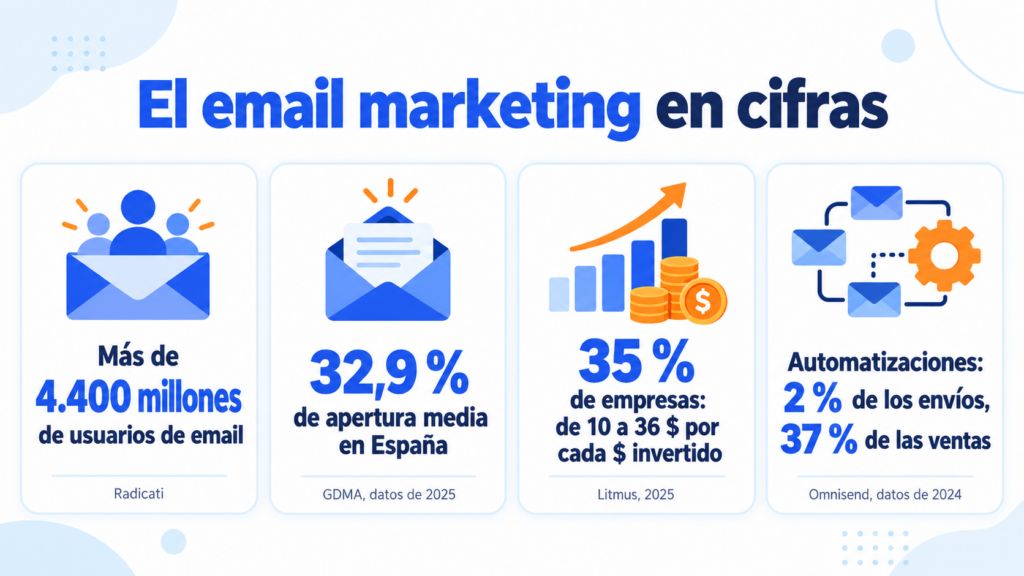
The takeaway is simple. Almost all your customers have email and use it every day. And most companies that measure it get back far more than they invest.
But the last figure is a warning: the open rate is no longer a reliable metric. Later on you’ll see what to measure instead.
They’re the same thing written in different ways. You’ll see “email marketing”, “e-mail marketing”, “e mail marketing”, “mail marketing” or simply “marketing by email”.
They all refer to the same strategy: sending email messages to people who have agreed to receive them. In this guide we use “email marketing”, which is the most searched form.
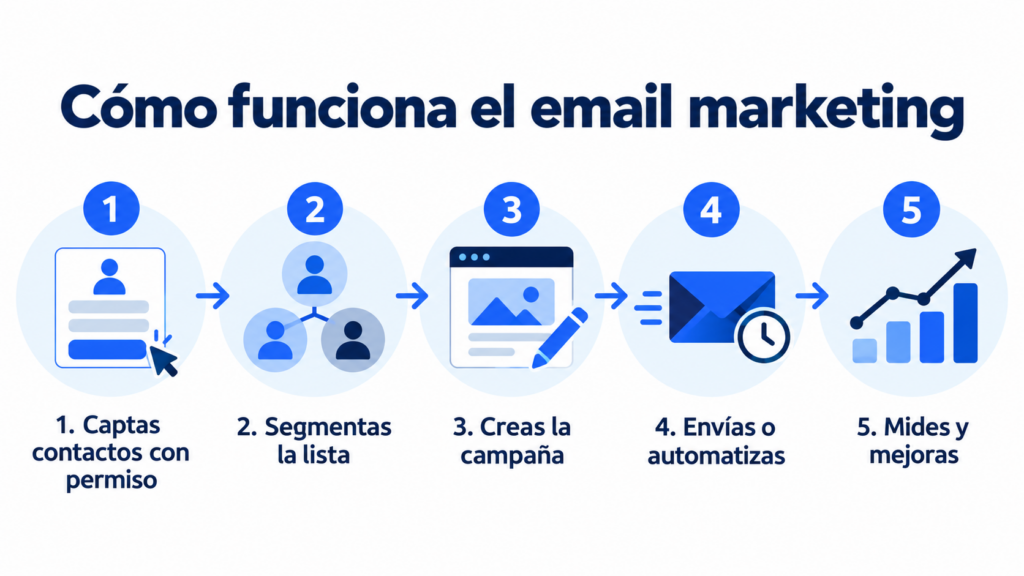
The process starts even before you write the subject line.
First you need to collect contacts the right way. Then you organize the information, create the message, send it and analyze the response.
Easy, right? Let’s go through it step by step in detail.
You can use forms on your website, downloadable content (a lead magnet), sign-ups, events or the checkout process.
Clearly explain what emails you’ll send and roughly how often. With double opt-in, the contact confirms their subscription from an initial email.
On top of that, always remember to offer an easy way to unsubscribe.
Never buy databases.
Those contacts aren’t expecting your messages and can lead to complaints, bounces and reputation problems for your sending domain.
Put simply, your sender could end up blocked.
A list doesn’t have to work as a single monolithic block.
You can organize your contacts into subscriber groups by interests, location, history, funnel stage or past interaction. Store that data in custom fields to personalize each message.
Segmentation in email marketing increases relevance.
For example, a repeat customer needs a different message from someone who has just subscribed.
Set one main goal and one call to action.
Then write a clear subject line, a useful preheader and a body that’s easy to scan.
The design must adapt to mobile.
Send a few tests to several of your own email addresses before the final send.
A one-off campaign is scheduled for a segment and a date.
An automation (or autoresponder), on the other hand, is triggered when a condition is met.
That condition can be a subscription, a date or an interaction. The system then sends the planned content without you repeating the manual work.
You need to choose which option best suits your needs at any given time.
For example, an automation is very useful for sending a welcome email to new subscribers, while a one-off offer is something you’ll use at specific moments.
After sending, review deliveries, bounces, clicks, unsubscribes and conversions.
Also look at which links generate interest and which segments respond best.
Mailrelay gives you all this information so you can improve your next sends.
A single campaign offers clues, but a series reveals trends.
Compare equivalent periods and adjust only one thing at a time (content, frequency, send times). That way you’ll know how each change affects the results.
Launch your first campaign
Create your free account and send up to 80,000 emails a month to 20,000 contacts, with an editor, automations and statistics.

Email marketing works for small businesses and large teams alike.
That’s thanks to its combination of reach, impact and affordable cost.
It suits every budget, so it fits every kind of business. You’ll find them in more detail in the benefits of email marketing.
Your list is an asset managed by your company.
It’s yours.
Unlike social media, paid ads and so on.
Your list is always available to you.
That’s why you don’t depend on a social network’s organic reach or on the budget needed for ads.
You just need to respect your contacts’ consent.
You can tailor the name, the content, the offer or the send time.
Plus, segmentation keeps you from sending the same message to people with different needs.
You have powerful segmentation tools at your disposal.
A campaign can reach thousands of contacts without multiplying the work.
The cost will depend on the volume, the features and the email marketing provider you choose.
And it usually pays off. According to Litmus’s State of Email 2025 report, 35% of companies get back between $10 and $36 for every dollar invested in email. Another 30% get back between $36 and $50.
With Mailrelay you get a free account that lets you send up to 80,000 emails a month to up to 20,000 contacts.
Welcome, follow-up or re-engagement sequences run on predefined rules.
This saves you time without neglecting your marketing efforts.
The impact shows in sales. In Omnisend’s analysis of 2024, automated emails were only 2% of sends, but they generated 37% of email-attributed sales.
Email marketing lets you analyze deliveries, clicks, conversions, unsubscribes and other indicators.
With that data you can tie performance to business goals.
As a benchmark, in Spain the average open rate is around 32.9% and the click rate around 2.1%. These are 2025 figures from the GDMA’s international benchmark. Always compare against your own previous sends: your industry and your list matter more than the average.
You’ll know whether it’s working for you or not. And that way you can assess the ROI.
A sale rarely comes from a single touchpoint.
Your customers are probably weighing options, comparing, analyzing.
Even more so today, when AI tools let them do this quickly and effortlessly.
That’s why email is, more than ever, a tool for educating, handling objections and keeping your brand top of mind for longer.

Every email marketing campaign should serve a specific goal.
Ideally, one you’ve set beforehand.
This table sums up the most common formats and when they can help you:
| Campaign type | Main goal | Example |
|---|---|---|
| Newsletter | Inform and maintain the relationship with the contact | Weekly or monthly selection of tips and news |
| Promotional | Generate sales or sign-ups | Offer with a call to action |
| Welcome | Start the relationship | Series introducing the brand and its resources |
| Lead nurturing | Support a decision | Educational sequence by problem or interest |
| Abandoned cart | Recover a purchase | Reminder of products left in the cart |
| Post-purchase | Improve experience and repeat purchases | Usage tips and related products |
| Re-engagement | Recover inactive contacts | Preferences question or incentive |
| Survey | Collect information | Request for feedback after a purchase |
| Event | Drive attendance | Invitation, reminder and follow-up |
| Seasonal | Make the most of a relevant moment | Christmas or back-to-school campaign |
A newsletter can educate and build loyalty. An automated sequence, for its part, accompanies individual actions with timely messages.
All these campaigns are part of an email marketing strategy; use the ones you need for your own strategy.
If you want to see each format with subject line examples and tips, we’ve explained the 12 types of email marketing one by one, and you’ll also find 20 complete email marketing examples you can copy.

These terms aren’t the same thing, but they’re often confused, so here’s a quick explanation of each:
As you can see, the number of emails doesn’t define the strategy on its own.
Relevance, permission and professional management make the difference.
If you want to dig deeper, see how to keep your emails out of spam.
When you’re starting out, it’s best not to overcomplicate things.
Start with a goal that’s useful for your company, for example increasing sales over a given period.
With that goal in mind, work out the “how”: the way you’re going to achieve it. That might be by sending a series of emails with offers. Decide how many emails you’ll send.
Carry out the action and analyze the results to find out which parts to change.
That’s the best approach: start with something simple, learn, and build up from there.
Let’s go through it step by step.
Choose a specific goal: getting first purchases, increasing bookings, educating prospects or winning back inactive customers.
Then assign an indicator that shows progress.
That indicator can be sales, visits to your website, customers replying to your emails, visits, whatever works.
Once you know what goal you want to achieve, you need to think about your target audience:
This information will guide the content of your emails, as well as their tone.
To generate a steady flow of new subscribers, develop a strategy that explains the benefit of signing up.
It could be learning, early access, news, resources or promotions.
Then keep that promise in every send.
This is where an automation is most useful, to send an introduction to new contacts.
You can introduce yourself and briefly explain the emails they’ll receive from then on.
You can also ask about their most common questions, which gives you ideas for possible answers.
Here’s an example you can adapt:
Subject: Welcome to [Brand]: here’s what you’ll receive
Preheader: One email a month with practical ideas (and no spam)
Hi [Name],
Thanks for subscribing. Every month we’ll send you [type of content] to help you [specific benefit].
To get started, here’s [promised resource]: [link].
A quick question: what would you like to solve first? Reply to this email and we’ll take it into account.
[Signature with a real name]
Notice three details: it keeps the promise made in the form, sets the frequency and invites a reply. You’ll find more templates in these welcome email examples.
Choose a frequency you can keep up.
And keep it up with quality content.
Consistency helps set expectations, although you should always put usefulness ahead of quantity.
If you see that a high volume doesn’t hold your contacts’ interest, try spacing out your sends a little.
There’s no one-size-fits-all strategy; you need to analyze what works in your case.
Use a clear subject line and short copy.
Organize your ideas with subheadings, lists and white space.
Then highlight one main call to action.
Run A/B tests on subject lines, calls to action, send times or content. Change one element per test so you can better attribute any difference in performance.
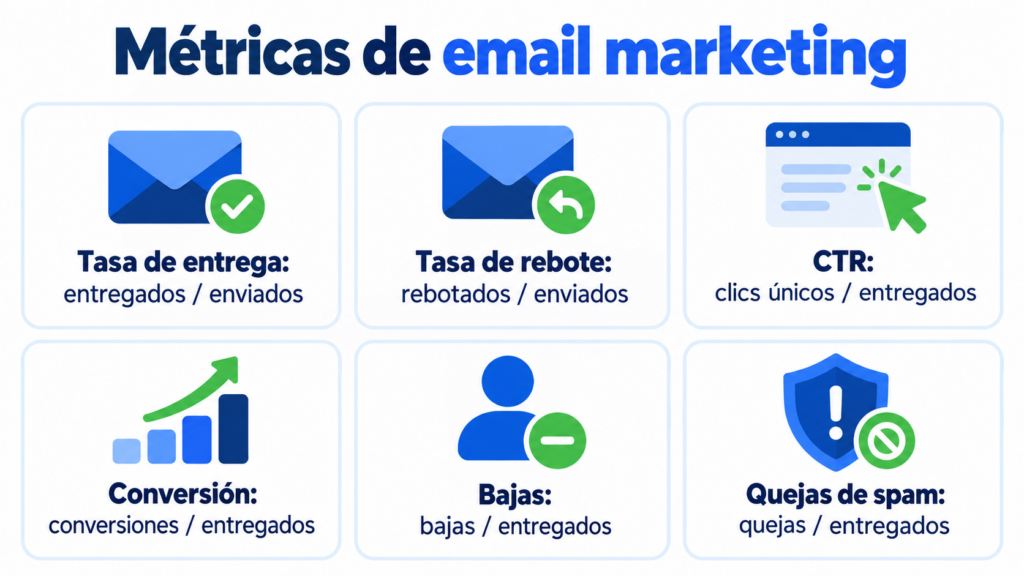
Email marketing is a highly measurable marketing strategy, with a range of metrics at your fingertips.
We cover the most important ones below, but remember to choose the ones that best help you assess how effective your actions are.
| Metric | What it indicates | How to interpret it |
|---|---|---|
| Delivery rate | Emails accepted by the servers | Detects technical or list quality problems |
| Bounce rate | Messages that could not be delivered | Helps keep the database clean |
| Click-through rate (CTR) | Recipients who clicked | Measures interest in the content and offer |
| Conversion | People who completed the goal | Connects the campaign to the business result |
| Unsubscribes | Contacts who are no longer subscribed | Points to frequency or relevance mismatches |
| Spam complaints | Users who marked the email as unsolicited | Warns about permission, expectations or content |
| ROI | Return compared with total cost | Assesses the strategy’s profitability |
Don’t interpret a figure in isolation.
Analyze the values together or in relation to each other; for example, lots of clicks with few conversions can point to a problem with the landing page.
Also, some privacy protections affect the accuracy of the open rate.
That’s why it’s best to prioritize clicks, conversions, revenue and replies whenever possible.
A great email is no use if it ends up in spam.
Deliverability is the ability of your messages to reach the inbox. It depends on three things: that mailbox providers know who is sending, that your sender reputation is good, and that your contacts want to hear from you.
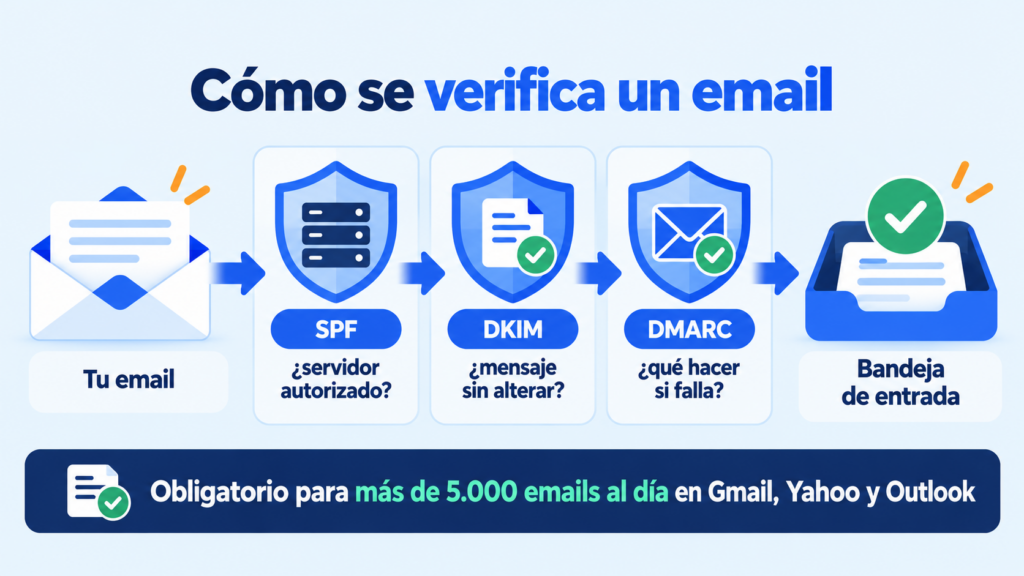
Gmail, Yahoo and Outlook check three records on your domain before deciding where to place a message:
| Record | What it does | If it’s missing |
|---|---|---|
| SPF | Specifies which servers can send emails on behalf of your domain | The provider can’t verify that the email is legitimate |
| DKIM | Adds a digital signature that proves the message hasn’t been altered | It increases the risk of the email being treated as suspicious |
| DMARC | Tells providers what to do with emails that fail SPF or DKIM and sends you reports | Gmail, Yahoo and Outlook require it from anyone sending more than 5,000 emails a day |
The rules have been stricter since 2024. These are the requirements for anyone sending more than 5,000 messages a day to their users:
| Provider | Since | Main requirements |
|---|---|---|
| Gmail | February 1, 2024 | SPF and DKIM, DMARC (a “none” policy is enough), aligned sender domain, one-click unsubscribe and spam complaints below 0.3% |
| Yahoo | February 2024 | Requirements equivalent to Gmail’s |
| Outlook, Hotmail and Live | May 5, 2025 | Aligned SPF, DKIM and DMARC (at least “p=none”); if they aren’t met, messages go to the junk folder and may end up being rejected |
Even if you send less, it pays to meet them. Gmail requires SPF or DKIM from all senders and recommends keeping complaints below 0.1%.
Beyond the technical side, deliverability depends on good habits:
Real case: Oxford University Press improved its deliverability by more than 30% after cleaning out spam traps, reviewing SPF and DNS, and working with Hotmail and AOL. They explain it in their Mailrelay success story.
At Mailrelay we guide you through setting up SPF, DKIM and your domain. Shared IPs are monitored continuously, bounces are cleaned automatically and, if your volume calls for it, you can get a dedicated IP. You’ll find the details in how to get the best deliverability with Mailrelay.
There are many factors to consider, but one of the most important is that, whichever tool you choose, it must help you reach your marketing goals.
That said, check these points when comparing each email marketing tool:
Consider the total cost, not just the starting price.
A cheap option can fall short if it limits contacts, features or support as you grow, forcing you to switch to a paid plan prematurely for the benefits you’re getting.

With Mailrelay you can create campaigns, manage lists, automate communications and analyze results from a simple dashboard with a very gentle learning curve.
We offer a free account with up to 80,000 emails a month and 20,000 contacts.
That way you can start or expand your email marketing strategy with plenty of room and no upfront investment.
Our visual editor makes it easy to design newsletters without coding. It also includes AI writing features to speed up content creation.
We also include automations, A/B tests, custom fields and segmentation. You can set up welcome emails, drip campaigns and autoresponders without building complex systems.
Real-time reports include statistics and click maps. That way, you can spot areas of interest and guide your next decisions.
And don’t forget you can always count on our support team. Available even on the free account. You can contact us by ticket on any plan, by chat from the Standard plan and by phone on Enterprise.
Start your email marketing with Mailrelay
Human support on every plan, including the free one.
Email has clear advantages, but it also has its challenges. It’s worth knowing them before you start:
| Challenge | Why it happens | What to do |
|---|---|---|
| Crowded inboxes | Your contacts receive lots of emails from lots of brands | Segment and send less, but make it more useful |
| Stricter filters | Gmail, Yahoo and Outlook tightened their rules in 2024 and 2025 | Authenticate your domain and keep an eye on complaints and bounces |
| Unreliable opens | Apple’s privacy protection opens emails automatically | Measure clicks, conversions and replies |
| Consent and the law | Spain’s LSSI and the GDPR require permission and an easy way to unsubscribe | Use clear forms and double opt-in |
| Consistency | A list goes cold after months without hearing from you | Set a calendar you can stick to |
None of these challenges is a reason to rule out the channel. They’re the reason it’s worth doing it right. If you’re worried about the legal side, check out the rules for a legal email marketing campaign.
Although email marketing is a very simple strategy, there are some basic mistakes that, just by avoiding them, will make everything work much better for you.
A purchased list has no previous relationship with you.
It’s unlikely you have permission to email them.
It usually increases bounces and spam complaints, and can also damage your sender reputation.
Contacts have different interests and situations; sending everyone the same thing doesn’t get the most out of your email marketing strategy.
Segment using useful criteria and avoid splits that won’t change the content.
Use a recognizable name and a valid address.
Avoid no-reply email addresses; it’s better for contacts to see that they can reply.
Trust starts before the message is opened.
Check the newsletter on small screens.
Text, buttons and forms must work without zooming in.
Link the campaign to clicks, requests, purchases or replies.
Use the metric that best fits your goal.
Authenticate your domain and look after your sender reputation. SPF, DKIM and DMARC help providers verify your messages. Since 2024 Gmail, Yahoo and Outlook have required them from bulk senders: it’s explained in the deliverability section of this guide.
A sequence can become outdated. Review links, offers, segments and results on a set schedule.
Avoid these mistakes from your very first send
Authenticate your domain, segment your list and measure every campaign with a tool built for the job.

There are many types of business and many strategies that work well for them.
Take the examples below as ideas for developing your strategy, not as something set in stone.
You can announce news, share available appointments and win back customers.
A monthly newsletter and a seasonal campaign make for an easy start.
Real case: the Smöoy franchise started from scratch, with no technical knowledge. In its first send with Mailrelay it exceeded a 45% open rate and a 20% click rate (see the case).
Combine welcome, recommendation, abandoned cart and post-purchase emails.
Segment by purchases and engagement to avoid irrelevant promotions.
Real case: Todocoleccion.net saves around 9,000 euros a year compared with what the same sending volume would cost with SMTP.com (see the case).
Use educational content, case studies and meeting invitations. A nurturing series helps support longer decision-making processes.
Define shared criteria across marketing, sales and customer service. Then connect data, permissions and goals to coordinate campaigns at scale.
Send resources, reminders, calls for participation and summaries. Segmenting by program, location or interest keeps each communication focused.
Real case: APMiB, an NGO, used to need 3 people working for 3 days to send its donation certificates. With the Mailrelay API, a single person sends them in 15 minutes (see the case).
Email marketing is almost 50 years old. These are its main milestones:
| Year | Milestone |
|---|---|
| 1971 | Ray Tomlinson sends the first email between two ARPANET computers and chooses the at sign to separate user and machine |
| 1978 | Gary Thuerk, of Digital Equipment Corporation, sends the first mass commercial email to 400 recipients. By his own account, it generated between $13 and $14 million in sales |
| 1996 | Hotmail arrives, one of the first free webmail services, and email goes mainstream |
| 2002 | Spain passes the LSSI: commercial communications by email require prior consent |
| 2004 | Google launches Gmail with much more storage space |
| 2018 | The GDPR comes into force across the European Union |
| 2021 | Apple turns on Mail Privacy Protection and opens are no longer reliable |
| 2024-2025 | Gmail, Yahoo and Outlook require authentication from bulk senders |
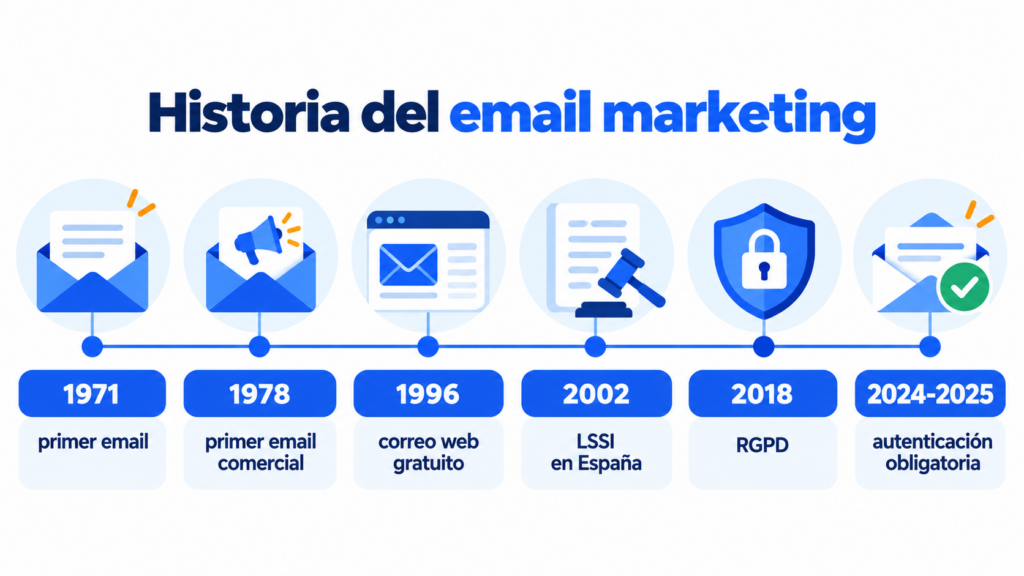
That first send in 1978 would be spam today: nobody had given permission. The history of the channel is, to a large extent, the history of how recipients have been protected.
Yes, as long as the messages are wanted, useful and relevant.
Social media helps people discover a brand, while email lets you build a direct relationship.
Artificial intelligence can suggest subject lines, summarize content or create variations.
It supports your strategy; it doesn’t replace it.
It can also help detect patterns and speed up segmentation.
However, always check the accuracy, the tone and the commercial promise. AI speeds up tasks, but your data, judgment and customer knowledge drive the strategy.
The future of email marketing demands more relevance and better consent management.
It also rewards a clear identity, a well-maintained technical setup and recognizable content.
Now you know what email marketing is and how it can help you. Start with permission, a clear goal and a useful campaign for a specific segment.
Then measure the actions that relate to your business. With every send you’ll learn what your contacts need and which offer gets the best response.
At Mailrelay we give you everything you need to test, automate and grow.
Plus, our team can help you even if you use the free account.
Email marketing is the strategic use of email to inform, attract, sell and build loyalty. It’s aimed at contacts who have agreed to receive communications from a company or organization. That’s why email marketing for businesses works the same way for an online store as for a small service business or a B2B company.
It’s used to generate opportunities, increase sales, educate prospects, build customer loyalty and re-engage contacts. It also lets you share news and maintain a direct relationship with your audience.
Choose a goal, collect subscribers with permission and select a professional platform. Then prepare a welcome email, send relevant content and analyze clicks, conversions, unsubscribes and bounces.
It’s not required, but a website makes it easier to collect contacts and host landing pages. You can also get subscribers through events, external forms or points of sale, always with consent.
The cost depends on the number of contacts, the sending volume and the features. At Mailrelay we offer up to 80,000 emails a month and 20,000 contacts with our free account.
There’s no universal frequency. Choose a sustainable cadence that’s consistent with what you promised when people subscribed. Then look at clicks, unsubscribes, conversions and replies to adjust it.
Email marketing is the complete strategy. A newsletter is one of its formats: a regular bulletin that shares content, news or offers with a list of subscribers.
No, as long as there’s permission, clear identification, expected content and an easy way to unsubscribe. Spam includes unsolicited messages or communications that ignore the recipient’s preferences.
It depends on the goal, but they usually include deliveries, bounces, clicks, conversions, unsubscribes, complaints and ROI. It’s best to give more weight to actions linked to business results.
In Spain, the average is around 32.9%, according to the GDMA benchmark with 2025 data. But Apple’s privacy protection inflates opens, so compare your campaigns with each other and give more weight to clicks and conversions.
It’s the ability of your emails to reach the inbox rather than spam. It depends on domain authentication (SPF, DKIM and DMARC), your sender reputation and whether your contacts want to hear from you.
Yes. You can set up welcome, follow-up, drip, abandoned cart or re-engagement emails. Each automation responds to a predefined condition, date or behavior.
Look for a platform that’s easy to use, scalable and compatible with your processes. Review limits, automation, segmentation, reports, integrations, deliverability, support and total cost before deciding.
At Mailrelay we offer a generous free account, automations, A/B tests, real-time reports and an easy-to-use editor with AI assistance. In addition, our expert support is available on every account.

Jose Argudo
CMO at Mailrelay. Writes about email marketing, copywriting, and conversion for small businesses and entrepreneurs.